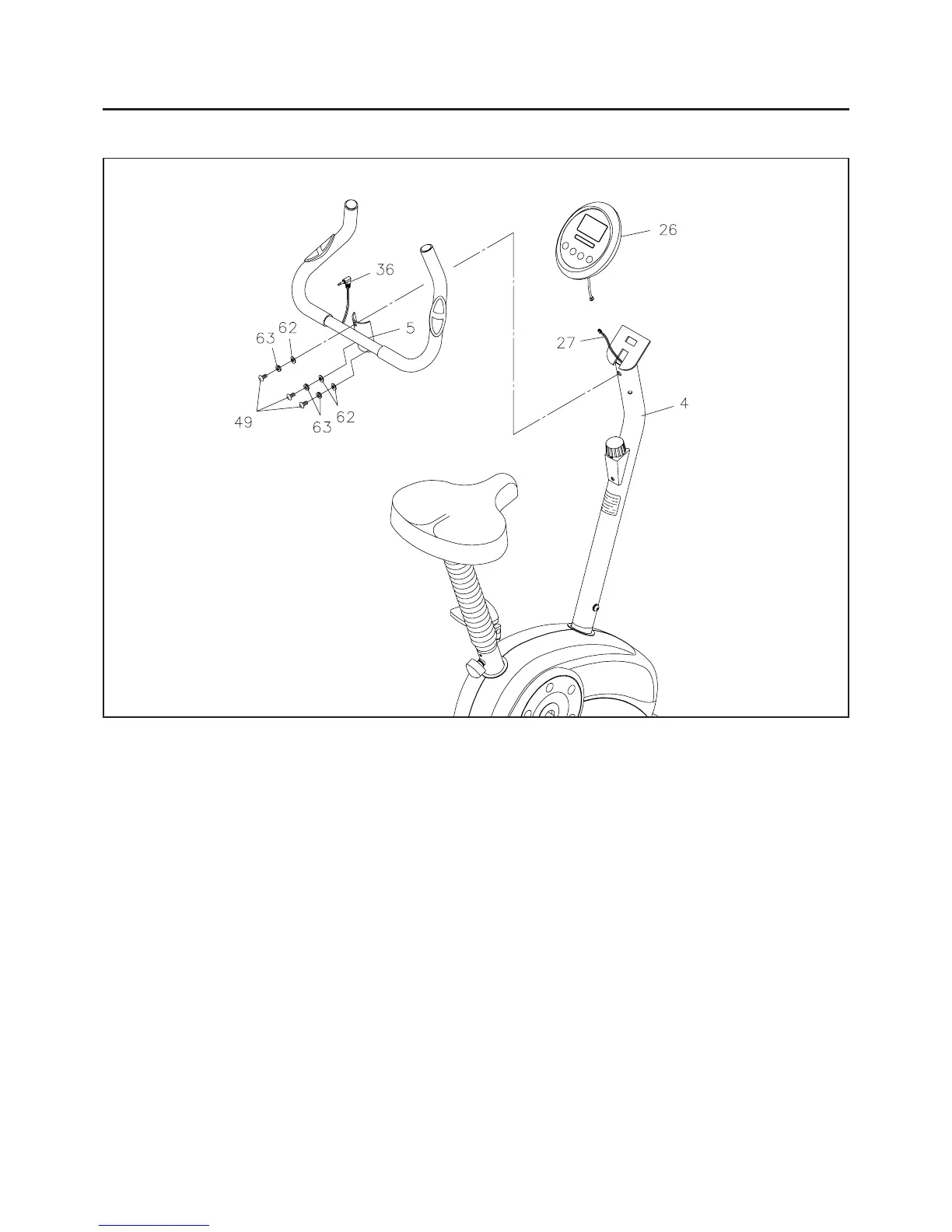
STEP 8
Attach the HANDLEBAR(5) onto the UPRIGHT(4) with BUTTON HEAD BOLTS(M8 x 20mm)(49),
LOCK WASHERS(M8)(63), and ARC WASHERS(M8)(62).
STEP 9
Install two "AA" batteries into the COMPUTER(26), two batteries included. See page 15 for detailed
battery installation instructions. Plug the
CONNECTION WIRE(27) to the COMPUTER(26), and push
the excess wires back into the
UPRIGHT(4). Place the COMPUTER(26) onto the plate on the
UPRIGHT(4), then slide it down to lock in position. Plug the PULSE PLUG WIRE(36) into the back of
the
COMPUTER(26).
NOTE: Be careful not to damage the wires when attaching the COMPUTER(26).
ASSEMBLY INSTRUCTIONS
9




 To Next Page