OPERATIONAL INSTRUCTIONS
10
GENERAL PRECAUTIONS
Use the lowest holes in the PIVOT ARMS(5) until you become familiar with the Gravity Inversion Table.
Do not use the Gravity Inversion Table alone. Always have a helper available in case assistance is
needed in recovering from the decline position.
Make sure that the HEEL HOLDERS(12) are holding your feet securely.
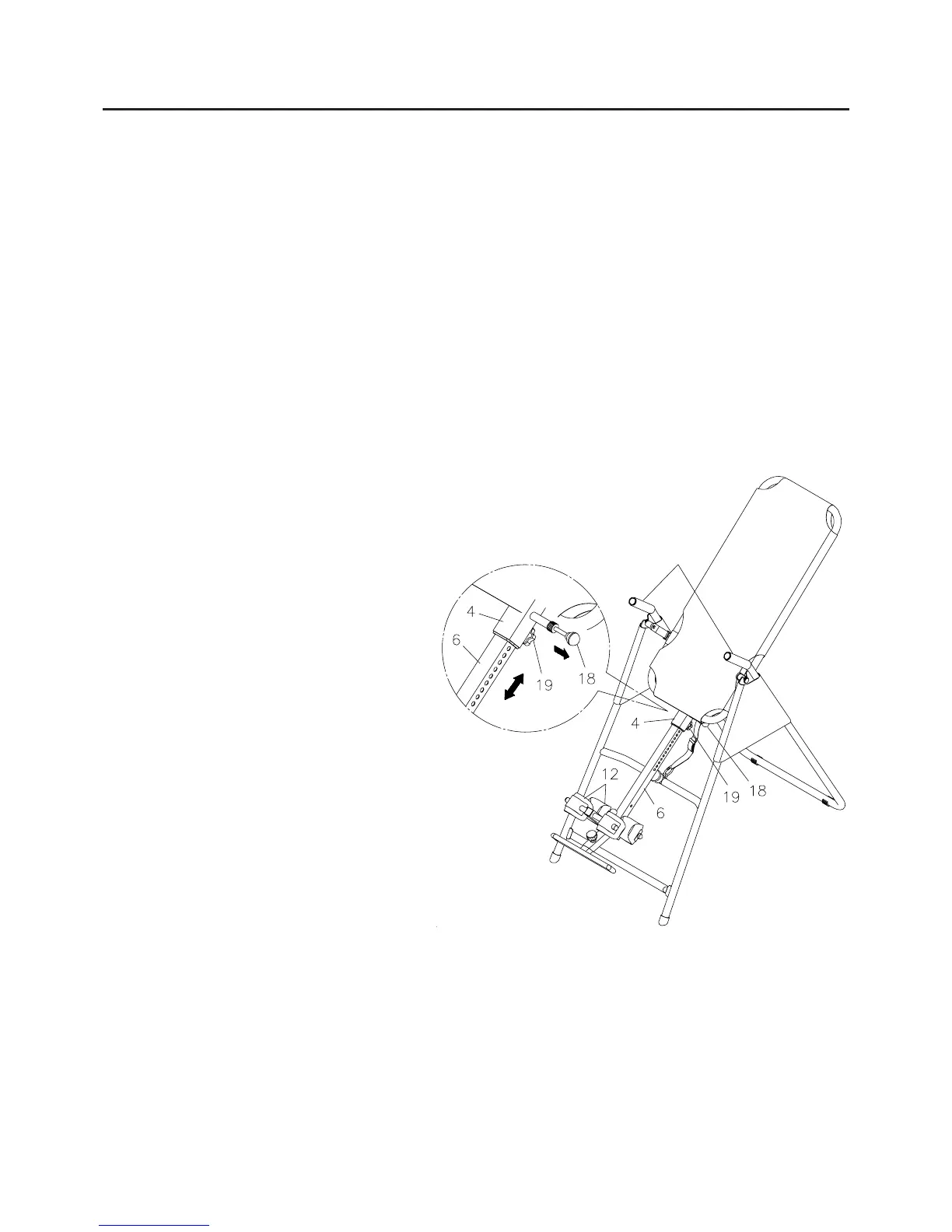
Make sure that the HEIGHT ADJUSTMENT BEAM(6) is properly set for your height.
Make sure that the HEIGHT ADJUSTMENT BEAM(6) is held securely by both the LARGE SPRING
PIN(18) and the LOCKING KNOB(19).
Make sure that there is enough room for the bed to rotate completely.
1.
2.
3.
4.
5.
6.
THE HANDLEBARS
For added convenience, and safety, a set of HANDLEBARS has been added to the Gravity Inversion
Table. These HANDLEBARS are located at the top of the REAR FRAME(2). The HANDLEBARS are to
help you return to the upright position from any degree of inversion. If you wish to return to the upright
position, and the bed is moving too slowly, or not moving at all, simply grab the HANDLEBARS and pull on
them until you return to the upright position.
HEIGHT ADJUSTMENT
The Gravity Inversion Table is a very sensitive balance device. It responds to very slight changes in
weight distribution. It is very important to make sure that the height adjustment is adjusted properly. Use
the following procedure to set the height adjustment and balance the
Gravity Inversion Table.
Adjust the NYLON STRAPS to restrict
movement to approximately 15 degrees
beyond the horizontal position. The
nylon straps
should not allow the Gravity
Inversion Table to go into the full inversion
position while you are setting the height
adjustment.
Loosen the
LOCKING KNOB(19) under
the
MAIN FRAME(4).
Pull the LARGE SPRING PIN(18) and use
the
SCALE DECAL(16) to set the
HEIGHT ADJUSTMENT BEAM(6).
Tighten the LOCKING KNOB(19).
Mount the machine.
Lock your ankles into the
HEEL
HOLDERS(12).
Lie back with your hands at your sides.
Slowly raise your hands to your chest.
If your feet are higher than your head,
dismount and try a taller setting. If you do
not rotate to a position close to level,
dismount and try a shorter setting.
3.
4.
5.
1.
2.
6.
7.
8.
9.
The
Gravity Inversion Table should return to the upright position when your hands are below
your waist. If it does not, use a taller setting.
Verify that adequate head clearance is available between the user's head and the floor before
using this inversion table. This is especially important for tall users.
NOTE:
1.
2.
Handlebars




 To Next Page