EasyManua.ls Logo

Stamina in Motion - User Manual

Stamina in Motion
19 pages
Print Icon
To Next Page IconTo Next Page
Loading...
When calling for parts or
service, please specify
the following number
:
Model#: 55-1618,
55-1618R
CAUTION:
Weight on this product should not exceed 250 lbs.
This Product is Distributed Exclusively by
2040 N. Alliance, Springeld, MO 65803
Customer Care
1 (800) 375-7520
www.staminaproducts.com
Product May Vary Slightly From Pictured.
!
WARNING
!
Exercise can present a
health risk. Consult a
physician before beginning
any exercise program with
this equipment. If you feel
faint or dizzy, immediately
discontinue use of this
equipment. Serious bodily
injury can occur if this
equipment is not assembled
and used correctly. Serious
bodily injury can also occur
if all instructions are not
followed. Keep others and
pets away from equipment
when in use. Always make
sure all bolts and nuts are
securely tightened prior to
each use. Follow all safety
instructions in this manual.
STAMINA PRODUCTS
MADE IN CHINA
©
2016 Stamina Products, Inc.
2017, 04
Owner’s Manual
COMPACT
STRIDER
Question and Answer IconNeed help?

Do you have a question about the Stamina in Motion and is the answer not in the manual?

Summary

Safety Instructions

Equipment Warning, Caution & Notice Labels

Identifies and explains warning, caution, and notice labels on the equipment for user safety.

Before You Begin

Hardware Identification Chart

Assembly Instructions

Set Up Instructions

Function Inspection

Guidance on checking the equipment's function and assembly after setup.

Operational Instructions

Using the Fitness Meter

Instructions on how to operate the digital fitness meter and its functions.

Battery

Information regarding the battery type and its maintenance for the fitness meter.

How to Install and Replace Battery

Step-by-step guide for the installation and replacement of the meter's battery.

Standing Workout

Instructions for performing exercises while standing on the compact strider.

Sitting Workout

Instructions for performing exercises while seated with the compact strider.

Forward and Reverse

Guidance on using the strider in both forward and reverse directions for varied workouts.

Load Level Adjustment

Instructions on how to adjust the resistance or intensity level during workouts.

Storage

Maintenance

Conditioning Guidelines

Warm-Up and Cool-Down

Suggested Stretching Exercises

Examples of stretching exercises to perform before and after workouts.

Product Parts Drawing

Parts List

Limited Warranty

Notes

Overview

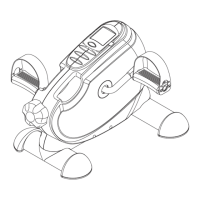
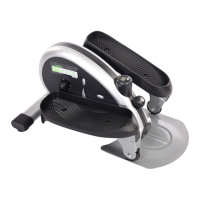
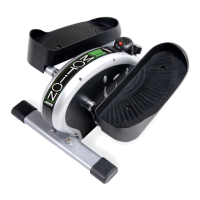
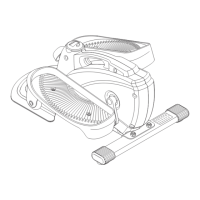
The InMotion® Compact Strider is a fitness device designed for home use, offering a convenient and simple method for cardiovascular exercise and muscle toning. It is suitable for both standing and sitting workouts, making it versatile for users with varying balance and fitness levels. The device is compact, measuring approximately 24.3 inches long x 17.5 inches wide x 11.4 inches tall, allowing it to fit easily into most home environments.

Function Description:

The primary function of the InMotion® Compact Strider is to provide a low-impact exercise experience that engages core and other muscles. Users can pedal in both forward and reverse directions to target different muscle groups and vary their workout. The device features a tension knob (21) that allows users to adjust the load level, increasing or decreasing resistance to match their desired intensity. A fitness meter (22) tracks workout data, including SCAN (automatically scans all functions), COUNT (total strides), TIME (workout duration), CALORIES (estimated calorie consumption), and DISTANCE (miles). This meter helps users monitor their progress and stay motivated.

Important Technical Specifications:

  • Dimensions: Approximately 24.3 inches (L) x 17.5 inches (W) x 11.4 inches (H). These dimensions may vary slightly.
  • Weight Capacity: The product should not be used by persons weighing over 250 lbs.
  • Power Source for Meter: The fitness meter operates with a 1.5v LR44 button cell battery.
  • Resistance Mechanism: Adjustable tension knob (21) controls the load level.
  • Drive Train: The device utilizes a V-Ribbed Belt (10) and various bearings (6, 12) for smooth operation.
  • Hardware: Assembly involves various bolts (42, 45, 59), nuts (51), and washers (31, 54).

Usage Features:

  • Standing Workout: For users with good balance and familiarity with ellipticals, the strider can be used while standing. It is recommended to mount and dismount from the lowest foot pedal. Users should place their feet with the front of their shoes close to the front edge of the pedal cap. For added stability, a chair, wall, or table can be used for support.
  • Sitting Workout: The strider can also be used while sitting in a chair, which is effective for toning legs and hips, and improving circulation and mobility. When sitting, feet will face the opposite direction on the pedals compared to standing. The meter (22) can be rotated 180 degrees to face the user in this position.
  • Forward and Reverse Pedaling: Users can pedal in both forward and reverse directions to engage different muscles and enhance workout variety. To change direction, simply slow the pedals until they stop, then pedal in the opposite direction.
  • Adjustable Load Level: The tension knob (21) allows for easy adjustment of workout intensity. Turning clockwise increases load, while counter-clockwise decreases it.
  • Fitness Meter Functions:
    • POWER ON: Activated by pedal movement or pressing the button.
    • POWER OFF: Automatic shut-off after four minutes of inactivity.
    • FUNCTION BUTTON: Press and release to select functions (SCAN, COUNT, TIME, CALORIES, DISTANCE). Press and hold for four seconds to reset all functions to zero.
    • SCAN: Automatically cycles through all functions every six seconds.
    • COUNT: Displays total strides (0-9999).
    • TIME: Displays workout duration (1 second to 99:59 minutes).
    • CALORIES: Displays estimated calorie consumption (0-9999 Kcal). Note: This is an estimate for an average user and should be used for comparison between workouts.
    • DISTANCE: Displays distance traveled (0-999.9 miles).
  • Safety Precautions:
    • Always consult a physician before starting an exercise program.
    • Discontinue use if feeling faint, dizzy, or experiencing pain.
    • Ensure proper assembly and secure tightening of all nuts and bolts before each use.
    • Keep children and pets away from the equipment during use.
    • Do not wear loose or dangling clothing.
    • Always wear correct footwear with non-skid rubber soles.
    • Maintain balance when mounting, dismounting, or using the equipment.
    • Mount and dismount from the lowest foot pedal.
    • Keep both feet firmly and securely on the pedal caps while exercising.
    • The unit does not have a free-wheel; pedal speed should be reduced in a controlled manner.
    • Place the equipment on a solid, level surface, preferably an equipment mat.
    • Ensure adequate space (minimum 20 inches on all sides) around the strider for safe operation and emergency dismount.
    • Locate and read the WARNING LABEL (55) on the product.

Maintenance Features:

  • Regular Inspection: The InMotion® Compact Strider should be regularly examined for damage and wear to ensure safety and integrity.
  • Tension Knob Check: Verify that the tension knob (21) functions properly and that resistance changes as adjusted.
  • Hardware Check: Ensure all nuts and bolts are present and securely tightened. Replace any missing or loose hardware.
  • Warning Label Integrity: Verify that the WARNING LABEL (55) is in place and easy to read. Contact customer care for a replacement if it is damaged or missing.
  • Component Replacement: Worn or damaged components must be replaced immediately, and only Stamina Products supplied components should be used for repair.
  • Cleaning: Keep the strider clean by wiping it with an absorbent cloth after each use.
  • Battery Replacement: Replace the LR44 button cell battery in the meter (22) when inconsistencies appear in the display. Instructions are provided for removing the meter, unplugging the sensor wire (23), replacing the battery, and reassembling.
  • Crank Removal (Advanced): A standard crank extractor tool is required to remove the CRANKS (72) from the AXLE (73) for more advanced maintenance.

Additional Information:

  • Warranty: The product comes with a limited warranty of 90 days on parts and one year on the frame from the date of original purchase. Commercial use voids the warranty.
  • Customer Support: Stamina Products offers customer care via email (customer.care@staminaproducts.com), phone (1-800-375-7520), fax (417-889-8064), and mail.
  • Product Registration: Users are encouraged to register their product online at register.staminaproducts.com to extend the parts warranty to 180 days and facilitate customer service.
  • Parts Ordering: Missing or damaged parts can be ordered through parts.staminaproducts.com or by contacting customer care.
  • Conditioning Guidelines: The manual provides guidelines for starting an exercise program, including warm-up, cool-down, and target heart rate zones based on age, recommending consultation with a physician.

Stamina in Motion Specifications

General IconGeneral
BrandStamina
Modelin Motion
CategoryFitness Equipment
LanguageEnglish

Related product manuals