10
Wireless Tag Reader Installation Guide
Standby Mode
In Standby Mode the WTR can be triggered by an opening or closing contact to generate
an LF Field for a 10 second interval. During this interval, tags in the LF Field are scanned
and the tag data transmitted to the RFID system.
• To
select Standby Mode, sett the Options block Mode Switches OFF, ON, OFF
as shown in Figure 6 on page 8.
• To
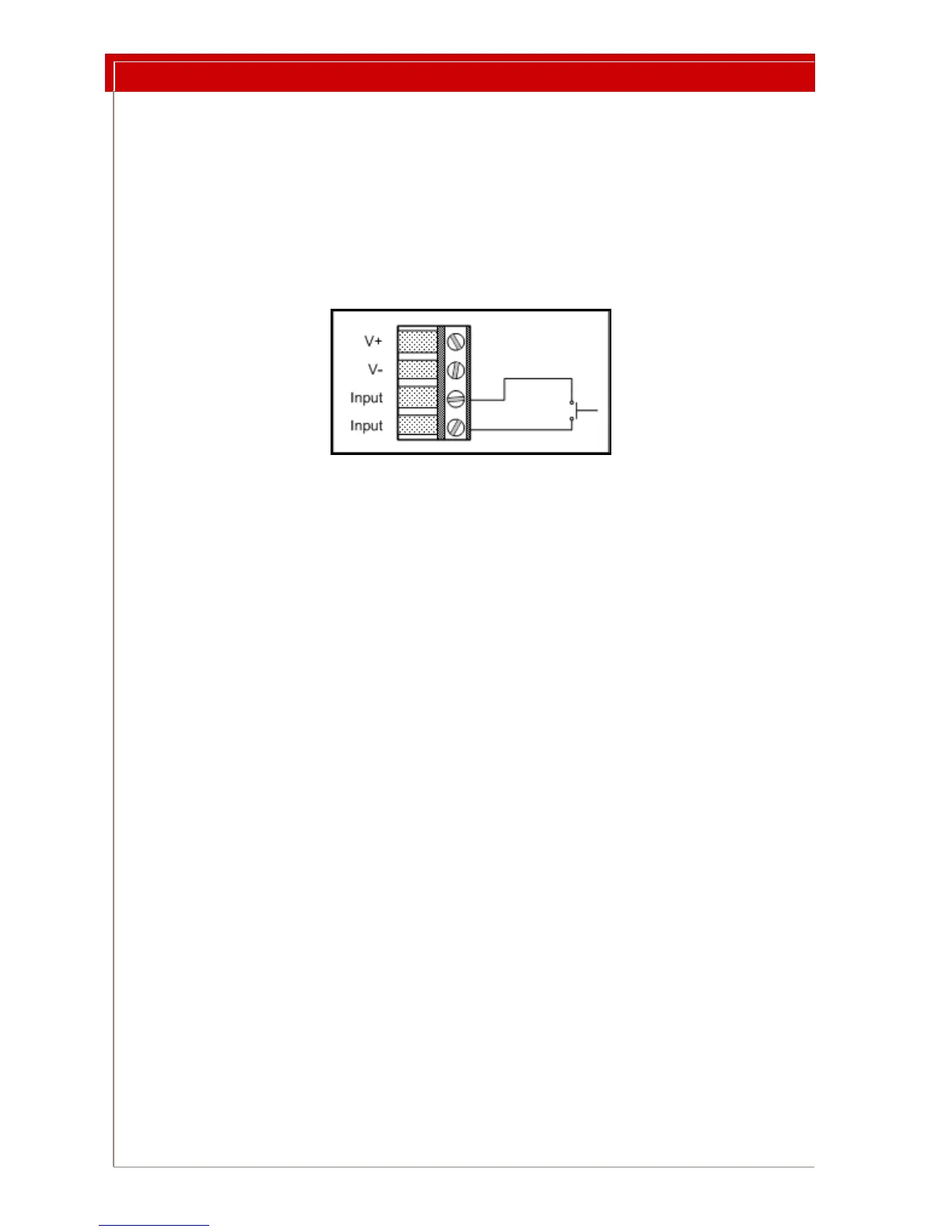
trigger Standby Mode, connect a switch across the input terminals of the
WTR 4 pin terminal block as shown in Figure 7 below.
Figure 7: Input Wiring
Using End Of Line Resistors in Standby Mode
In Standby Mode, the input can be configured to use EOL resistors. This configuration
provides input fault or tampering detection.
• To enable
EOL resistor detection, move Switch 1 of the Options DIP switch to
the
ON position. See Figure 6 on page 8.
An input with EOL resistors provides two fix
ed resistance values instead of open and
closed switch states. The WTR treats the transition from one resistance value to the other
as an opening, or as a closing switch. If EOL resistors are present and the WTR so config-
ured, the WTR remembers the input values resulting fr
om the EOL resistors. If the
WTR detects an input value different from the EOL values, it transmits a unique mes-
sage. Please see “Troubleshooting” on page 12.
Input Edge Selection in Standby Mode
You can choose to trigger the LF Field on either a rising edge (opening switch) or a falling
edge (closing switch). See Figure 7 above for the switch wiring diagram.
Edge selection is controlled by switch 2
in the Options DIP Switch shown in Figure 6 on
page 8. See Step 2 below.
To configure Standby Mode options:
1 Connect the input wires as shown in Figure 7above.
2 Set switch 2 of the Options DIP switch
block to the desired position.
2.a To trigger the LF Field on by a ri
sing edge, or by an opening switch,
move Switch 2 (edge selection switch) to the ON position.
2.b To trigger the LF Field on by a falling edge,
or by a closing switch,
move Switch 2 (edge selection switch) to the
OFF position.



 To Next Page