8
Wireless Tag Reader Installation Guide
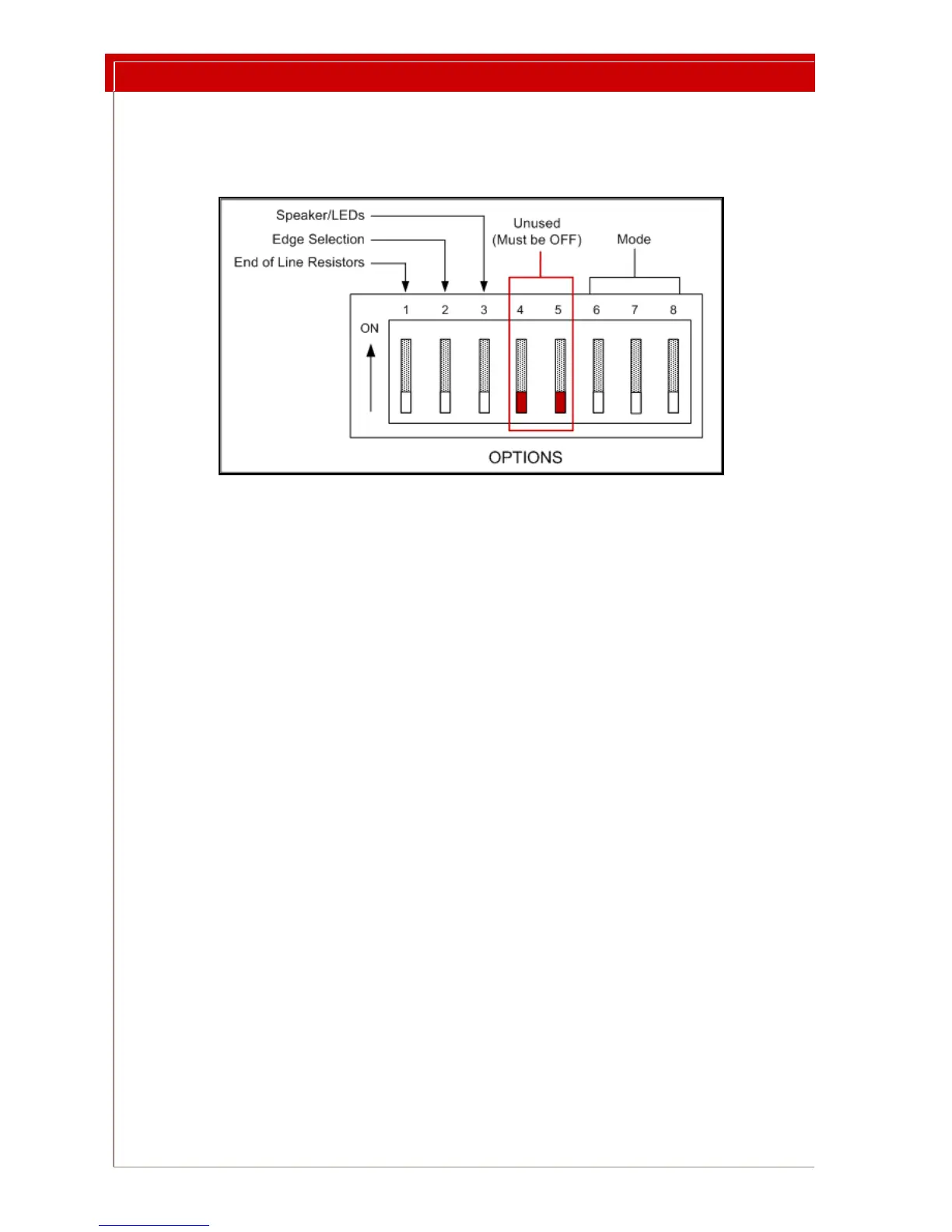
Options DIP Switch Settings
The Options DIP switch block is used to enable or disable End of Line (EOL) resistors
and annunciation, and to set edge selection and the operating mode.
Figure 6: Switches on the Options DIP Switch Block
Setting the LF Field Strength
Varying the LF Field strength changes the size of the tag detection zone. Test Mode pro-
vides an audible beep each time a tag is scanned,
and disables network messaging. You
will need a wrist tag and a small Phillips screwdriver.
To set the LF Field strength:
1 Locate the Options DIP switch (see Figure 5 on page 7).
2Use Figure 6 to identify the 3 Mode Switches: 6, 7, and 8. Set all 3 Mode
Switches
OFF. This sets the WTR to Test Mode. In Test Mode the red LED will
blink and the buzzer will sound whenever a tag is detected, but the WTR will
not pass the information to the network.
3 Confirm Test Mode and tag operation by placing the tag beside the WTR. The
WTR buzzer should sound and the red
LED should blink.
4
Turn the LF Field adjuster fully counter-clockwise. Then turn the adjustment
1/4 turn clockwise. Do not turn the adjuster forcefully to its limits. Do not
needlessly wiggle or turn the adjuster.
5 Temporarily place the tag at the detection
area perimeter. If the LED is off
slowly turn the adjustment clockwise. If the LED is on slowly turn the
adjustment counterclockwise. Turn the field adjuster until the red LED is
blinking.
6 Walk the tag through the detection
area to make sure that the LF Field is
consistent throughout. Continually change the orientation of the tag with
respect to the WTR by turning the tag in your hand. This action checks for
radio signal directional effects.



 To Next Page