SK SIX
Professional performance mixer
STANTON MAGNETICS, LLC
2821 Evans St. Hollywood, FL 33020
(954) 929-8999 - Fax: (954) 929-0333
info@stantonmagnetics.com
OWNER’S M A N U A L
FA DER CLEA N I N G
The SK SIX faders may need lubrication from time to time. This will extend the
fader life and eliminate any potential damage due to extended heavy usage.
R E P L AC E M E N T PA RT S
To replace the cross or channel faders, follow steps 1 and 2 of the cleaning
instructions. The following replacement parts are available from Stanton or your
local Stanton dealer.
ROTATING AND REPLACING THE INPUT TOGGLE SWITCHES
Cleaning Instructions
1. Remove the 3 fader knobs and 4 screws
located in the corners of the PROTEKT™
(see “ ” inside) panel
and take the panel off the mixer.
2 . Remove the fader to be cleaned by
unscrewing the 2 outer screws (removing
the 2 inner screws will detach the fader
from the fader plate) and disconnect the
cable coming from the mixer.
3. Spray a small amount of cleaner or
lubricant into both ends of the fader and
slide the fader back and forth a few times
to spread the fluid evenly throughout the
fader.
4. Shake and wipe off excess fluid before
re-assembling the fader.
PL-SK6 Two way input toggle switch
3PL-SK6 Three way input toggle
switch with FLASH™
LF-SK6 Channel input fader
CF-SK6 Crossfader
PP-SK6 PROTEKT™ panel
PS-18US US Power Supply (110v)
PS-18EU European Power Supply (220v)
PS-18UK UK only Power Supply (240v)
ROTATING I NST RU C TI O N S
1 . Remove the PROTEKT™ panel
2. Remove the 2 outer screws from the
round plate (removing the 2 inner screws
will detach the switch from the plate)
3. Rotate the plate to the desired position
and tighten the screws back in the top and
bottom holes
R E PLAC I N G I NST RU C TI O NS
1. Remove the PROTEKT™ panel
2. Remove the 2 outer screws from the
round plate (removing the 2 inner screws
will detach the switch from the plate)
3. Remove the switch assembly and dis-
connect the cable coming from the mixer.
4. Set the replacement switch assembly in
the desired position and place the screws
back in the top and bottom holes.
© 1999, Stanton Magnetics, LLC

 Need help?
 General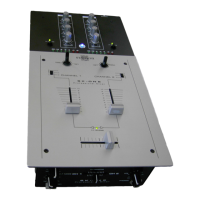





 To Next Page