6
16. It is forbidden to heat the food in a sealed container because the sealed
container is possible to explode, such as, sealed bottles, boxed milk, etc. It
is necessary to tear the package and drop the food into other vessels for
heating.;
17. Please put the oven on counter over 850 millimeter height.
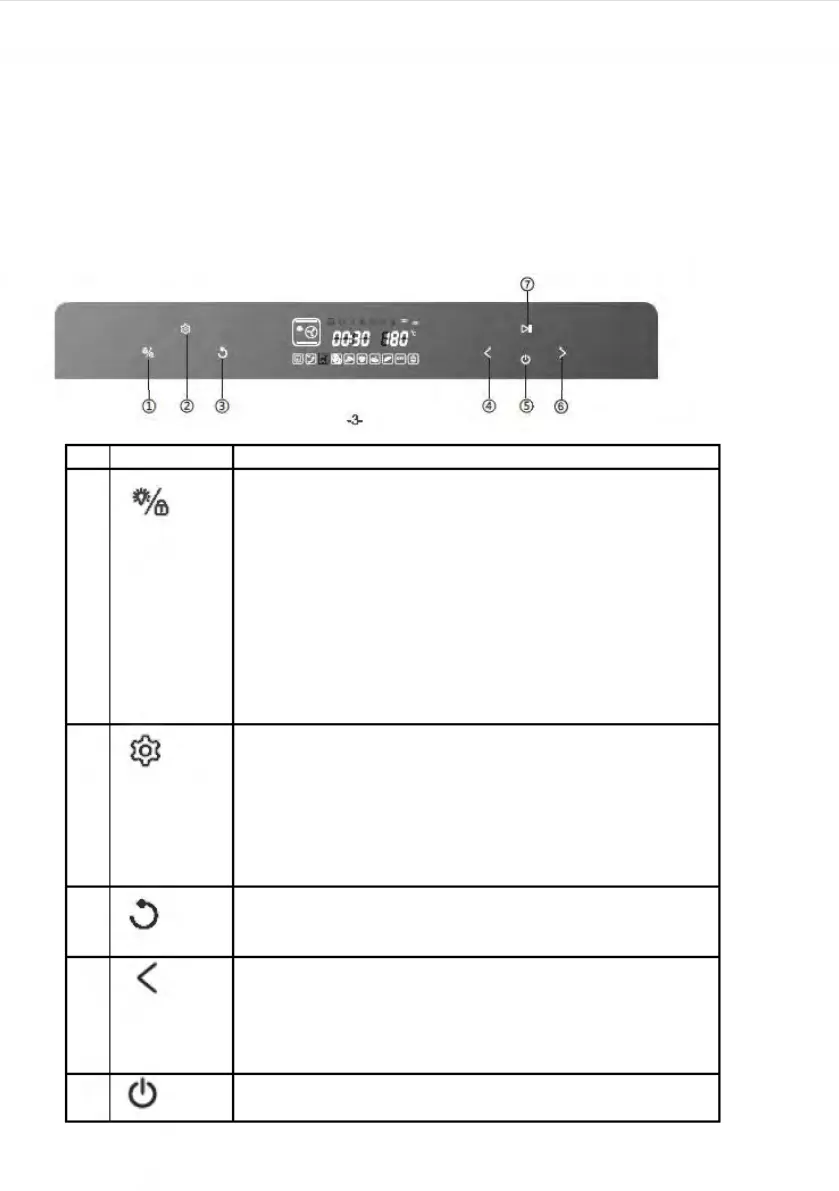
Control Panel
Oven lamp/child lock key:
1. Touch it once, oven lamp is ON; touch it
again, oven lamp is OFF;
2. Oven lamp will be ON for three minutes after
the work is over;
3. Oven lamp will be ON for three minutes
when the oven door is opened;
4. The key turns to child lock by holding it down
for three seconds; in the standby mode, hold
it down once, it is locked; press it again to
unlock.
Setting key: preset and time-delay
1. In any programs standby mode, press this key to
enter the preset mode
and preset icon is ON;
2.After any programs working end, Press this key to
enter the time-delay function sates and the time-
delay icon is ON;
BACK key: press this key to return to the previous
setting mode before start working, and press it again
to return again.
Selection key (Reverse function):
1.Select 9 DIY regular function modes and 10
specific working modes;
2.Adjust the time;
3.Adjust the temperature.;
ON/OFF key: press this key to activate all icons to
light up; In the activation or working status of the
(11,4
®
0
<
(!)


 To Next Page