EasyManua.ls Logo

Star-Light Pro CAB-4024BL - Display PCB Functions

Star-Light Pro CAB-4024BL
111 pages
Print Icon
To Next Page IconTo Next Page
To Previous Page IconTo Previous Page
Loading...
7
machine press this key to exit the running mode, and
the machine will return to the standby status.
06
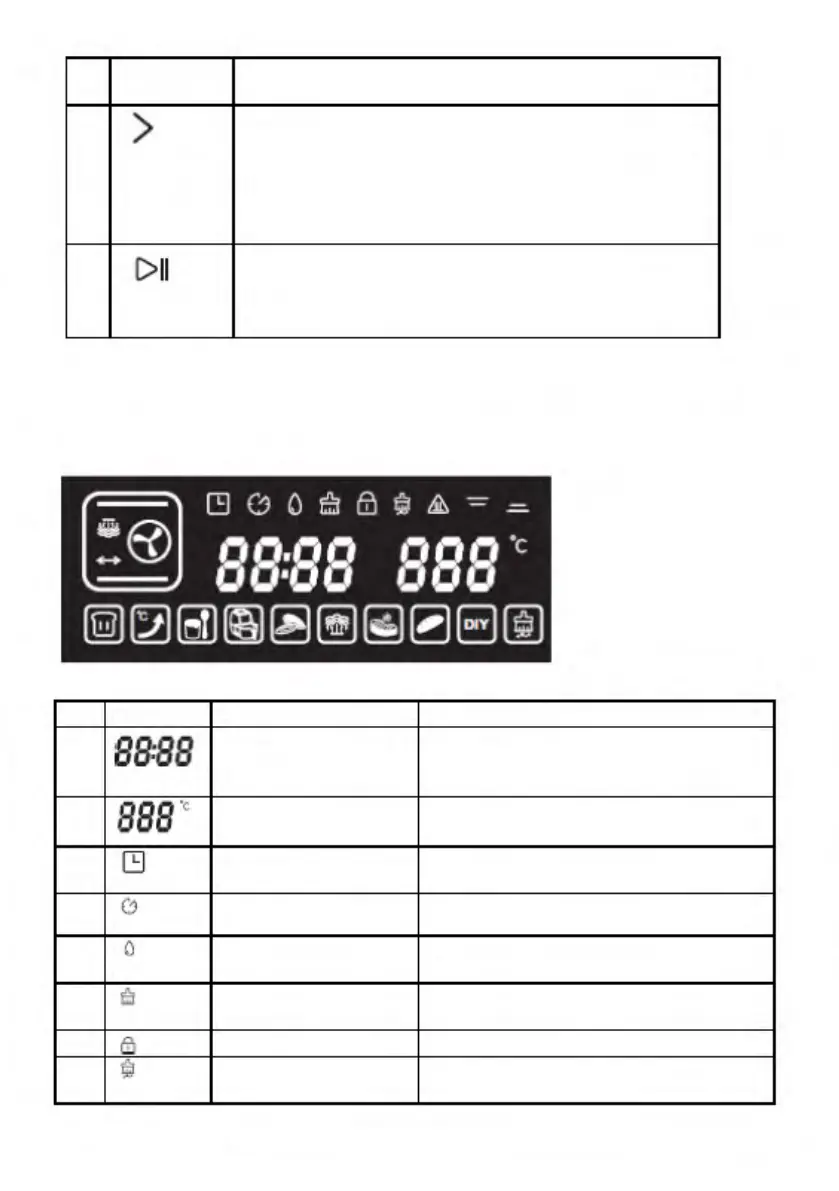
Selection key (Forward function):
1.Select 9 DIY regular function modes and 10
specific working modes
in a forwarding sequence;
2.Adjust the time;
3. Adjust the temperature
07
ENTER key:
1.Start;
2.Pause;
3.Enter.
DISPLAY PCB
Function
Description
1.
Time
The first two LEDs are hours (0-
24)and the second two LEDs are
minutes (0-59)
2.
Temperature
Adjustable range: 30
°C - 230 °C
3.
Preset function
prompt
4.
Working time
-delay prompt
5.
Water level icon
Icon is always ON for water; a
flashing light means a lack of water.
6.
Prompt for cleaning
of water tray
7.
Children lock
8.
Prompt for
descaling
>
1>
11
88:88
888
·c
(9
(;)
0
e
©
1!/4