EasyManua.ls Logo

Starcraft 2005 - Tent Assembly and Securing

Starcraft 2005
40 pages
Print Icon
To Next Page IconTo Next Page
To Previous Page IconTo Previous Page
Loading...
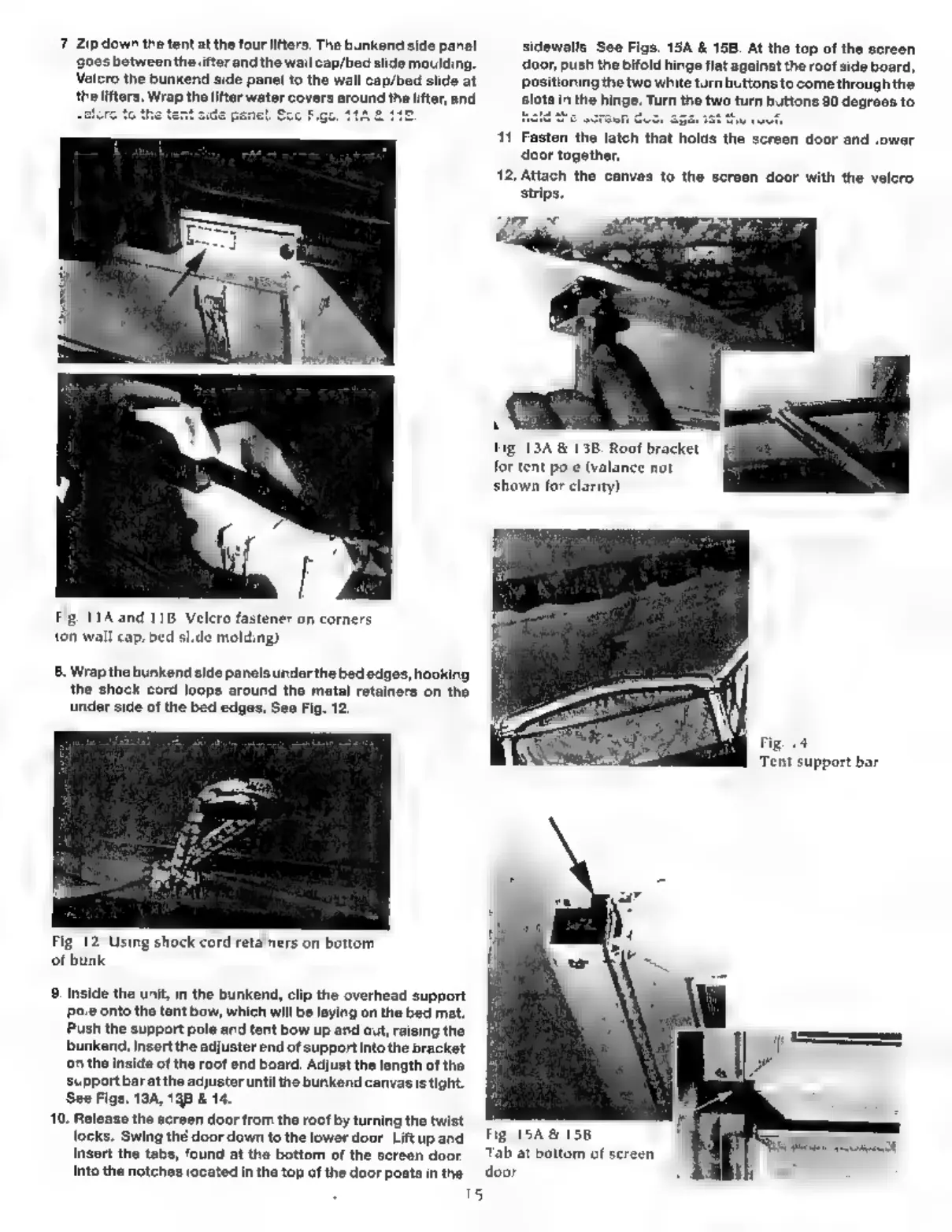
7.
Zip
down
the
tent
at
the
four
lifters.
The
bunkend
side
panel
_sidewalls.
See
Figs.
15A
&
15B.
At
the
top
of
the
screen
goes
betweenthelifter
andthe
wall
cap/bed
slidemoulding.
__
door,
push
the
bifold
hinge
flat
against
the
roof side
board,
Velcro
the
bunkend
side
panel
to
the
wall
cap/bed
slide
at
_
positioning
the two
white
turn
buttons
to
come
through
the
the
lifters.
Wrap
the
lifter
water
covers
around
the
lifter,
and
slot
11.
Fasten
the
latch
that
holds
the
screen
door
and
lower
door
together
12,
Attach
the
canvas
to
the
screen
door
with
the
velcro
strips,
for
tent
pole
(valan
shown
for
clarity),
Fig.
1A
and
11B.
Velero
fastener
on
corners
(on
wall
cap/bed
slide
molding).
8.
Wrap
the
bunkend
side
panels
under
the
bed
edges,
hooking
the
shock
cord
loops
around
the
metal
retainers
on
the
under
side
of
the
bed
edges.
See
Fig.
12.
‘Tent
support
bar.
Fig.
12.
Using
shock
cord
retainers
on
bottom
of
bunk.
9.
Inside
the
unit,
in
the
bunkend,
clip
the
overhead
support
Pole
onto
the
tent
bow,
which
will
be
laying
on
the
bed
mat.
Push
the
support
pole
and
tent
bow
up
and
out,
raising
the
bunkend.
Insert
the
adjuster
end
of
support
into
the
bracket
on
the
inside
of
the
roof
end
board.
Adjust
the
length
of
the
support
bar
at
the
adjuster
until
the
bunkend
canvasis
tight.
See
Figs.
19A,
198
&
14.
10,
Release
the
screen
door
from
the
root
by
turning
the
twist
locks.
Swing
thé
door
down
to
the
lower
door.
Lift
up
and
Fig.
15A
&
156.
insert
the
tabs,
found
at
the
bottom
of
the
screen
door,
Tab
at
bottom
of
screen
the
door
into
the
notches
located
in
the
top
of
the
door
posts

Table of Contents