This document is a Quick Start Guide for Livio Edge AI and Livio Rechargeable hearing aids, manufactured by Starkey. It provides essential information on how to use and care for these devices, which are designed to enhance hearing and improve the quality of life.
Function Description
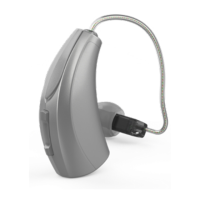
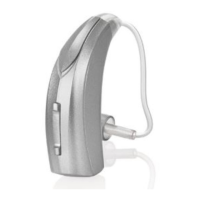
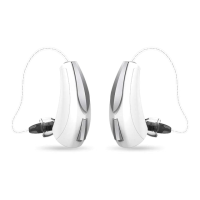
The Livio Edge AI and Livio Rechargeable hearing aids are advanced 2.4 GHz hearing aids that offer supreme sound quality and customizable features to meet individual hearing needs. They are designed to help users stay connected to the people and things they love most. These hearing aids feature integrated sensors and artificial intelligence (available with Livio Edge AI models only), automatic and custom memories, geotags, SoundSpace, tinnitus management, and the ability to find lost hearing aids. They also provide alerts to keep users informed.
Usage Features
The hearing aids are rechargeable, offering convenience and ease of use.
- Power On & Off:
- Automatic Power On: When removed from the charger, the hearing aids automatically power on. There's a brief delay to allow time for insertion into the ear.
- Manual Power On: If manually powered off, pressing the user control for three seconds will power them on, with the same insertion delay.
- Automatic Power Off: Placing the hearing aids in the charging port automatically powers them off, and charging begins.
- Manual Power Off: The hearing aids can be manually powered off by pressing the user control for three seconds.
- Charging:
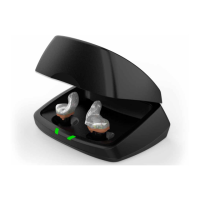
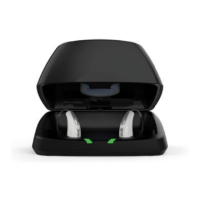
- To charge, place the hearing aids in the charger with the earbuds or earmolds resting inside the reservoir. They will automatically turn off and begin charging.
- The charging process is indicated by LEDs: Glowing Green means charging, Solid Green means fully charged, and Blinking Red indicates a fault state.
- A full charge takes approximately 3.5 hours.
- It is safe to store the hearing aids in the charger even after they are fully charged.
- To illuminate the LEDs when the charger is not plugged in, remove a hearing aid for three seconds and re-insert it; the LEDs will illuminate for 10 seconds.
- For extended periods of non-use (weeks), it's recommended to remove both the plug from the charger and the hearing aids from the charging ports. Manually power off the hearing aids by pressing the user control for three seconds.
- The guide also mentions a pocket-sized Mini Turbo Charger that provides a 3.5-hour charge in just seven minutes, available from your clinician.
- Thrive Hearing Control App: The Thrive Hearing Control app, compatible with Apple® and Android™ devices, allows users to control and adjust their hearing aids. It provides access to features like integrated sensors and AI (Livio Edge AI only), automatic and custom memories, geotags, SoundSpace, tinnitus management, finding hearing aids, and alerts. Users can visit starkey.com/thrivesupport for compatibility information and the user guide.
Maintenance Features
Proper care and maintenance are crucial for the longevity and optimal performance of the hearing aids and charger.
- Hearing Aid Care:
- Keep the hearing aid clean to prevent poor performance due to heat, moisture, and foreign substances.
- Use the provided cleaning brush or a soft cloth to clean debris from around the user control, microphone, and battery compartment.
- Regularly inspect the receiver, earbud, and wax guard.
- Do not use water, solvents, cleaning fluids, or oil to clean the hearing aid.
- Do not take apart the hearing aids or insert cleaning tools inside them.
- When not in use, store the hearing aid in the charger or a storage container in a dry, safe place, away from direct sunlight, heat, and out of reach of children and pets.
- Hear Clear Receiver Wax Guards: RIC (Receiver-In-Canal) hearing aids incorporate disposable Hear Clear earwax protection. These innovative wax guards prevent earwax accumulation in the hearing aid receiver. To replace them:
- Insert the empty end of the application stick straight into the used wax guard in the hearing aid.
- Pull the stick straight out (do not twist) to remove the used wax guard.
- Use the opposite end of the stick to firmly insert a clean wax guard straight into the hearing aid.
- Pull the stick straight out (do not twist) and discard it.
- Charger Care:
- Keep the charger clean to prevent poor performance due to heat, moisture, and foreign materials.
- Use the provided cleaning brush to keep the charging ports clear of debris.
- Do not use water, solvents, or cleaning fluids to clean the charging ports.
- Keep the lid closed as much as possible to avoid dust and debris buildup.
- Store the charger in a clean and dry location, such as a dresser or shelf, rather than in the bathroom or kitchen.
- Battery Life Optimization:
- Fully charge hearing aid batteries every night.
- Do not expose the hearing aids or charger to excess heat; avoid storing them on a window sill or in a hot car.
- The desiccant puck provided with the charger is effective for 3-6 months, depending on moisture levels. Replace it when it fades from blue to white.

 Need help?
 General



 To Next Page