EasyManua.ls Logo

Starkey Evolv AI - User Manual

Starkey Evolv AI
7 pages
Print Icon
To Next Page IconTo Next Page
Loading...
Quick
Start
Guide
Evolv AI
RIC Rechargeable and BTE Rechargeable
Question and Answer IconNeed help?

Do you have a question about the Starkey Evolv AI and is the answer not in the manual?

Summary

Charging Your Hearing Aids

Power On & Off

System Care

Hearing Aid Care

Guidance on cleaning hearing aids to maintain performance and prevent damage.

Charger Care

Instructions for cleaning the charger and maintaining its performance.

Helpful Hints

Hear Clear Receiver Wax Guards

Download and Connect to the Thrive Hearing Control App

Hearing Aid Information

M;T Ratings

Overview

This document is a Quick Start Guide for Starkey Evolv AI hearing aids, specifically for RIC (Receiver-In-Canal) Rechargeable and BTE (Behind-The-Ear) Rechargeable models. It provides essential information on how to use and care for these hearing aids, emphasizing ease of use and connection to the user's life.

The Starkey Evolv AI hearing aids are designed to offer a complete line of innovative hearing aids, handcrafted with advanced technology for clear sound and seamless connectivity. The guide encourages users to visit starkey.com.au/support for additional resources like instructional videos, operation manuals, and product brochures to maximize their hearing aid experience.

Charging Your Hearing Aids

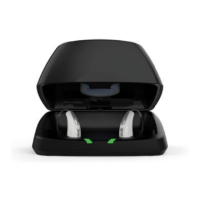
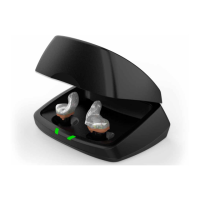
To charge the hearing aids, users should place them in the charger with the earbuds or earmolds resting inside the reservoir. The hearing aids will automatically turn off and begin charging once the charger is powered. A standard charger requires an external power source, such as a wall outlet. Once removed from the charger, the hearing aids will automatically power on.

The charging process is indicated by LEDs on the charger:

  • Glowing Green: Indicates that the hearing aids are currently charging.
  • Solid Green: Signifies that the hearing aids are fully charged.
  • Blinking Red: Indicates a fault state. To resolve this, users should remove the hearing aids from the charger, wait until the LED turns off, and then re-insert them. If the blinking red light persists, users are advised to contact their hearing professional.

Charging can occur with the lid of the charger open or closed, and a full charge takes less than 3.5 hours. It is safe to store fully charged hearing aids in the charger when not in use. For extended periods of non-use (e.g., weeks), users should remove both the plug from the charger and the hearing aids from the charging ports. In this scenario, the hearing aids need to be manually powered off by pressing the user control on each hearing aid for three seconds. The hearing aids can then be stored in the reservoir.

The charger also comes with a desiccant puck, which helps to absorb moisture from the hearing aids. This puck is effective for 3-6 months, depending on the moisture levels in the hearing aids and ambient humidity. Users should replace the desiccant puck when its color fades from blue to white. For faster charging needs, a pocket-sized Mini Turbo Charger is available, which provides a 3.5-hour charge in just seven minutes. Users are encouraged to ask their hearing professional about this accessory.

Power On & Off

The Evolv AI hearing aids offer both automatic and manual power control:

  • Automatic Power On: When removed from the charger, the hearing aids will automatically power on, provided the charger was connected to an external power source. There is a built-in delay to allow the user time to insert the hearing aid into their ear before it fully activates.
  • Manual Power On: If the hearing aid has been manually powered off, pressing the user control for three seconds will power it on. The same delay applies to allow for insertion into the ear.
  • Automatic Power Off: Placing the hearing aids back into the charging port will automatically power them off, as long as the charger is connected to an external power source. This initiates the charging process.
  • Manual Power Off: Users can manually power off the hearing aids by pressing the user control for three seconds.

System Care

Proper care is essential for maintaining the performance and longevity of the Evolv AI hearing aids and their charger.

Hearing Aid Care:

  • Cleaning: Keep the hearing aids clean to prevent poor performance caused by heat, moisture, and foreign substances. Use the provided cleaning brush or a soft cloth to remove debris from around the user control, microphone, and battery compartment.
  • Inspection: Regularly inspect the receiver, earbud, and wax guard for any buildup or damage.
  • Avoid Liquids: Never use water, solvents, cleaning fluids, or oil to clean the hearing aids.

Charger Care:

  • Cleaning: Maintain a clean charger. Heat, moisture, and foreign materials can negatively impact its performance. Use the provided cleaning brush to keep the charging ports and hearing aid microphones clear of debris.
  • Avoid Liquids: Do not use water, solvents, or cleaning fluids to clean the charging ports.
  • Protection: Keep the charger lid closed as much as possible to prevent dust and debris buildup.
  • Storage: Store the charger in a clean and dry location, such as a dresser or shelf, rather than in humid environments like a bathroom or kitchen.

Battery Longevity:

To ensure the longest life for the rechargeable hearing aid batteries:

  • Fully charge the hearing aid batteries every night.
  • Avoid exposing the hearing aids to excess heat; do not store them on a window sill or in a hot car.

Helpful Hints

  • Handling: Do not attempt to take apart the hearing aids or insert cleaning tools inside them, as this can cause damage.
  • Storage When Not In Use: When not wearing the hearing aids, place them in their storage container and store them in a dry, safe place, away from direct sunlight and heat, extreme temperatures, and out of reach of children and pets. Ensure they are stored in a location where they can be easily found.

Hear Clear Receiver Wax Guards

RIC hearing aids incorporate disposable Hear Clear earwax protection, which prevents earwax accumulation in the hearing aid receiver. When it's time to replace the wax guards, follow these steps:

  1. Remove Used Wax Guard: Insert the empty end of the application stick straight into the used wax guard in the hearing aid.
  2. Pull Out: Pull the stick straight out (do not twist) to remove the used wax guard from the hearing aid.
  3. Insert New Wax Guard: Use the opposite end of the stick to firmly insert a clean wax guard straight into the hearing aid.
  4. Remove Stick: Pull the stick straight out (do not twist) to remove it, and then discard the stick.

Download and Connect to the Thrive Hearing Control App

The Thrive Hearing Control app allows users to easily control and adjust their 2.4 GHz rechargeable hearing aids using a compatible Apple® or Android™ device. The app offers several features:

  • Integrated sensors and artificial intelligence features.
  • Automatic and custom memories for different listening environments.
  • Geotags for location-based memory activation.
  • Tinnitus management options.
  • "Find My Hearing Aids" feature to locate misplaced devices.
  • Alerts for various notifications.

For information on downloading, connecting, and using the app, including iOS/Android compatibility, users should refer to the Thrive Hearing Control app User Guide or visit starkey.com/thrivesupport.

Hearing Aid Information

The guide includes a section for recording important hearing aid details:

  • Hearing aid model
  • Hearing aid serial number (L for left, R for right)
  • Charger serial number
  • Warranty expiration date
  • Memory settings, if applicable, including Memory #, Environment/Listening Situation, and Beep/Indicator.
  • Special instructions
  • Hearing professional's contact information

M/T Ratings

The document also provides M/T ratings for the hearing aids:

  • RIC Rechargeable: M=4, T=4
  • BTE Rechargeable: M=4, T=4

The guide concludes with legal disclaimers regarding trademarks for Apple, Android, Google Play, and Starkey, along with Starkey's contact information and copyright details.

Starkey Evolv AI Specifications

General IconGeneral
Technology LevelPremium
Bluetooth ConnectivityYes
Rechargeable OptionYes
Tinnitus ReliefYes
Artificial IntelligenceYes
ManufacturerStarkey
TelecoilYes
Water ResistanceIP68
Customizable SoundYes
Styles AvailableRIC, BTE, ITE, ITC, CIC
Noise ManagementYes
CompatibilityiOS, Android
App ControlYes
Battery LifeUp to 30 hours (rechargeable)

Related product manuals