10 | Connecting to Audio Sources
Connecting
to Audio Sources
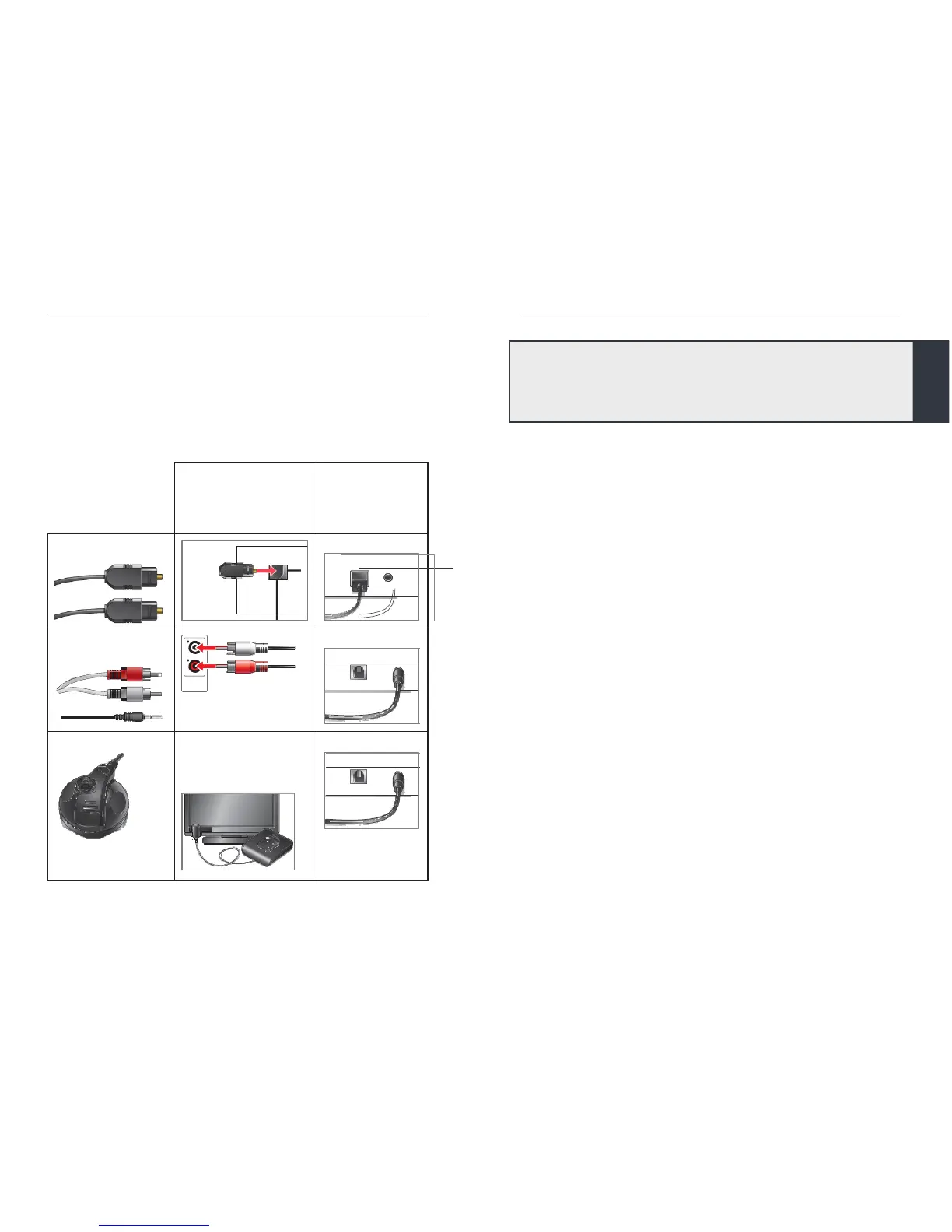
There are different
ways
to attach an audio source
to
Starkey
Hearing Technologies TV. Carefully examine
an electronic audio source to determine which
AUDIO OUT options it offers.
Pairing
For
Starkey
Hearing Technologies
TV
to interact
with
your hearing
aid(s),
you must first pair the TV device
with each hearing aid. You only need to
perfor
m
this action one time, as they should automatically
recognize each other when both are powered on and
within wireless operating range.
*
To pair the
TV
device with your hearing aid(s):
Ensure
your hearing aids are not connected
to
nearby Bluetooth devices. To do this,
•
Disable Bluetooth on your mobile phone.
•
Power off any nearby
Starkey
Hearing
Technologies
TV
or Remote Microphone
+
accessories,
which you previously pair
ed
to
your hearing aids.
Power off, then power on your hearing aids.
Place
your hearing aids within 15cm [6 inches]
of the TV device.
*Typical
operating
range
is up to 15
meters (~50 feet). Operational range may
be
reduced
by
environmental factors, such as obstructions, interference,
and human
body
positioning. Larger operational distances are achievable,
though
audio
quality
and
connectivity may
decrease.
Insert cable into
the
AUDIO OUT jack
on
your
electronic
audio
sour
ce
Attach the
other
end of cable
to
the rear of
the
TV
device
Audio
Out
Note: Connect the
r
ed-to-
red and white-to-white.
External Microphone
Ask your hearing
professional for part
#52640-000
If no AUDIO OUT
jacks
are
available, then place an
external microphone near
an active speaker.
Tip: During initial setup, a solid blue LED confirms the
audio cable is properly attached to the TV device and
audio streaming is active.


 To Next Page