EasyManua.ls Logo

Starmatrix Clever-Pool/220V - Page 18

Starmatrix Clever-Pool/220V
18 pages
Print Icon
To Previous Page IconTo Previous Page
Loading...
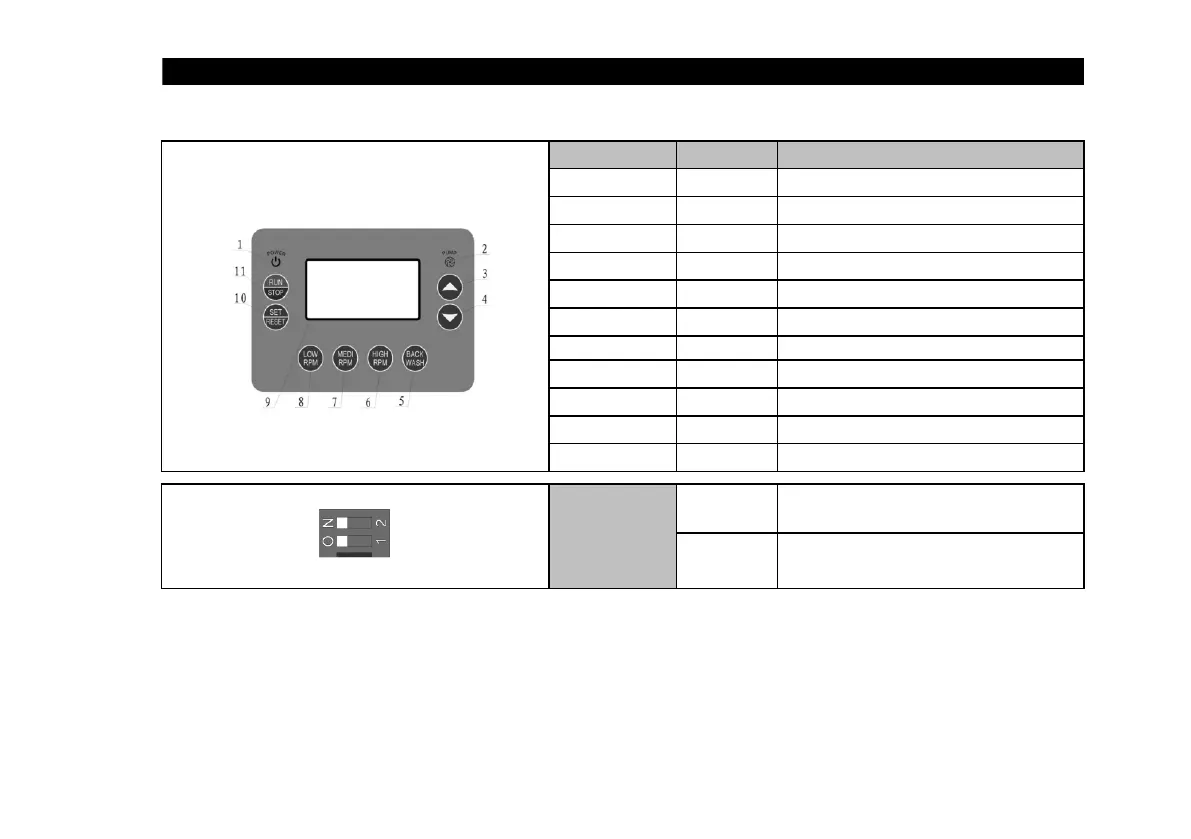
Number Name
1 Power light
2 Pump light
3
Increase
4
Decrease
5
Full RPM
6
High RPM
7
Medium RPM
8
Low RPM
9
LCD screen
10 Setting
11 Run/Stop
Motor rotation
direction
4. BUTTON AND FUCNTION EXPLANATION
Pump motor RPM setting
Showing all parameters
Parameter setting or re-set system
Manually control pump run or stop
4.1 BUTTON AND FUCNTION EXPLANATION
Explanation
Power supply connected or disconnected
Pump on or off
Increase the parameter
Decrease the parameter
Pump motor RPM setting
Dial-switch S1
Frequency
option
“N” stands for 50Hz
“2” stands for 60Hz
If three-phase motor runs in anti-clockwised
direction, move“O”to“1”
- 18 -

Related product manuals