Battery Installation
Note: Do not allow children to install batteries.
• This unit requires four (4) AA batteries.
We recommend alkaline batteries.
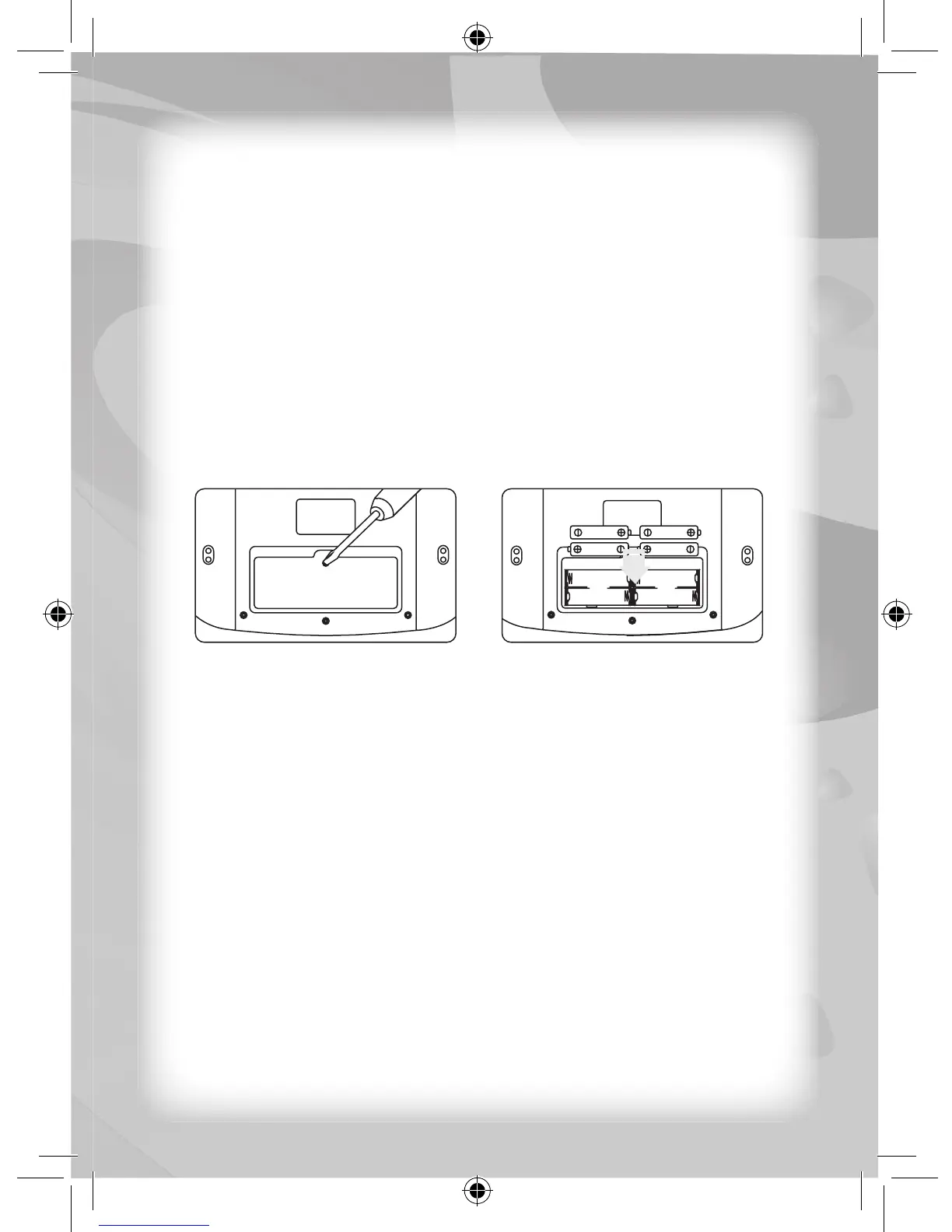
• Open the battery compartment found on the back of the unit.
(See Fig. 1)
• Insert the batteries correctly, as indicated by the polarity
symbols (+) and (-) marked inside the battery compartment.
(See Fig. 2)
• Make sure to correctly replace the battery compartment door
and screw it fi rmly back in place.
Battery Precautions
• Install batteries for your child.
• Do not use rechargeable batteries.
• Do not recharge non-rechargeable batteries.
• Do not mix old and new batteries.
• Do not mix alkaline, standard (Carbon-Zinc), or rechargeable
(Nickel-Cadmium) batteries.
• Do not short circuit the supply terminals.
• Only use batteries of the same type or equivalent as
recommended.
• For best operation, always use new alkaline batteries.
• Insert batteries following the correct polarity.
• Replace the batteries if the sound weakens or the display dims.
• Remove exhausted or weak batteries from the unit.
• Remove batteries if you are not going to use the unit for more
than one week.
Notice To Parents
Fig. 1 Fig. 2



 To Next Page