5.4. Tips of temperature display malfunction:
In order to prevent the machine from abnormity, following are some tips for you to maintain:
E1: upper sensor short circuit E2:upper sensor open circuit
5.5. The control of cooling system
The compressor will stop working when the cooling system in the cabinet reaches the presetting temperature,
and re-start working until the desired temperature is achieved. Allow a minimum 5 minutes’ interval before
re-starting.
CHANGE THE POSITION OF THE SHELF
Read the following carefully if change
the position of shelf: To move a sliding shelf,
first remove all bottles, then move the sliding
shelf by sliding guides from walls, while
making sure not to mix up the right and left
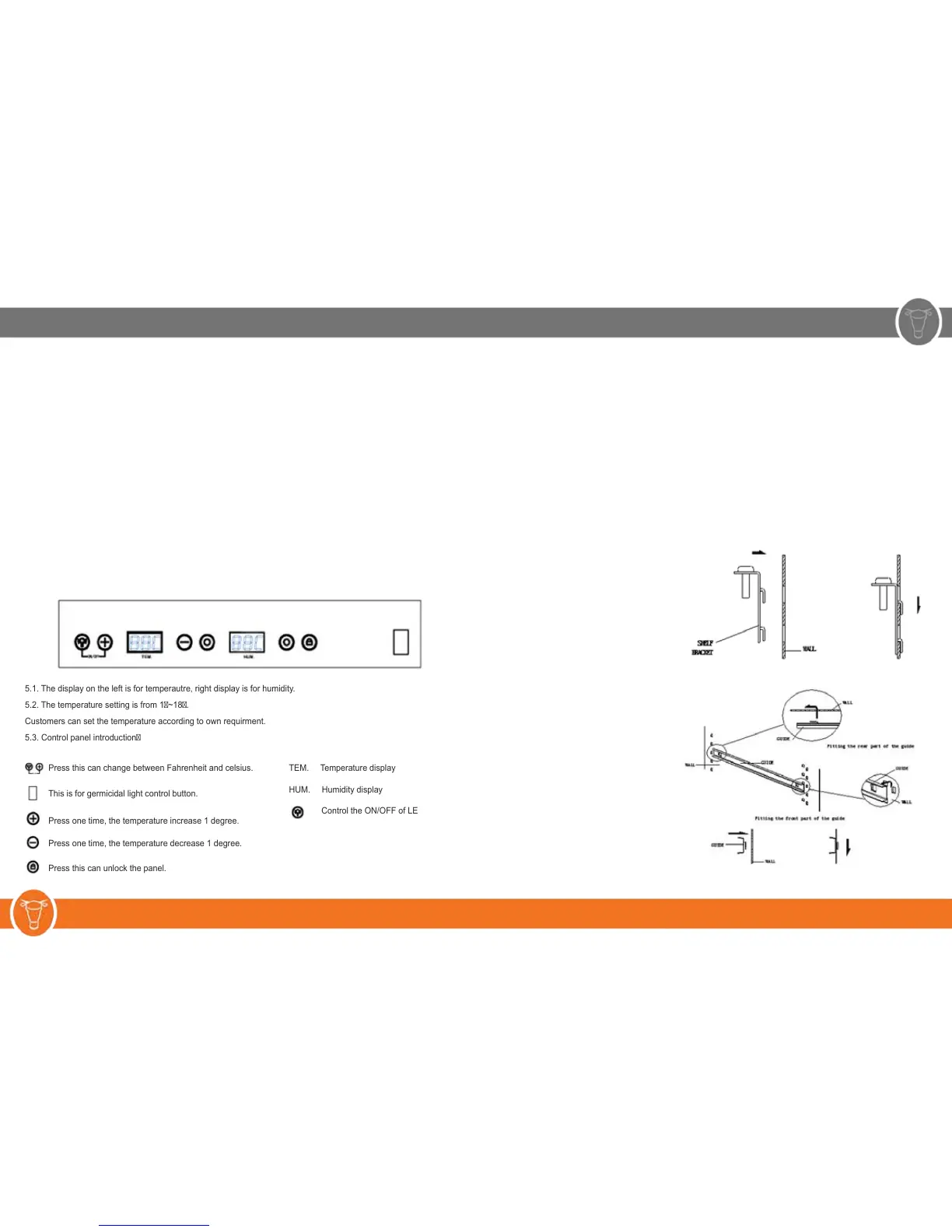
guides. Installation diagram of sliding shelf:
Diagram of fixed and sliding shelf:
(3)Move your unit to the final place if there is no problem with it after checking. Observe the following when
placed:
A. Allow at least 5 cm between the back and sides of the machine; and leave a minimum space of 8cm
between the back cabinet and the wall.
B. Place your machine on a floor that is strong enough to support it when it is fully loaded. Adjust the four
underneath the cabinet so that your cabinet is level..
(4)Locate the steak locker away from direct sunlight and sources of heat and high humidity areas, such as
laundry room and bathroom, etc.
(5)Do not tilt the cabinet at an angle of more than 45° when moving it. Allow a minimum 10 minutes’ interval
between transit and re-starting.
(6)Make sure the ventilation is free if you wish to install your cabinet into a workable, otherwise, it will reduce the
effect of usage.
Temperature Setting
The temperature setting
5.1. The display on the left is for temperautre, right display is for humidity.
5.2. The temperature setting is from 1~18.
Customers can set the temperature according to own requirment.
5.3. Control panel introduction
Press this can change between Fahrenheit and celsius.
This is for germicidal light control button.
Press one time, the temperature increase 1 degree.
Press one time, the temperature decrease 1 degree.
Press this can unlock the panel.
TEM. Temperature display
HUM. Humidity display
Control the ON/OFF of LED light
4 5 w w w . s t e a k l o c k e r . c o m



 To Next Page