21
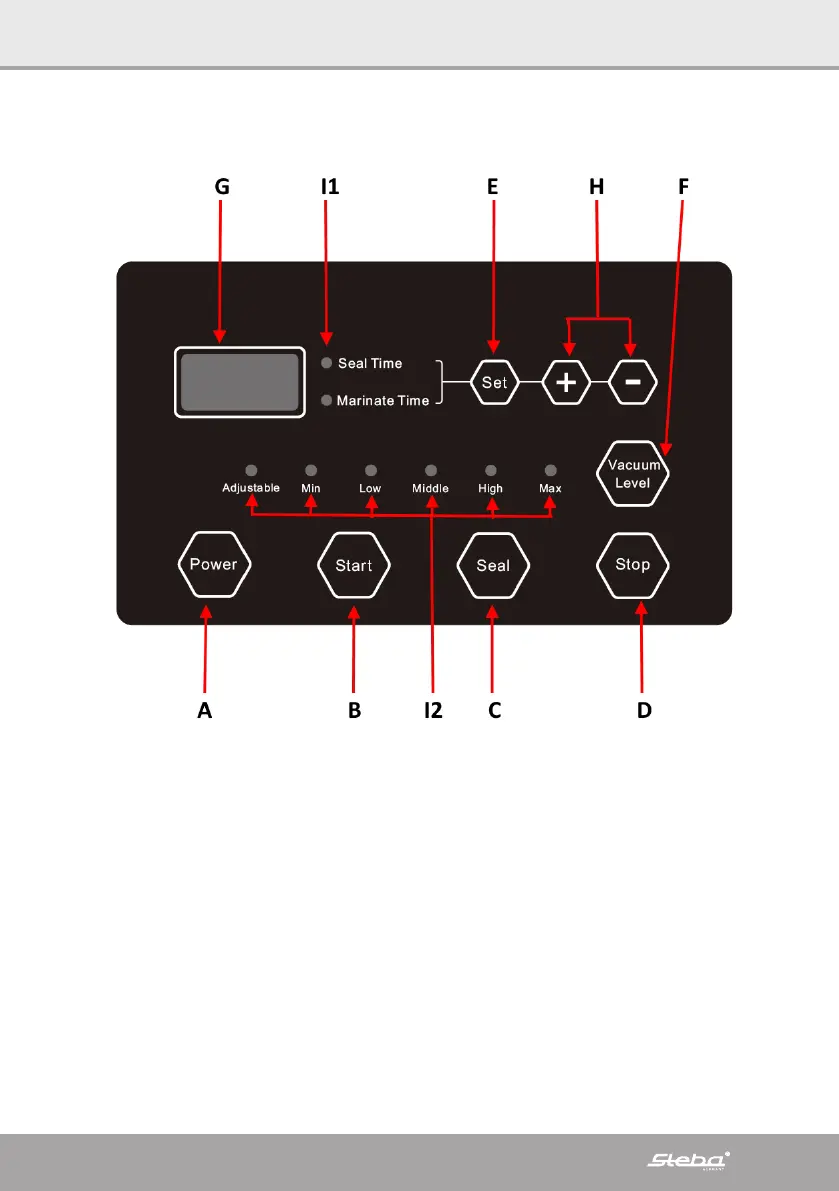
Power (A)
∙ Plug in the device and turn it on with the ON/OFF button on the side of the device.
∙ Press the power button. The display shows CLO. The device is in stand-by mode.
The LED Seal time and the vacuum level are displayed. The ventilation starts.
∙ If the device is not needed any longer, the power button has to be pressed first.
After that the main ON/OFF button can be pressed.
∙ To end a vacuuming process, press the power button.
∙ If the error LP is displayed, you can reset the device with Stop.
Start (B)
∙ This button starts the device with the selected program:
A) Automatic vacuuming and sealing
B) Gradual marinating
Seal (C)
∙ Press this button to immediately weld the bag during vacuuming. This prevents
sensitive foods (bread, biscuits, pastries) from breaking.


 To Next Page
 Loading...