12
742.110 | 14.50
EN
Commission the controller for the first time as follows:
Setting the time
1. Apply power to the controller.
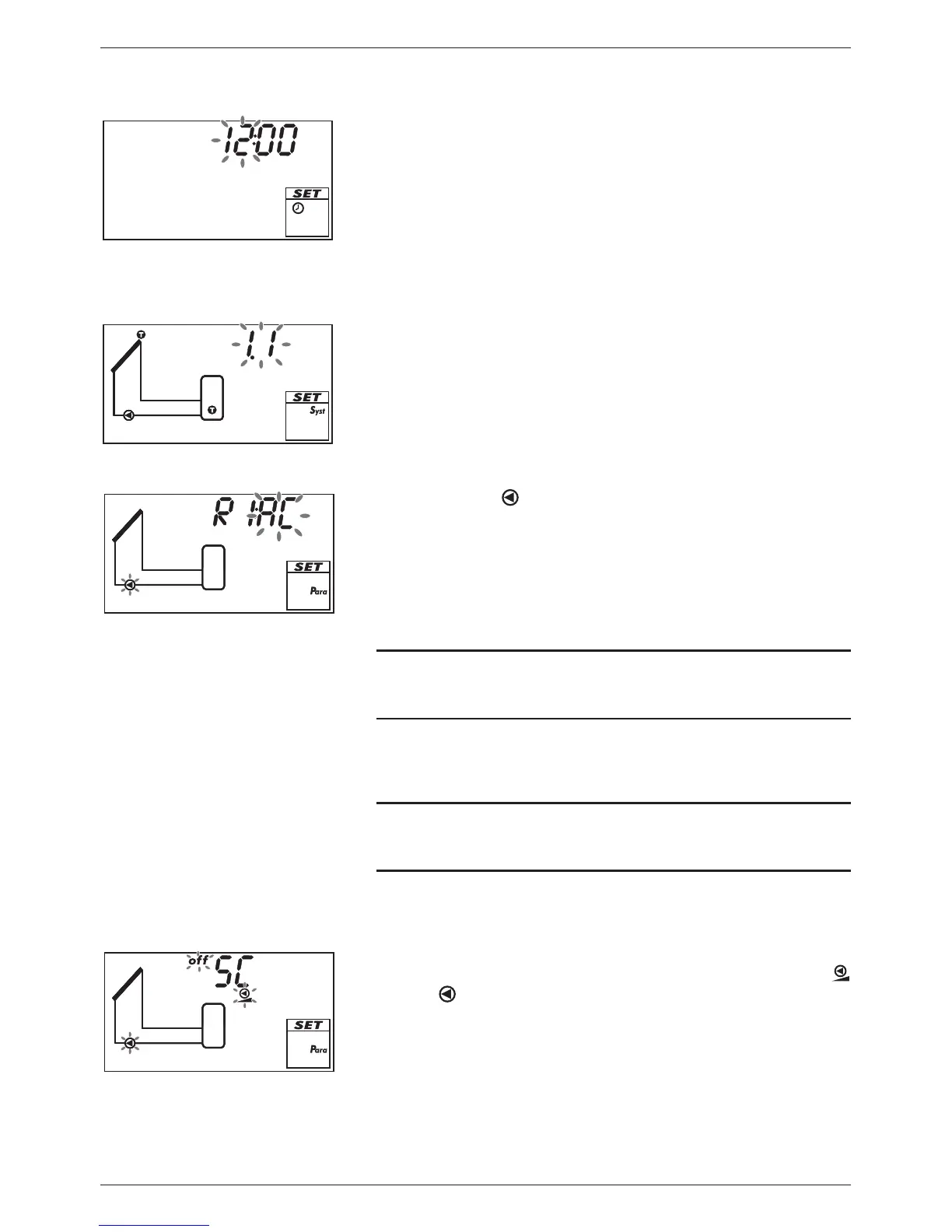
– The time 12:00 is displayed.
– 12 flashes (Fig. left).
– Backlighting is red.
2. Press to set the hours.
3. Press SET. The minute flashes.
4. Press to set the minutes.
5. Press SET. The set time is displayed.
Selecting a system
6. Press . System 1.1 is displayed, 1.1 flashes (Fig. left).
7. Press to select a different system.
8. Press SET.
If System 0.1 was selected in step 7, then continue with
step 18.
Setting pump 1 (output R1)
9. Press . AC and flash (example in Fig. left).
10.
Notice
Standard pump: Select AC!
High-efficiency pump: Select HE!
Press to set the type of pump 1.
11. Press SET.
12.
Notice
Pay attention to the pump characteristics when selecting HE
(high-efficiency pump).
Only if HE was selected in step 10:
Press to set the characteristics of the high-efficiency
pump; see Tab. 2 and Fig. 6 on p. 14.
13. Press SET:
– If bA or bb was selected in step 12, SC is displayed; off,
and
flash (example in Fig. left; SC = Speed control).
– If C was selected in step 12, then continue with step 18.
14. Press to switch on the speed control if necessary (on flashes).
15. Press SET.
If off was selected in step 14. then proceed with step 18.


 To Next Page