EasyManua.ls Logo

Steca TR-A501T-U - 9 Settings Menu; Overview; Calling up the Settings Menu and Selecting a Menu Entry

Steca TR-A501T-U
48 pages
Print Icon
To Next Page IconTo Next Page
To Previous Page IconTo Previous Page
Loading...
22
742.110 | 14.50
EN
9 Settings menu
9.1 Overview
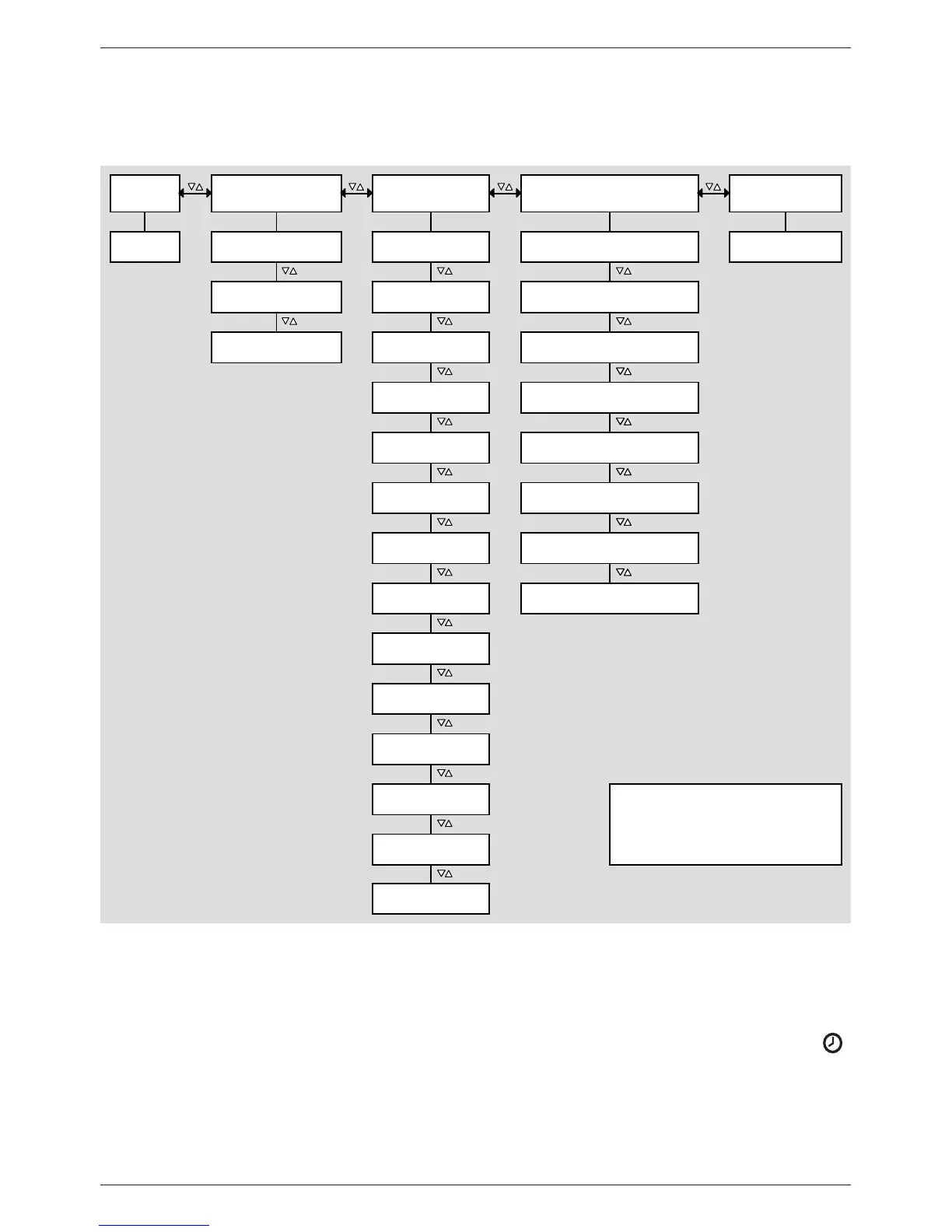
The following graphic provides an overview of the structure of the settings menu.
SET SET SET SET
SET 5 s
Differential ther-
mostat – F14
Time System
Drainback – F01Set time
Functions
1)
No system – 0.1
1 swimming pool,
1 collector array – 1.2
Speed control – P08
Switch-off temperature
difference solar circuit – P04
Thermostat – F13
Upper storage tan
k
display – F07
Heat quantity
– F08
Circulation – F09
Back-up heating
– F10
Solid fuel boiler
– F11
Interval – F04
Parameters
1)
Factory setting
Return increase
– F12
1)
Depending on the system selected,
only certain functions and parameters
can be accessed.
Quick charge
– F05
Freeze recircula-
tion – F06
Maximum temperature
storage tank – P01
Maximum collector
temperature – P05
Minimum collector
temperature – P06
Loading strategy – P07
Switch-on temperature
difference solar circuit – P03
Reset to factory
settings
1 storage tank,
1 collector array – 1.1
Holiday – recooling
– F02
Maximum temperature
swimming pool – P02
Stagnation reduc-
tion – F03
9.2 Calling up the settings menu and selecting a menu entry
Automatic or Off mode is selected.
1. Press and hold SET for two seconds. The settings menu is displayed, menu entry
flashes.
2. Press  to select a different menu entry.
3. Change the settings as described in the following sections.