before programming:-
1. Set in CD I mode & stop the playback.
2. Press the “Program” button, “ PROG “ will appear on USB/SD operation display area (2). Moreover, it will indicate
program no. and digits for track no. to be programmed.
3. Select a desired track by pressing USB/SD skip or buttons.
E-3
4. Press the “ Program ” button to store the trace into memory.
5. Repeat steps 3 and 4 to enter additional files into the memory if necessary.
6. When all the desired files have been programmed, press CD I Play/Pause/Stop button (10) to play the files in
assigned order.
7. To cancel the programmed file, press “CD I Play/Pause/Stop ” button (10) until “ PROG “ is disappear on
USB/SD operation display area (2).
Remark
- The system can detect and read the file under MP3 format only though the CD I /USB/SD port.
- If connect the system to MP3 player via the USB socket, due to variances in MP3 encoding format, some MP3 player
may not be able to play via the USB socket. this is not a malfunction of the system.
Playing compact disc at CDII
Getting start
1. Select the Off/Source/Tuner switch (7) to “SOURCE” position. The LCD display (2) will show “PLS SELECT FUNCTION“.
Then press the CD I function button (22).
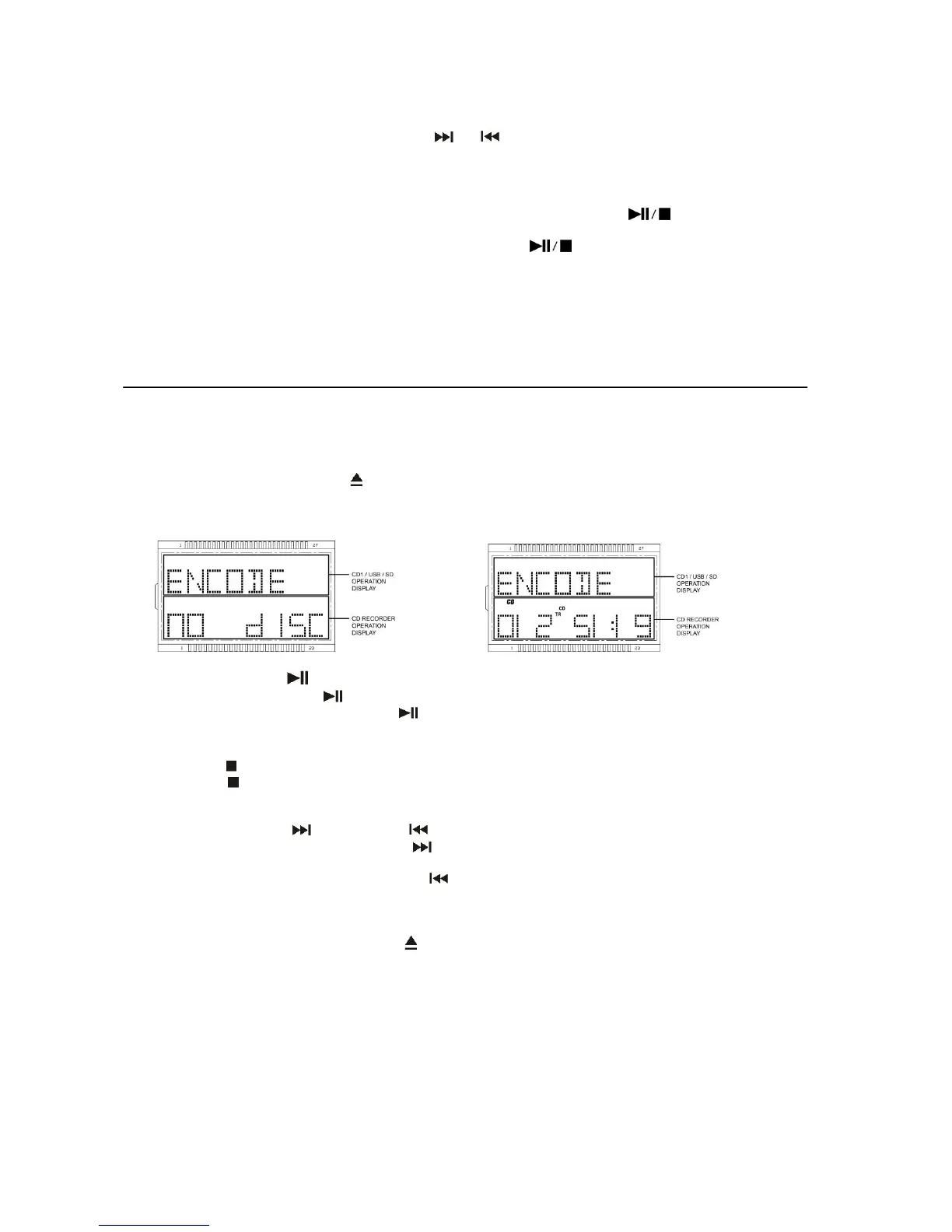
2. The LCD display will show “ --- busy “ on the CD/CD Recorder operation display area few second and then “ no disc “ if
the CD compartment is empty and “ENCODE ” will show on CD I /USB/SD operation display as well. (Figure 2)
3. Then press “CDII Open/Close” button (25) to open the CDII tray (27).
4. Place a audio CD with the printed side facing up inside the tray & then close the CD tray.
5. Focus search is performing and CD Recorder operation display area LCD area (2) will show “ BUSY “ and then display
the total number of tracks & total playing time. (Figure 3)
(Figure2) (Figure 3)
Play / Pause mode
6. Press the CDII “Play/Pause ” button (26) to start playback, the first track will start playback.
7. To interrupt, press the CDII “Play/Pause ” button (26) once, the playing time will be freeze on the LCD display (2).
Press again to resume normal playback.
Stop mode
8. If “CDII Stop “ button (29) is pressed during play or pause mode. CDII will go to stop mode and display total number of
track on the CD Recorder operation display area (2).
Skip mode (skip up / skip down )
9. During play or pause mode, if “CDII Skip up ” button (32) is pressed. It will go to next track and display the track no.
and then remain the play or pause mode.
10. During play or pause mode, if “CDII Skip down ” button (32) is pressed. It will go back to the previous track and play
the track.
Remark:-
Before pressing the “CDII Open/Close ” button (25) for changing disc. Press the “CDII Stop ” button (29)
every time and resume the CD Recorder operation display area to the original information.
- The reaction time of the CD Recorder is longer than normal CD player due to the complicacy system.
- Keep pressing with all difference function within a short time may cause mal-function of the system. Please re-start the
unit if this is happen.
- The reading and playback time of CD-R(W) disc is various from brand to brand. It depends on the compatibility of the
used disc.
- This device only design for normal compact disc format. Is not support any MP3 format.
Repeat/Random mode (by remote control)
Repeat play (by remote control)
Press the repeat/random button before or during playback, a single track or all the tracks can be played in difference mode as
follow:-


 To Next Page
 Loading...