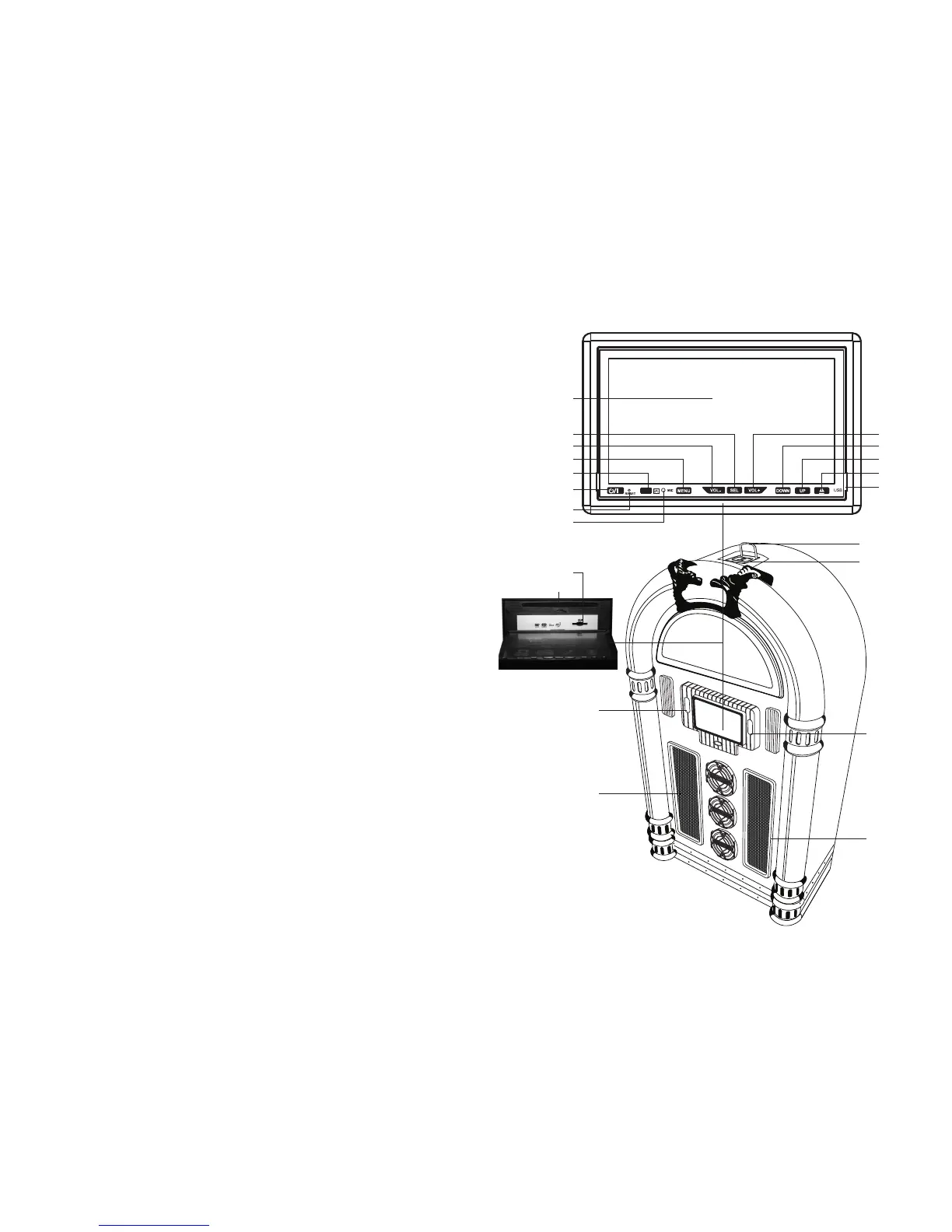
LOCATION OF PARTS
VOLUME+
DOWN
UP
EJECT
VOLUME-
MENU
SEL
LCD DISPLAY
STAND BY/MUTE
MIC
RESET
REMOTE SENSOR
USB
2
SPEAKER
SPEAKER
iPOD DOCK
MAIN POWER
LIGHT
SD CARD
DVD SLOT
TROUBLESHOOTING
No Power and No Lighting
1 Check the DC
Adaptor’s 3-pin plug been correctly inserted into the AC mains wall socket.
2 Has the small plug of the DC Adaptor been fully inserted into the DC Jack?
3 Has the Main Power switch on the front of the unit been pressed and the Panel Lighting On/Off
switch on the rear of the unit?
4 Press the LIGHT switch to ‘ON’.
5 Press the reset key (RESET) on the panel with a pen tip.
There is No Sound
1 Make sure the Mute function is turned off.
2 Check to make sure the power is turned on and the Standby button pressed.
3 Check that the volume is turned up by pressing Vol.+ button on the remote.
4 Make sure the EXT. /INT. switch on back of unit is on "INT.", (unless you are using external speakers,
in which case it should be on "EXT.").
5 This unit cannot support “DTS” audio, do not select “DTS” audio.
6 Check if any headphones are still connected to the unit.
The Remote Control does not work
1 The battery charge level may be low or the battery may be completely discharged, replace the
battery with a new one.
Radio Reception is poor
1 Check whether the antenna/earth wire is connected properly.
2 There is a directional built-in Ferrite Antenna for MW band. Rotate the whole set to find the position
in which the best reception is obtained.
Cannot insert a Disc
1 Check if there is not already a disc inserted.
2 Eject the disc inside and re-insert the new disc.
Cannot Eject the Disc
1 Press and hold the panel “EJECT” button for over 3 seconds.
Cannot Play the Disc
1 The disc is not inserted properly.
2 Try a different disc – if it plays, then re-insert the previous disc to check if it is not a faulty disc.
3 Make sure the disc has been inserted with the label side up.
4 The laser head may be dirty - clean the laser head with a special cleaning disc (not supplied).
Can’t switch the Language/Caption
1 The disc may contain only one language/caption. You cannot switch the language/caption if the
disc contains only one language/caption.
Touch Screen is disturbed
1 The touch screen has not been calibrated.
2 Re-calibrate the touch screen.
The Remote Control(s) does not store magnetically on the front cabinet
1 If a non-metal battery/batteries is/are inserted in the battery compartment, this will not allow the
handset(s) to attract the magnetic power from the unit, and therefore cannot stick to the cabinet.
13
iPAD BRACKET


 To Next Page