EasyManua.ls Logo

Steinberg UR12 - UR12 Connection Examples; Connection Examples to Computer and iPad

Steinberg UR12
31 pages
Print Icon
To Next Page IconTo Next Page
To Previous Page IconTo Previous Page
Loading...
Using the UR12
UR12 Operation Manual 9
Using the UR12
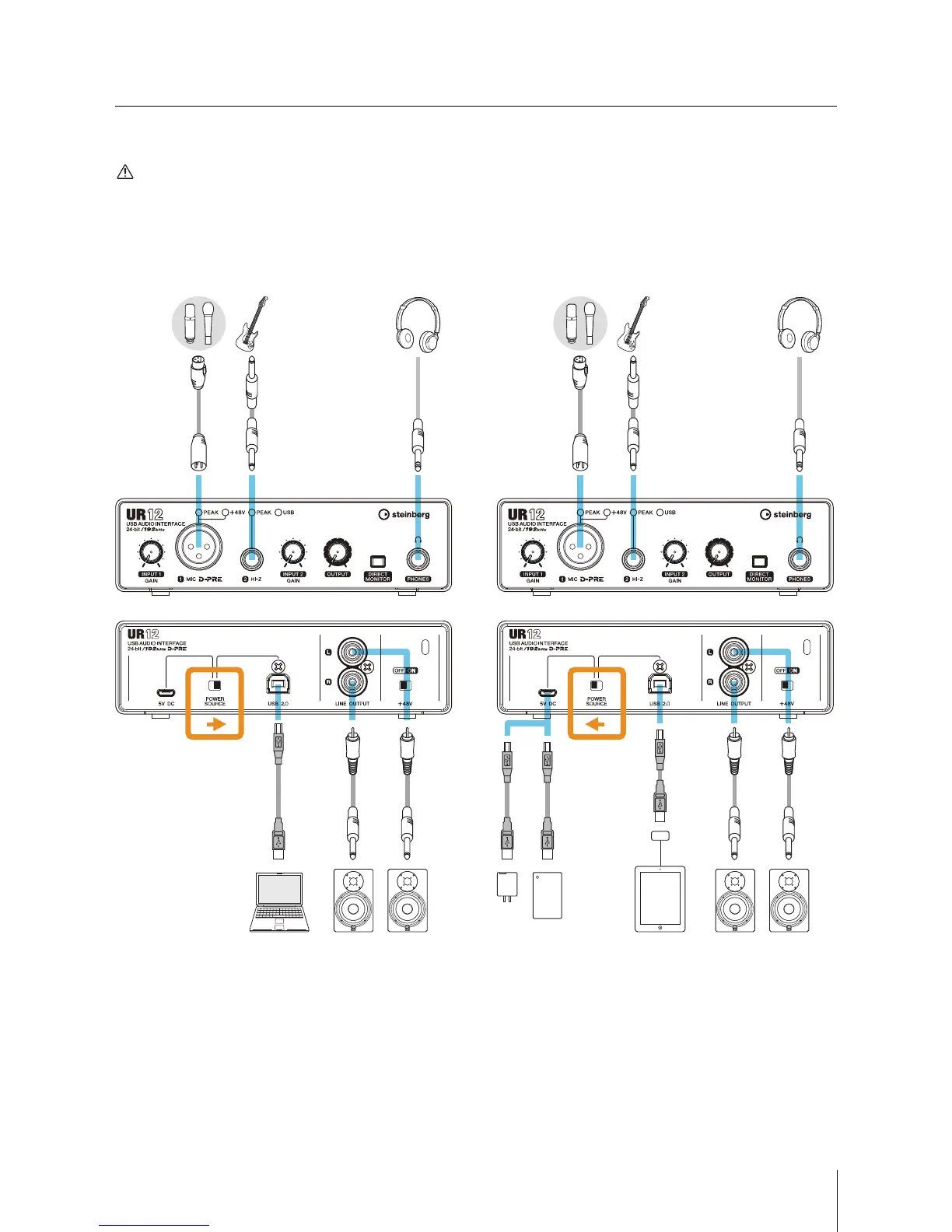
Connection Examples
CAUTION
Make sure that you set all volume levels to minimum before connecting or disconnecting the external device. Otherwise,
high-volume output may damage your hearing or the equipment.
Connecting to a Computer Connecting to an iPad
NOTE
Apple iPad Camera Connection Kit or Lightning to USB Camera Adapter are required when connecting the UR12 with an iPad.
For the latest information on compatible iOS devices, refer to the Steinberg Website below.
http://www.steinberg.net/

L
LR
R
HeadphonesGuitarMicrophone
To [USB2.0] side
Monitor speakers
Computer
Front Panel
Rear Panel
L
LR
R
GuitarMicrophone
To [ 5V DC] side
Monitor speakersiPad
Apple iPad Camera
Connection Kit or
Lightning to USB
Camera Adapter
Front Panel
Rear Panel
Headphones
USB power adapter or
USB mobile battery

Other manuals for Steinberg UR12