Using the UR12
UR12 Operation Manual 11
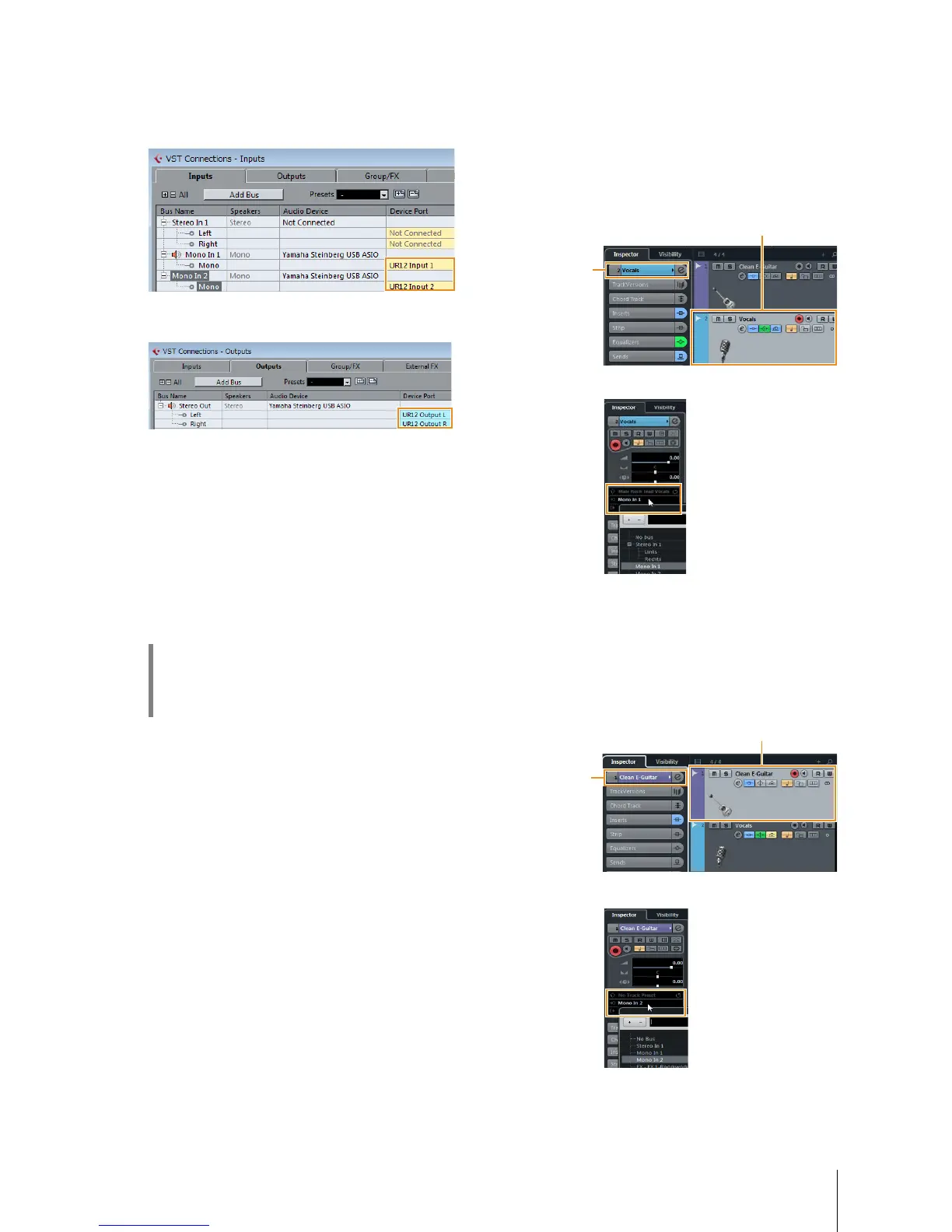
4. Select UR12 ports for [Device Port] on both
the Inputs and Outputs tabs.
Inputs Tab
Outputs Tab
5. Turn on (O) the [DIRECT MONITOR] switch
on the front panel.
6. Adjust the input signal level of the
microphone or guitar with the [INPUT GAIN]
knob on the device.
If you have a microphone connected to the [MIC] jack,
adjust the [INPUT 1 GAIN] knob. If you have a guitar
connected to the [HI-Z] jack, adjust the [INPUT 2 GAIN]
knob.
7. While singing into the microphone or
playing the guitar, adjust the output signal
level of the headphones with the [OUTPUT]
knob on the device.
8. Select desired track for recording.
9. Select the input routing.
When a microphone is connected to the [MIC] jack:
Click on the track, and then click the track name on the
left side of the project window.
NOTE
If the track name is not shown in the inspector, close the
currently displayed section (initial setting is [Fader]).
In the window that appears below, select [Mono-In 1].
When a guitar is connected to the [HI-Z] jack:
Click on the track, and then click the track name on the
left side of the project window.
NOTE
If the track name is not shown in the inspector, close the
currently displayed section (initial setting is [Fader]).
In the window that appears below, select [Mono-In 2].
HINT
Setting optimum recording levels
Adjust the gain knobs so that the [PEAK] indicator
flashes briefly at the loudest input volume.


 To Next Page