This document provides an installation guide for the Stinger HEIGH10® integrated infotainment touch screen solution, specifically designed for the Alfa Romeo Giulietta models from 2010 to 2014. The part number for this kit is UN1810E-AR2.
The Stinger HEIGH10® system is designed to upgrade the existing radio in Alfa Romeo Giulietta vehicles, providing a 10-inch infotainment display. This upgrade aims to retain all original equipment manufacturer (OEM) features, vehicle settings, and other functionalities, offering a comprehensive plug-and-play solution. The system is specifically compatible with Alfa Romeo Giulietta (940) models manufactured between 2010 and 2014 that originally came with Bosche/Blaupunkt factory head units. It is important to note that this installation kit is not compatible with vehicles equipped with the Uconnect system.
Function Description
The HEIGH10® system enhances the in-car entertainment and information experience by offering a larger screen size and a range of modern infotainment features. Key functionalities include:
- Apple CarPlay: Allows seamless integration of iPhone features, including navigation, music, messages, and calls, directly onto the HEIGH10® display.
- Android Auto: Provides a similar integration for Android smartphones, enabling access to Google Maps, music apps, messaging, and voice commands.
- DAB+ (Digital Audio Broadcasting Plus): Offers access to a wider range of digital radio stations with improved sound quality compared to traditional FM/AM radio.
- Bluetooth Streaming: Enables wireless audio streaming from compatible devices, allowing users to play music and make hands-free calls.
- Vehicle Retention Interface: The system includes an interface that ensures the retention of key vehicle settings. These settings can be controlled and adjusted directly through the HEIGH10® display, often utilizing the existing steering wheel controls.
- Camera Input: The system supports camera input, likely for a reverse camera, enhancing safety and convenience during parking maneuvers.
- HDMI Input: Provides an HDMI port, allowing for connection of external video sources to display content on the HEIGH10® screen.
- AV IN: An auxiliary video input is available for connecting other audio/video sources.
Usage Features
The HEIGH10® system is designed for ease of use and integration with the vehicle's existing controls.
- Touch Screen Interface: The 10-inch display provides a responsive touch screen interface for navigating menus, selecting options, and controlling various functions.
- Steering Wheel Control Functionality: The system is designed to integrate with the vehicle's existing steering wheel controls. This allows drivers to manage audio playback, answer/end calls, adjust volume, and switch sources without taking their hands off the wheel. The manual provides a detailed mapping of original steering wheel button functions to their new functions with the HEIGH10® system. For example, the original "Window Icon" button becomes "Hang Up," and the "Phone Icon" becomes "Pick Up." Volume up/down and source selection functions are retained.
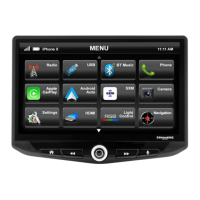
- Intuitive Menu System: The on-screen menu is designed to be user-friendly, with clear icons for Radio, USB, BT Music, Phone, Apple CarPlay, Android Auto, DAB, iPod, Camera, Settings, HDMI, and AV IN.
- Plug-and-Play Installation: The kit is described as a "plug-and-play" package, indicating that it comes with vehicle-specific wiring harnesses and adapters to simplify the installation process and minimize the need for complex wiring modifications.
- Retained Vehicle Settings: Important vehicle settings, which were previously accessible through the factory head unit, can now be managed via the HEIGH10® display.
Maintenance Features
While the manual primarily focuses on installation, some aspects relate to the ongoing use and potential maintenance of the system.
- Software Updates: Although not explicitly detailed in this excerpt, modern infotainment systems like the HEIGH10® typically support software updates to introduce new features, improve performance, and address any bugs. Users are encouraged to visit the Stinger Electronics EU website for the latest manuals and updates, suggesting that software or firmware updates might be available through this channel.
- Instruction Manual: The kit includes a comprehensive instruction manual, which is crucial for both initial installation and understanding the full functionality of the HEIGH10® unit. This manual would serve as a primary resource for troubleshooting minor issues or understanding specific features.
- Technical Assistance: Stinger provides technical assistance for users. In case of issues, users can fill out a support ticket via email (uktechnical@aampglobal.com) with full details of their problem. General inquiries can also be made via phone or email (stinger.eu@aampglobal.com) during specified business hours (Mon-Fri 9am - 5:30pm GMT). This support system is a key maintenance feature, ensuring users can get help if they encounter problems with the device.
- Digital Manual Availability: A digital copy of the manual is available for download from the www.StingerElectronics-EU.com website, providing easy access to documentation for reference or if the physical copy is misplaced.
- Durability and Design: The system is designed to integrate seamlessly into the vehicle's dashboard with a piano black double DIN fascia plate, suggesting a focus on aesthetic and structural integrity. The components are built to replace the factory unit, implying a certain level of durability expected from automotive electronics.
The installation process involves several steps:
- Stereo Removal: This includes opening the glovebox to access a hidden screw, carefully disengaging the fascia panel clips, and then undoing four bolts to remove the original radio and disconnect its wiring.
- Dash Modification: Some plastic parts of the dashboard may need to be cut or removed to create space for the new HEIGH10® unit. The manual advises caution during this step and recommends professional installation.
- HEIGH10® Assembly: The core components of the HEIGH10® unit are assembled according to its specific installation manual.
- Fascia Plate Set-Up: The fascia brackets are attached to the HEIGH10® unit, test-fitted in the vehicle, and then the unit is screwed into the dashboard. Yellow grommets are attached to the fascia panel before it is placed onto the dashboard.
- Interface Set-Up: This involves connecting the 14-way connector of the vehicle interface harness to the interface, and the 12-way connector of the stereo patch lead to the interface, with its 3.5mm jack connecting to the HEIGH10® unit. The antenna adapter is connected, and additional flying wires (Pink - Speed Pulse, Green - Park Brake, Purple - Reverse, Blue - Amp Remote Turn On) are wired to the back of the stereo. Finally, power connections are made between the stereo and the vehicle's existing connector. A detailed wiring diagram is provided, illustrating the connections between the Mini ISO Connector (from vehicle), ISO Connector (to new stereo), Main Wiring Loom Connector, Stereo Connection (Patch) Lead Connector, and the Interface Box, along with the flying wires.
The product is intended for off-road use and passenger use only, and users agree to use it in compliance with instructions, terms of use, and all applicable laws. Stinger disclaims liability for misuse or use not in conjunction with its instructions.

 Need help?
 General










 To Next Page