
 Need help?
Do you have a question about the Stinger HEIGH10 UN1810E-VX2 and is the answer not in the manual?
Detailed steps for removing the original stereo unit using trim tools and screws.
Instructions for assembling the core components of the HEIGH10 unit.
Steps for attaching fascia brackets and mounting the unit into the dashboard.
Instructions for connecting the vehicle interface harness, patch lead, and other accessories.
Explanation of dipswitch functions for configuring the Infodapter settings.
Diagrams and labels for connecting the Infodapter to the aftermarket head unit and vehicle.
Procedure for accessing the configuration menu using the source button.
Details on adjusting vehicle setup options via the aftermarket head unit menu.
Settings for screen size, position, and picture adjustments on the Infodapter.
Configuration options for driver position, camera, park brake, Bluetooth, and logo settings.
This document provides an installation guide for the Stinger HEIGH10® integrated infotainment touch screen solution, designed for Vauxhall Corsa E models from 2014 to 2019. The system upgrades the vehicle's radio with a 10-inch infotainment display, retaining all original equipment manufacturer (OEM) features, vehicle settings, and more, in a plug-and-play package.
The HEIGH10® system enhances the in-car entertainment experience by offering a larger screen and advanced infotainment features. It supports Apple CarPlay, Android Auto, DAB+, and Bluetooth streaming, allowing users to seamlessly integrate their smartphones and enjoy a wide range of audio content. The system is paired with a vehicle retention interface, which ensures that key vehicle settings are retained and can be controlled through the HEIGH10® display using the existing steering wheel controls. This integration means that drivers can access and adjust various vehicle functions directly from the new touchscreen, maintaining the original functionality while upgrading the interface.
The Connects2 Infodapter, which is part of this solution, allows vehicle settings and parking sensor information to be displayed on the aftermarket head unit. This is particularly useful for maintaining awareness of the vehicle's surroundings and status. The Infodapter also enables the use of the steering wheel controls with almost any steering wheel control-compatible head unit on the market, providing a familiar and convenient way to interact with the new system. It's important to note that the system does not retain Onstar functionality.
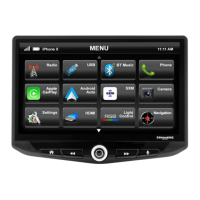
The HEIGH10® unit offers a comprehensive set of features designed to improve the driving experience. The main menu on the touchscreen provides quick access to various functions, including Radio, USB, Bluetooth Music, Phone, Apple CarPlay, Android Auto, DAB+, iPod, Camera, Settings, HDMI, and AV In. This intuitive layout ensures that users can easily navigate between different applications and media sources.
Steering Wheel Controls: The system fully integrates with the vehicle's existing steering wheel controls, allowing drivers to manage the infotainment system without taking their hands off the wheel. The controls typically include:
Configuration Menu: To access the configuration menu, users need to push and hold the source button on the steering wheel for 2 seconds. Navigation through the menu options is done using the Track Up/Track Down buttons, and selection is made by pushing the source button once. This menu provides access to:
Infodapter Settings Details:
The system is designed for ease of installation and long-term reliability. The plug-and-play nature of the kit minimizes the need for complex wiring or modifications, making it straightforward to install.
Software Updates: The manufacturer provides updates for the system. Users can visit the www.StingerElectronics-EU.com website to download digital copies of the manual and check for the latest manuals and updates. This ensures that the system remains current with new features and improvements.
Troubleshooting: In case of issues, technical assistance is available. Users can contact support by filling out a support ticket with full details of their issue via uktechnical@aampglobal.com. General inquiries can be directed to 01384 958 500 or stinger.eu@aampglobal.com during business hours (Mon-Fri 9am-5:30pm GMT).
The product is intended for both off-road and passenger use, indicating its robust design. The manual emphasizes compliance with instructions and terms of use, and users are advised to discontinue use and contact Stinger if they do not agree with the terms, as Stinger disclaims liability for misuse or use not in conjunction with the provided instructions.
 General
| Screen Size | 10.1 inches |
|---|---|
| Touchscreen | Yes |
| Bluetooth | Yes |
| Apple CarPlay | Yes |
| Android Auto | Yes |
| SiriusXM-Ready | Yes |
| Navigation | Yes |
| Backup Camera Input | Yes |
| RAM | 2 GB |
| Internal Storage | 32 GB |
| Wi-Fi | Yes |
| GPS | Yes |
| USB Ports | 2 |
| Steering Wheel Control | Yes |
| Inputs | USB, HDMI |
| Outputs | RCA |
| Power Output | 4 x 50 watts |
| Operating System | Android |
| Expandable Storage | Up to 128 GB |
| Front Camera | No |
| Resolution | 1024 x 600 pixels |











 To Next Page