SPXM1
8
9
StingerElectronics.com StingerElectronics.com
®
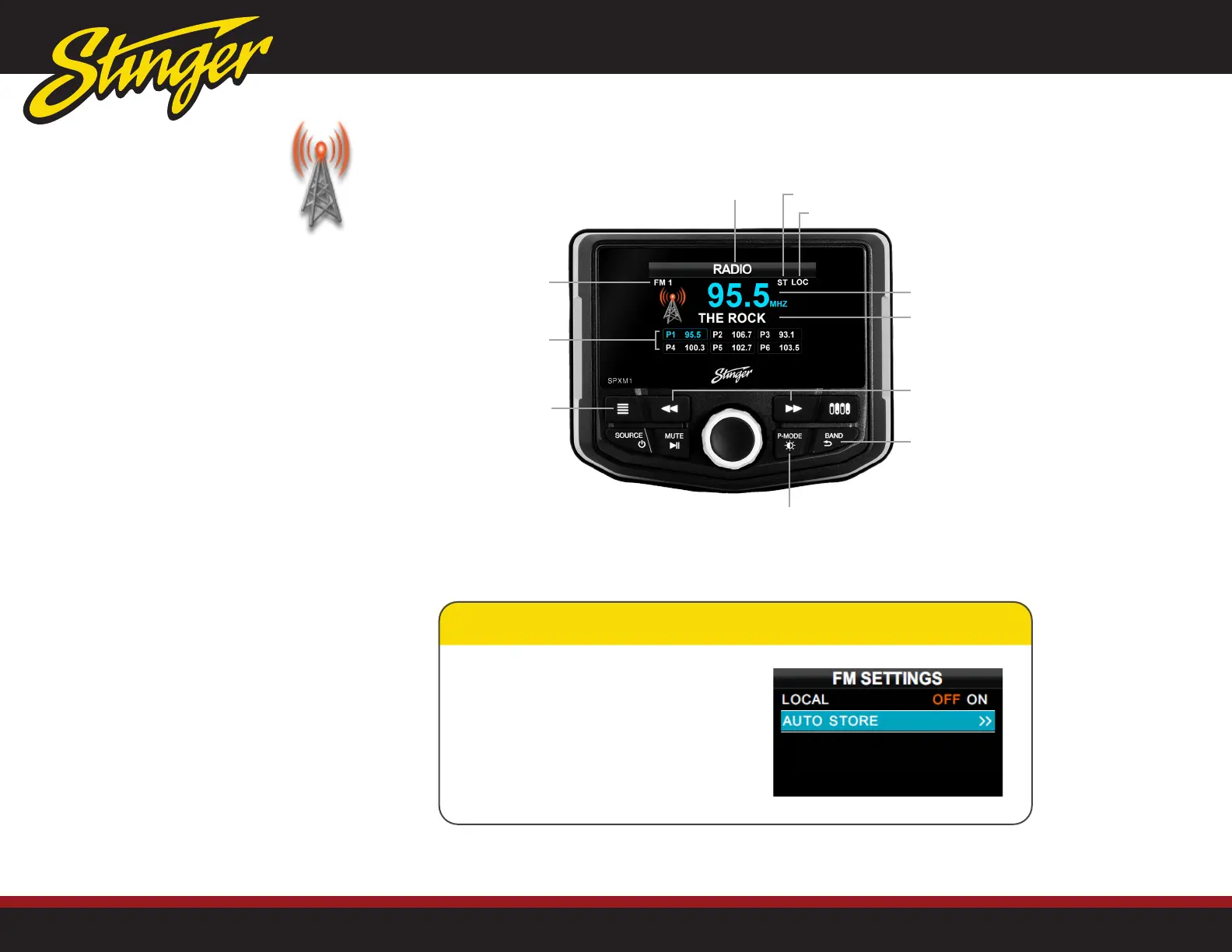
MENU Button
Press to access
FM settings menu
P-MODE Button
Press and hold to
access presets
BAND Button
Press to change radio
bands
TUNE UP/DOWN
Press to tune
Station Presets
Local (ON)
Stereo Indicator
Current Station
Station Information
Source
Band/Bank
Changing Radio Bands
Press the [BAND] button to cycle
through radio bands and presets
(FM1-FM2-FM3-AM1-AM2-WB)
Tuning Radio Stations
Press [
/
] buttons to Auto Seek
available stations.
Long Press [
/
] buttons to
Manually Tune stations.
Saving Presets
Tune to the desired radio station to save
as a preset.
Press and Hold the [P-MODE] button for
3 seconds.
Rotate [M-KNOB] and highlight
desired preset position (P1-P6)
Press and Hold [M-KNOB] for 3
seconds to save preset.
Recalling Presets
Press and Hold the [P-MODE] button
for 3 seconds.
Rotate [M-KNOB] to desired preset
(P1-P6).
Press the [M-KNOB] to select.
NOTE! Tuning, Saving and Recalling
Presets functions are the the same for
all radio bands (AM/FM/Weather Band).
FM Settings Menu (See Page 7 for Navigating & Changing Settings)
While in Radio Source, press the [MENU] button.
LOCAL [OFF/ON]
When set to ON, sets FM tuner sensitivity for LOCAL
(close proximity) radio stations.
AUTO STORE
Select to automatically set radio presets with available
radio stations.
AM/FM/WB RADIO
Press the [SOURCE] button and
select RADIO.


 To Next Page