Instructions (Cont.)
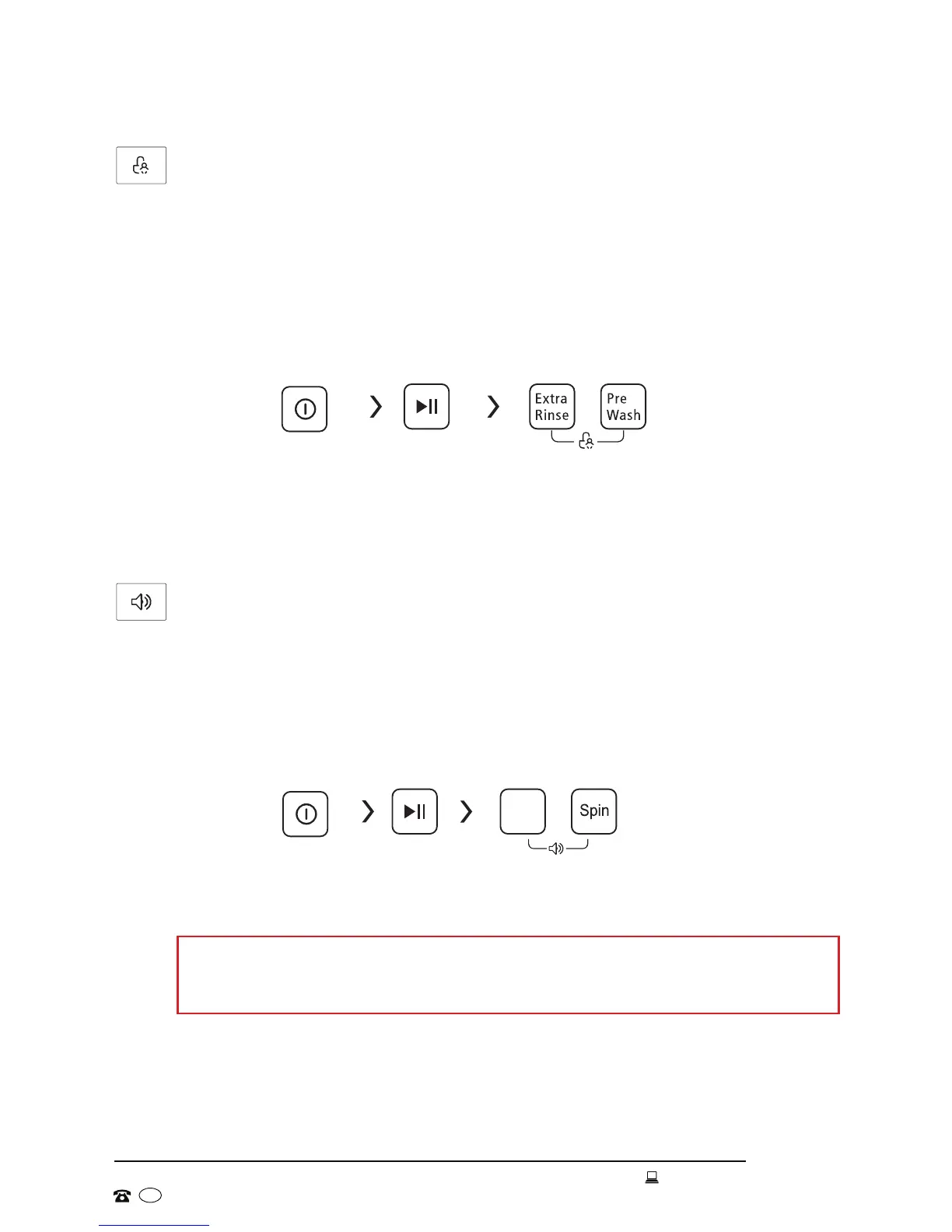
Child lock
The child lock function lets you lock the buttons to prevent unauthorised
operation of the machine by young children.
1. To set the child lock, the machine must be in operation.
2. Press the EXTRA RINSE and PREWASH buttons simultaneously and hold
for 3 seconds until a buzzer sounds. All buttons will now be locked, except
the POWER button.
3. To cancel the child lock, press the EXTRA RINSE and PREWASH buttons
simultaneously and hold for 3 seconds until a buzzer sounds.
POWER Start Press simultaneously
and hold for 3 seconds
NOTE: Once activated, the child lock will remain in place until you cancel it, or
until power to the machine is cut off.
Buzzer
The machine has a buzzer which alerts you when the program has finished or
when there is a malfunction.
1. To mute the buzzer, the machine must be in operation.
2. Press the TEMPERATURE and SPIN buttons simultaneously and hold for
3 seconds. The buzzer is now muted and will remain muted until the next
reset.
POWER Start Press simultaneously
and hold for 3 seconds
CAUTION!
Once the buzzer is muted, you will no longer be alerted audibly to the end of
a program or a malfunction.
Temperature


 To Next Page