FAQs and Troubleshooting Guide
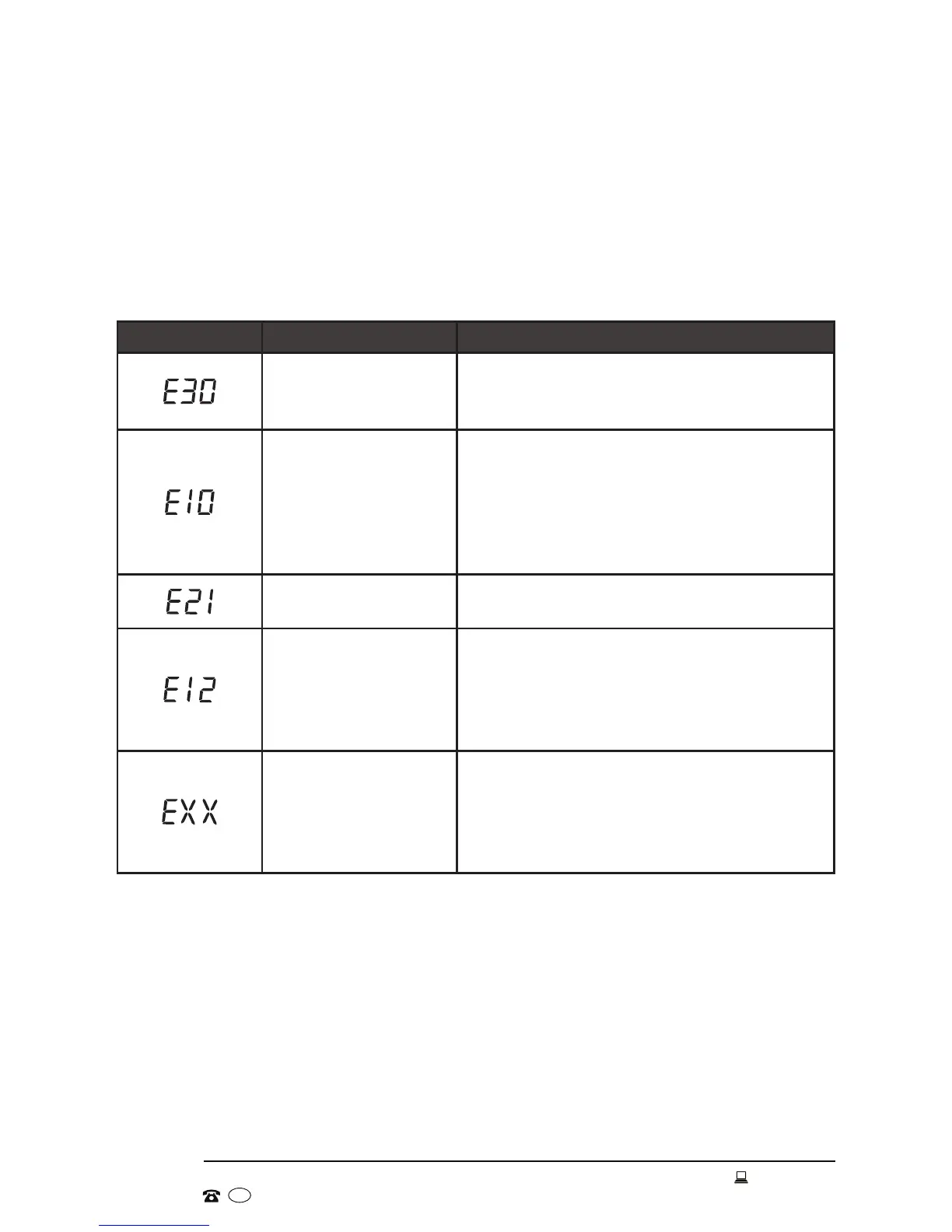
Error messages
When the following problems occur, the microcomputer inside the washer will detect
the abnormal condition, display an error message and the washer will stop operating.
If after your remedial action the problem persists, please contact our after sales
support centre for advice.
Table 3: Error messages
Error message Possible cause Solution
Door is not closed
properly
• Close the door properly and restart.
• Check and ensure no items are caught in
the door.
Water injection
problem during the
wash
• Check and ensure your water pressure is
appropriate and not too low.
• Check and ensure your water supply
hose is properly installed and not kinked.
• Check and ensure that the inlet valve
filter is clean and not blocked.
Excessive water
drainage
• Check and ensure that your drain hose is
properly installed and not blocked.
Water overflow
• Restart the washer.
• If the problem still persists after
restarting, unplug the washer, close the
water tap and contact our after sales
support centre.
Other problems
• Restart the washer.
• If the problem still persists after
restarting, unplug the washer, close the
water tap and contact our after sales
support centre.


 To Next Page