23
www.stobag.com
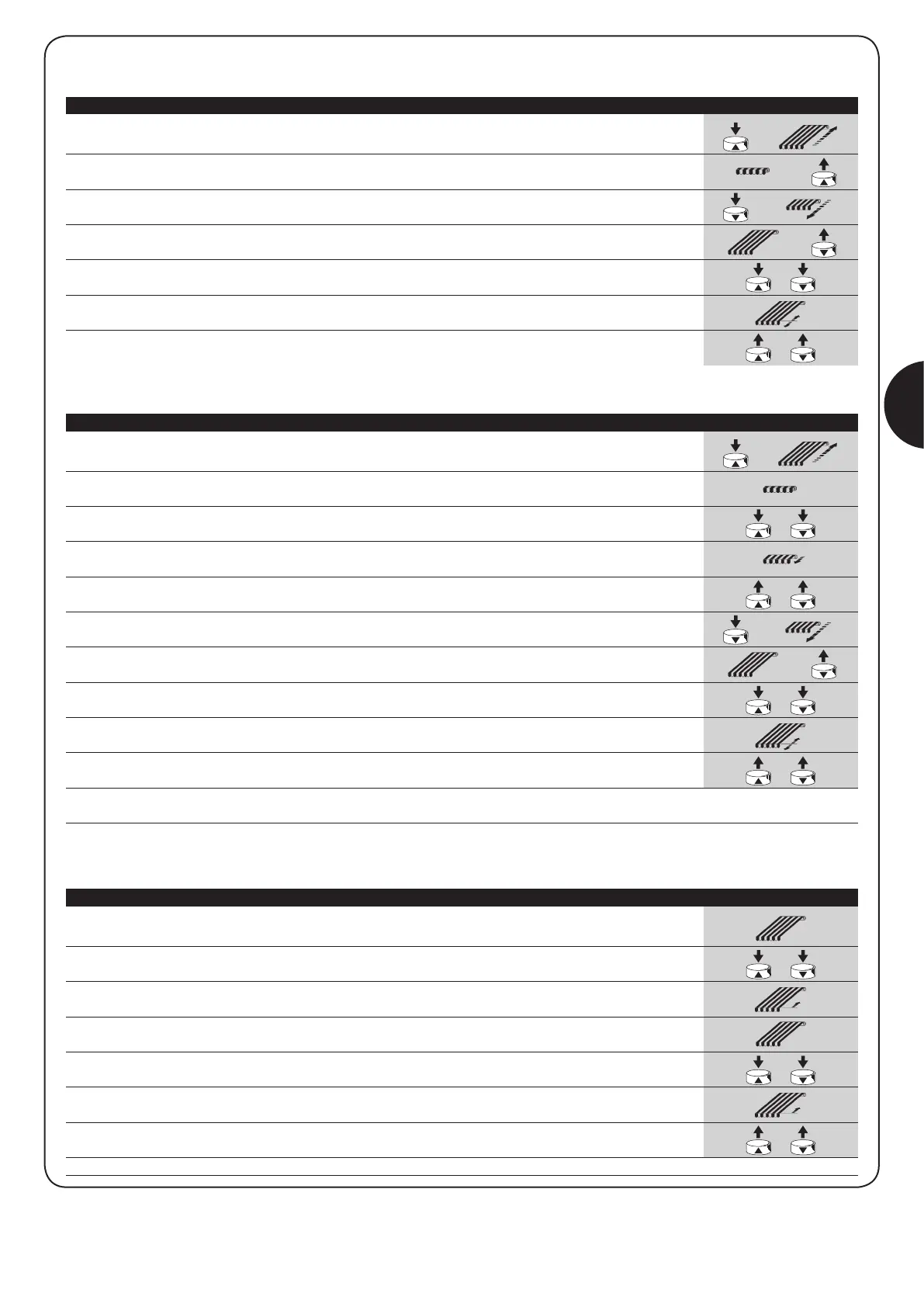
After having programmed positions “0” and “1”, it is possible to program position “2” that activates the FRT fabric tightening function.
Table “A3” Programming the position “2” (fig. 8) Example
3s
If you wish to enable the RDC torque reduction function, which activates during the up manoeuvre a few centimetres before the “0” position
is reached, proceed as follows:
3s
3s
Table “A2” Programming the “0” and “1” positions without RDC (fig. 7) Example
1. Press and hold down the ▲ control to raise the awning.
2. Wait for the motor to stop so that the awning is fully rolled up (position “0”).
3. While still pressing the ▲ up control, press also the ▼ down control.
4. Wait for the awning to move briefly down.
5. Release the ▲ and ▼ controls.
6. Press and hold down the ▼ control to lower the awning.
7. Release the ▼ control when the awning has reached the desired position (“1”).
Operate the ▲ up and ▼down controls as many times as necessary to adjust the position.
8. Simultaneously press and hold down the ▲ and ▼ controls.
9. Wait approximately 3 seconds for the awning to move briefly up and down and then stop
again in the position you have just programmed.
10. Release the ▲ and ▼ controls.
Note: If you later wish to enable the RDC torque reduction function, you must erase the memorised positions (see table A5) and then repro-
gram them with the RDC function (see table A1).
1. Make sure that positions “0” and “1” have been correctly programmed by raising and
lowering the awning. Then leave the awning in position “1”.
2. Simultaneously press and hold down the ▲ and ▼ controls.
3. Wait approximately 3 seconds for the awning to move briefly up.
4. Use the ▲ or ▼ controls to position the awning in the desired position “2”.
5. Simultaneously press and hold down the ▲ and ▼ controls.
6. Wait approximately 3 seconds for the awning to move briefly up.
7. Release the ▲ and ▼ controls.
Note: If you wish to remove the fabric tightening function at a later date, proceed as illustrated in table A4.
GB
If you do not wish to activate the RDC torque reduction function, proceed as follows:
Table “A1” Programming the “0” and “1” positions with RDC (fig. 6) Example
3s
1. Press and hold down the ▲ control to raise the awning.
2. Wait for the motor to stop so that the awning is fully rolled up (position “0”).
Then release the ▲ control.
3. Press and hold down the ▼ control to lower the awning.
4. Release the ▼ control when the awning has reached the desired position (“1”).
Operate the ▲ and ▼ as many times as necessary to adjust the position.
5. Simultaneously press and hold down the ▲ and ▼ controls.
6. Wait approximately 3 seconds for the awning to move briefly up and down and then stop
again in the position you have just programmed.
7. Release the ▲ and ▼ controls.



 To Next Page