10
SIDE
PANEL (L)
FRONT
SUPPORT
FRONT
SUPPORT
FRONT
OF FIREBOX
FIREBOX HANDLE
SCREW HOLES
REAR
SUPPORT
ASSEMBLY
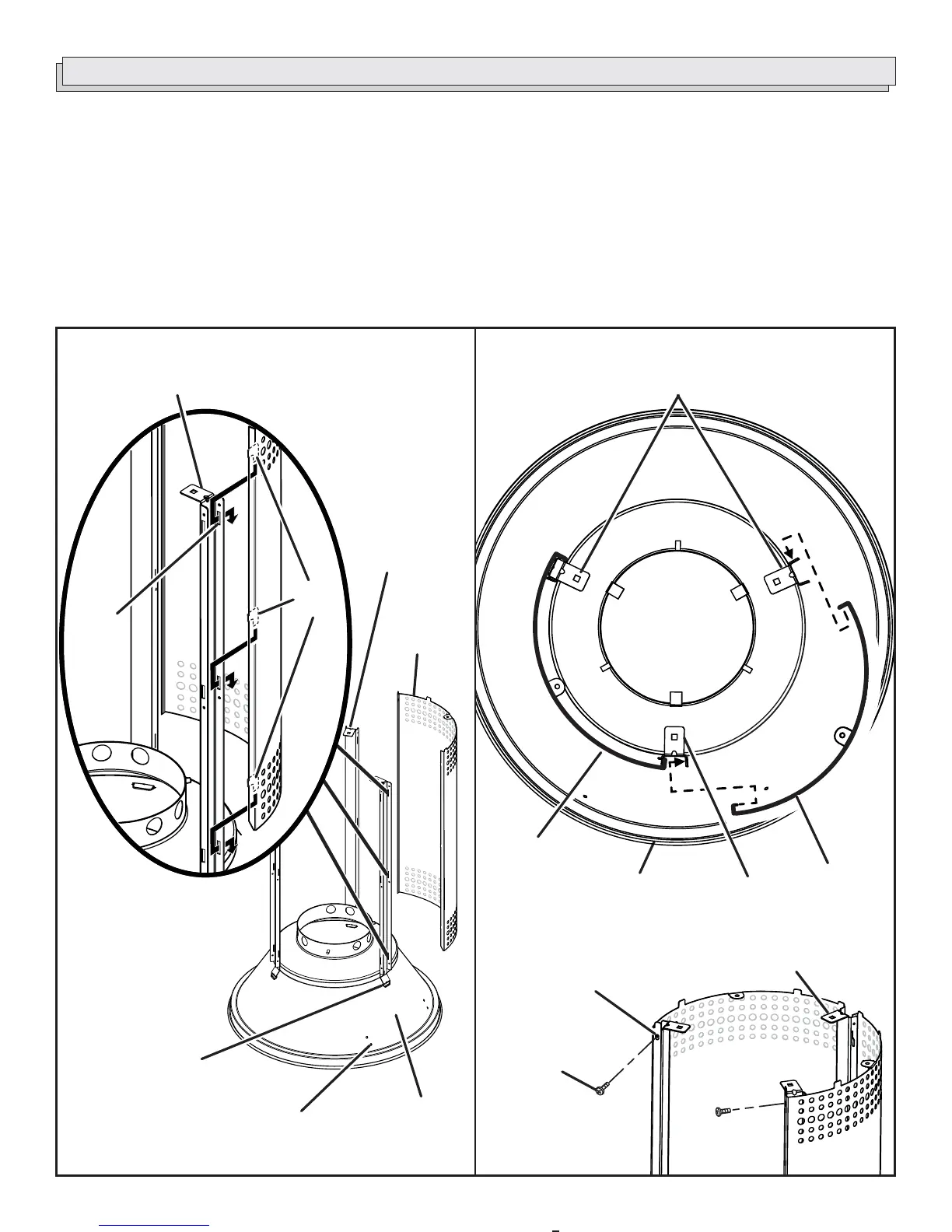
STEP 2: ASSEMBLING PANELS TO THE
SUPPORTS
See Figures 6 - 7.
To attach the side panel labeled “L”:
Hook the 3 tabs of the side panel labeled “L” into the
slots on the front support.
Make sure the panel is oriented as shown below.
NOTE: The front support is located above the firebox
handle screw holes.
Place the side panel labeled “L” around the rear support.
The screw holes in the left side panel should align with
the screw holes on the outside of the support.
Using screws (DD), attach the side panel to the rear
support.
NOTE: Insert and tighten the center screw first. Repeat
with the top and bottom screws. Tighten securely.
Repeat the instructions above to attach the panel labeled
“R”.
Fig. 7
Fig. 6
TABS
SLOTS
SCREWS (DD)
SCREW
HOLES
REAR
SUPPORTS
FRONT
SUPPORT
SIDE
PANEL (L)
TABS MUST
FACE UP
SIDE
PANEL (R)
FRONT OF
FIREBOX


 To Next Page