11
Independent Remote Control
The IR control unit operates effectively within a
distance of 23 feet (7 meters) and an angle of 30° from
the processor. Using the control near fluorescent
lights may shorten this range, as will any dust or dirt
that accumulates on the front of the remote control
or the remote-sensor area of the processor. Also,
avoid blocking the line of sight between processor
and remote.
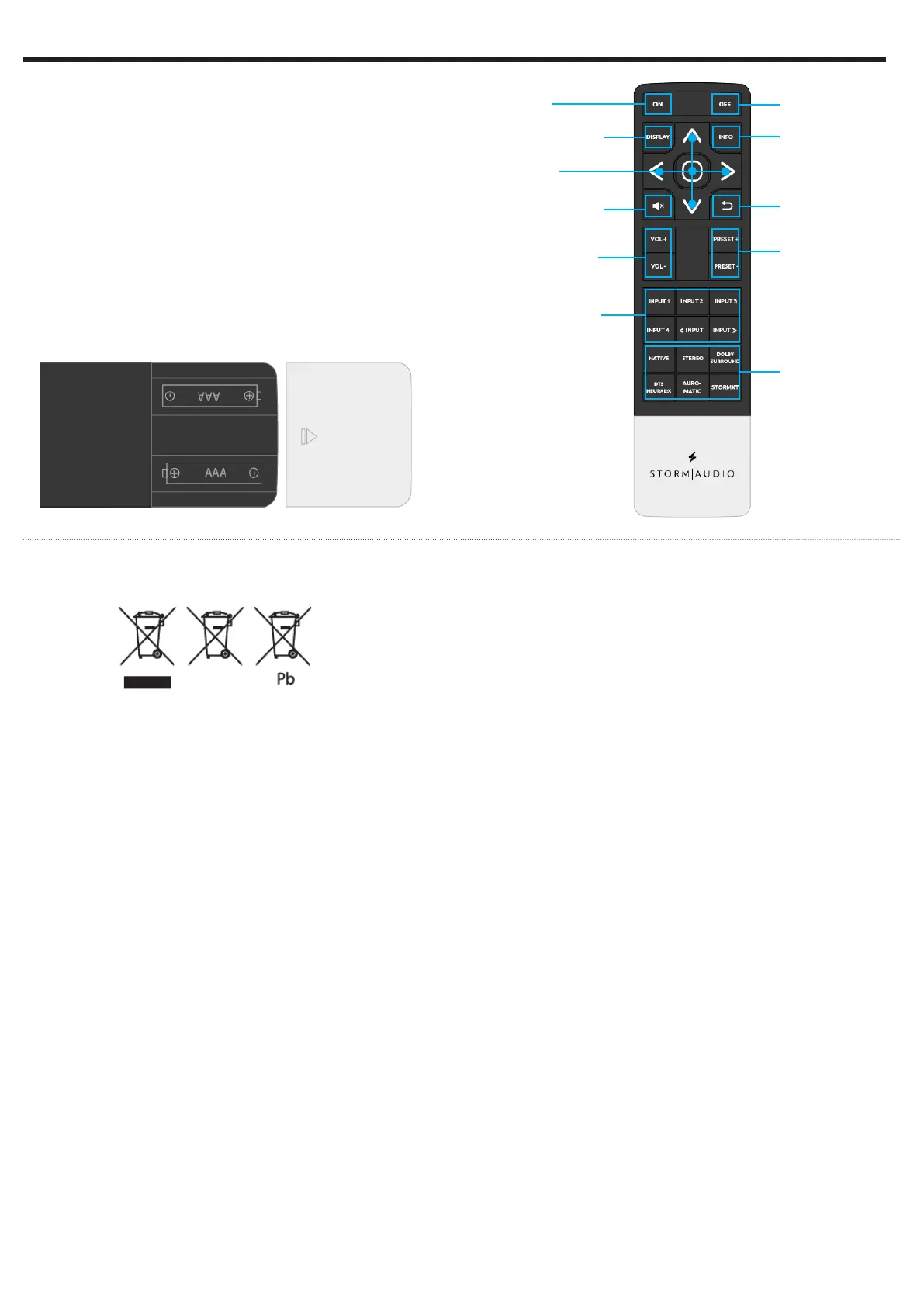
Install the two supplied AAA batteries in the remote
as shown. Be certain to follow the (+) and (–)
polarity indicators that are on the top of the battery
compartment.
Instructions for disposal of used Batteries.
These symbols shown on the product, the packaging
or in the manual or separate information sheet mean
that the product itself, as well as the batteries included
or built into the product, should never be thrown
away with general household waste. Take them to
applicable collection points, where proper treatment,
recycling and recovery takes place, in accordance with
national or local legislation, or European Directives
2002/96/EC and 2006/66/EC.
Correct handling of the product and batteries to be
disposed helps save resources and prevents possible
negative effects on the environment or human
health.
The batteries included with your equipment may be
alkaline or carbon zinc/manganese. All types should
be disposed of according to the above instructions.
To remove the batteries from your remote control,
reverse the procedure described above for inserting
batteries.
Power ON
Front panel
navigation keys
Control front panel
display mode
MUTE audio of the
selected theater or
zone
Control volume of
the selected theater
or zone
Select the input of
the selected theater
or zone
Power OFF
Show the stream
information
Return to previous
menu
Select the Listening
Preset
Select the
Preferred Upmix
mode of the
selected Theater
8 - REMOTE CONTROL


 To Next Page