EasyManua.ls Logo

Strand FLX S24 - User Manual

Strand FLX S24
4 pages
Print Icon
To Next Page IconTo Next Page
Loading...
1
QUICK START GUIDE
FLX S24
FLX S48
9850-000840-00
OVERVIEW
This document provides installation and operation instructions for the following product(s):
PRODUCT NAME ORDER CODE
FLX S24 54108-020
FLX S48 54109-020
INTRODUCTION
FLX S consoles are easy to learn and simple to use -
delivering all the features you need at an aordable
price. We sincerely hope that your new FLX S will
bring you years of trouble-free service. We take
great care to build in reliability and serviceability
at every stage of our development and production
processes.
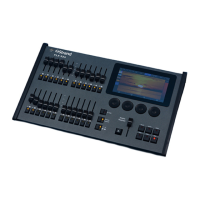
FLX S24
FLX S24 is a 19” wide console, capable of controlling
48 physical xtures (LEDs, dimmers, moving lights,
etc).
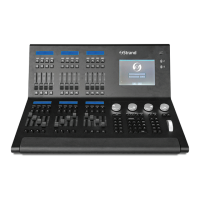
FLX S48
FLX S48 is capable of controlling 96 physical
xtures (LEDs, dimmers, moving lights, etc), and
includes a DVI-D output for optional external touch
screen monitor.
MANUAL
To view the full manual, visit strandlighting.com.
SOFTWARE
FLX S runs ZerOS software, which is regularly
updated to bring new features and to keep your
console stable and secure. Software updates
are free of charge and can be downloaded from
strandlighting.com. It is strongly recommended to
always be running the latest release of software.
OVERVIEW
ACCESSORIES
Flightcases, Replacement PSUs, Dustcovers and
Side Brackets are all available for FLX S. Visit
strandlighting.com for more information.
Question and Answer IconNeed help?

Do you have a question about the Strand FLX S24 and is the answer not in the manual?

Summary

Overview

Introduction

General introduction to FLX S consoles, focusing on ease of use and reliability.

Manual and Software Information

Details on accessing the full manual and managing ZerOS software updates.

Product Overviews

Specific details on FLX S24 and FLX S48 console capabilities and features.

Available Accessories

List of optional accessories for FLX S consoles and where to find more information.

Getting Started with FLX S

Powering On and Off

Instructions for powering the FLX S console on and the procedure for powering it off.

Touchscreen Navigation

Explanation of the touchscreen interface, buttons, and navigation elements.

Console Connections

Details on DMX, USB, and Ethernet port connections and their uses.

Key Operational Features

Information on Playback, Groups windows, RigSync, and Guidance help features.

Security and Power Supply

Notes on Kensington lock security and the required external power supply.

FLX S Terminology and Concepts

Fixture and Channel Basics

Definition of fixtures, channel numbers, and how faders control them.

Faders and Playbacks

Explanation of Multi-Function Faders, Playbacks, and the Page button.

Control Keys and Interfaces

Details on Shift key, Command/Function keys, internal/external monitors, and encoders.

Fixture Grouping and Effects

How to create fixture groups, and use Chases and Effects for lighting control.

Troubleshooting and Maintenance

Fixture and Screen Issues

Troubleshooting steps for unresponsive fixtures, DMX, and external touch screens.

Connectivity and Startup Problems

Steps for resolving remote app connection issues and console startup failures.

Basic Hardware Maintenance

Guidelines for cleaning the console surface and fader tracks.

Transportation, Storage, and Support

Advice on safe transport, storage, operating environments, and customer service.

Strand FLX S24 Specifications

General IconGeneral
BrandStrand
ModelFLX S24
CategoryMusic Mixer
LanguageEnglish

Related product manuals