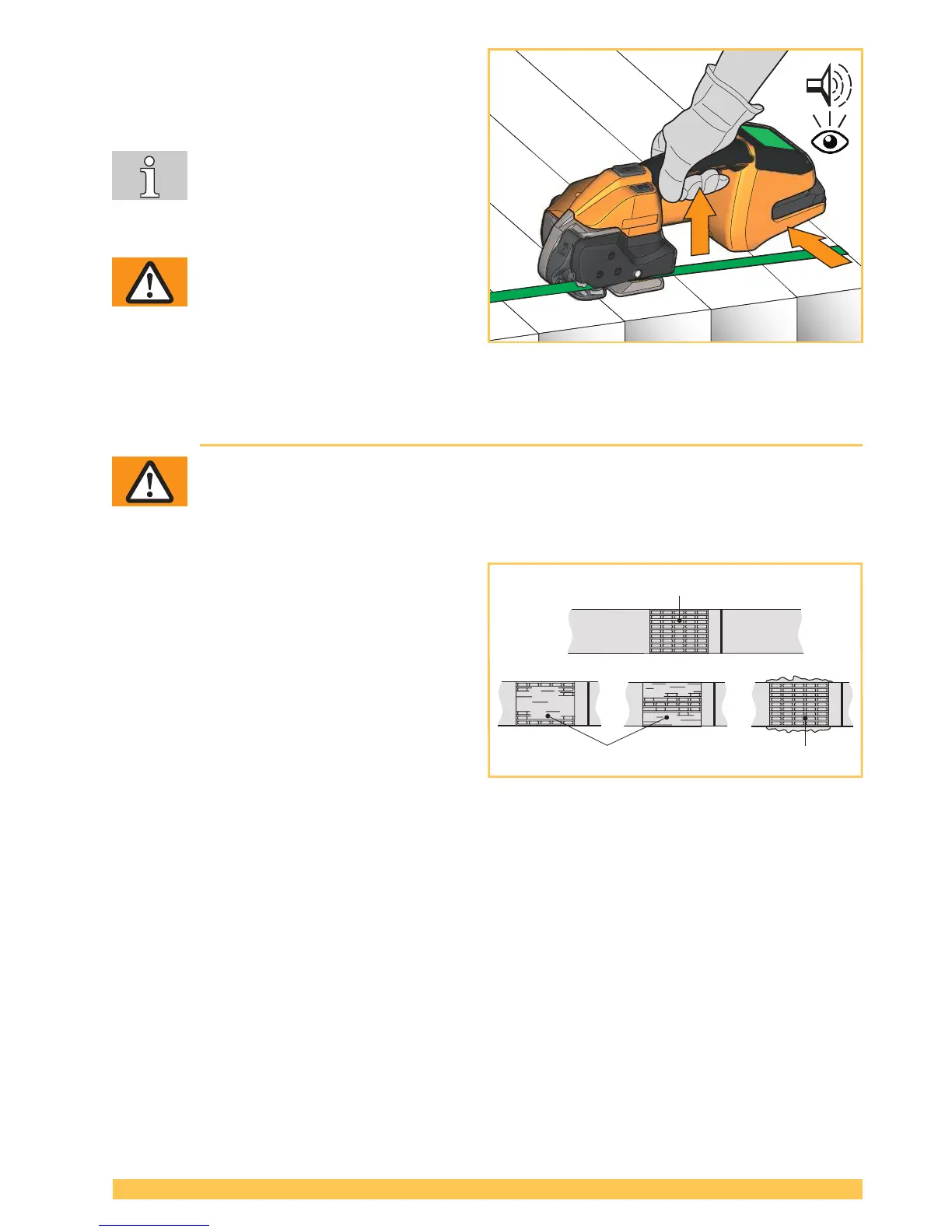
► After the display turns green and an acoustic
signal sounds the cooling time is ended. Lift
rocker lever.
– Rocker of the tensioning device opens.
After lifting the rocker lever, do not
re-tension (do not press the tensioning
button any more).
► Swivel the tool to the right away from the
strapping.
WARNING
If the tool is removed too early the dis-
play turns orange with error code and
an acoustic signal sounds repeatedly
(Section 6.8).
► Carry out a visual sealing inspection (Section 5.2)
5.2 Checking the seal
WARNING
Never transport or move packaged goods with improperly performed strapping /
weld sealing - serious injuries may result.
Perform sealing check after each strapping.
► Perform sealing check by visual inspection.
1 Good seal (the entire sealing area has been
cleanly welded, without excess material being
forced out sideways).
2 Poorly welded seal (weld not over entire
sealing area), welding time too short.
3 Poorly welded seal (excess material has
been forced out sideways), welding time too
long.
In the case of straps with poorly welded seals:
► Check the welding time setting (Section 4.5).
► Strapping with poorly welded seals must be performed again.
► Check strap type (Section 7).
► If good welding is not achieved, the tool must be checked by an authorized service center.



 To Next Page