AD Plus2.0 User Manual
Page 23 of 66
DST:
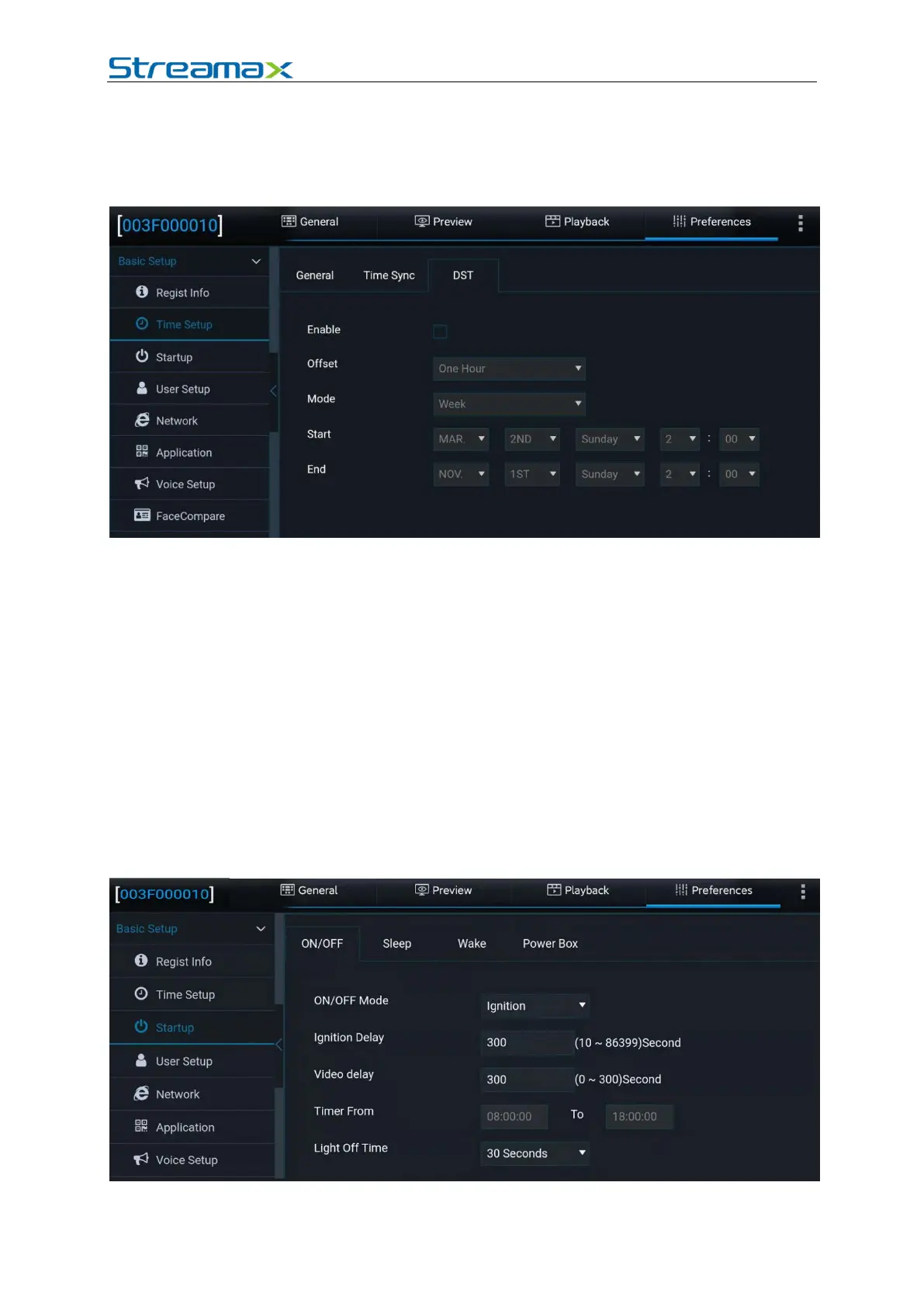
For some regions, you need to set the DST due to the time zone reason. Specifically,
you can set the start & end time, and offset in weeks or days. Tap Preferences >
Basic Setup > Time Setup > DST, as shown in the following figure:
1. Enable: allows you to enable or disable the DST function. It is disabled by
default.
2. Offset: can be set to One Hour or Two Hours.
3. Mode: can be set to Week or Date.
4. Week: allows you to set Start and End of the DST by setting the month, Nth
day of the week, and hour/minute/second.
5. Date: allows you to set Start and End of the DST by setting the date and
hour/minute/second.
2.6.3. ON/OFF
ON/OFF
Tap Preferences > Basic Setup > Time Setup > ON/OFF, as shown in the
following figure:
1. ON/OFF Mode: You can select Ignition (that is, use the car key to turn on the



 To Next Page