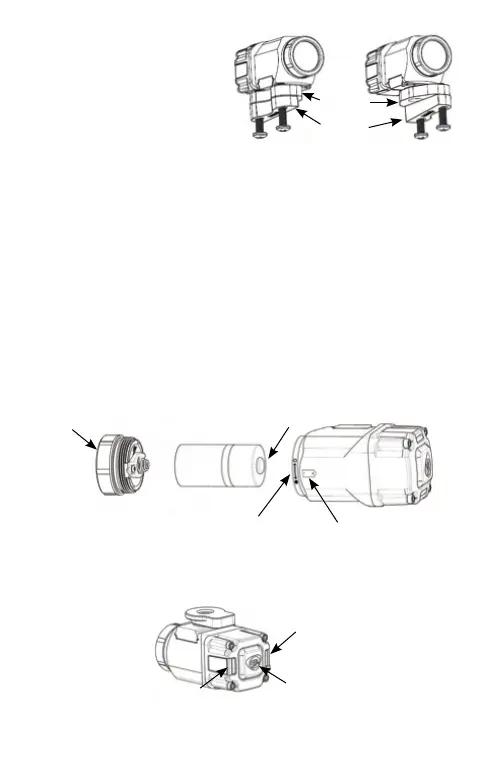
MOUNTING: MSA HELMET
1. This light can be mounted on top of the
brim (either side of the helmet).
2. Remove the chin strap screws, plate,
and two nuts on the top of the helmet brim.
3. Rotate the adapter plate and wedge spacer
such that the arrow is pointing forward and
the thickest end of the wedge spacer is
towards the back. This will maintain a slight
downward aim to illuminate the ground ahead.
4. Slide the clamp assembly over the brim
of the helmet and rotate it to the desired position.
5. Tighten the chin strap screws until the Vantage
®
II
is securely attached to the helmet.
NOTE: For all helmet mounts, it is possible to remove mount assembly from the “dove tail” slot by
unscrewing the small set screw on the dove tail plate. (Hex key not included)
BATTERY INSTALLATION/REMOVAL
At the end of battery life, the unit may appear intermittent or non-functional.
Replacing the battery will restore normal operation.
1. Unscrew and remove the facecap assembly from the body of the Vantage
®
II.
Remove the exhausted battery from the ashlight body.
2. Insert a fresh CR123A battery, positive end rst, into the body of the Vantage
®
II.
Battery polarity is indicated on the side of the Vantage
®
II body.
3. Place the facecap assembly onto the Vantage
®
II body. Fully tighten the facecap assembly
to ensure that the battery makes complete contact with the internal electrical contacts.
4. For “safe” mode, loosen the facecap approximately ¼ turn to the detent. This will disconnect
the battery for safe storage and the light will not operate if the switch is depressed.
SWITCH OPERATION
Press switch button to turn on light in Low mode.
Double tap switch button within 1.5 seconds for High mode.
• NOTE: The Vantage
®
II will not operate if the facecap is in “safe” mode.
TAIL LIGHT ENABLE/DISABLE/FLASH
The Vantage
®
II ships from the factory with tail lights set to steady mode. To change the tail light
TAIL LIGHT
SWITCH
TAIL LIGHT
ADAPTER
PLATE
WEDGE
SPACER
LEFT SIDE
HELMET MOUNT
RIGHT SIDE
HELMET MOUNT
SAFE MODE INDICATOR BATTERY INDICATOR
FACECAP ASSEMBLY
BATTERY PLUS


 To Next Page