EasyManua.ls Logo

STRIKER PLUS Pro - Loading Striker Ink Rolls

STRIKER PLUS Pro
12 pages
Print Icon
To Next Page IconTo Next Page
To Previous Page IconTo Previous Page
Loading...
Copyright © 2015 Cobra Systems, Inc. All rights reserved
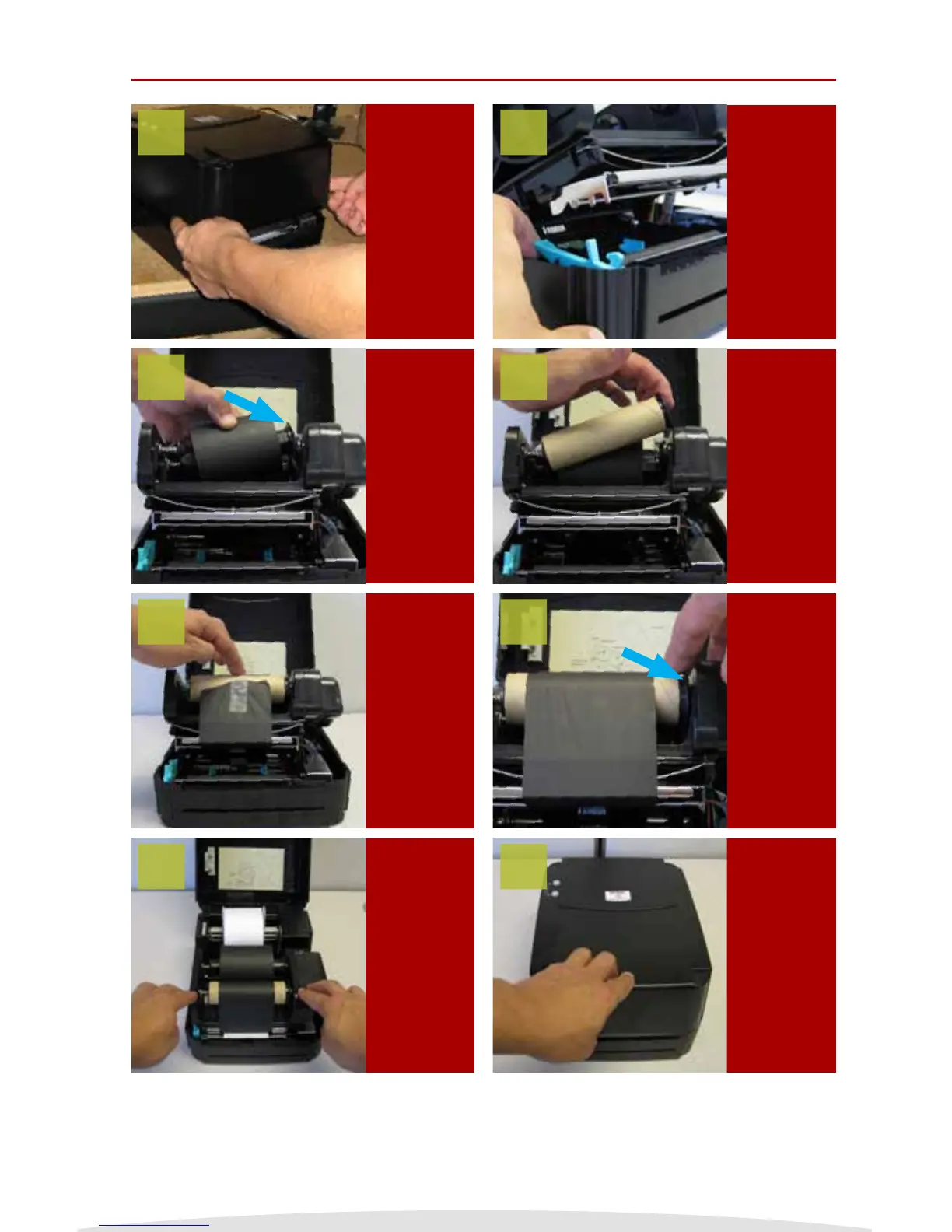
Loading Striker Ink Rolls
TURN OFF
Striker
system and
open the
printer cover
Release the
ink carriage
lever by
gently
pressing up
on the lever
Load the
take up
ink core
spindle and
make sure
the larger
circular ends
are on the
right
Make sure
ink spindles
are as
shown,
note larger
circular end
on the right
side
End result,
close the ink
roll access
cover
Load rear ink
spindle with
the unused
portion of
the ink roll
Ink goes
overhand
from the
back roll,
under print
element and
taped to
front take up
ink spindle
Wind the
front ink
spindle to
take up
the slack,
make sure
there are no
wrinkles in
the ink
1
3
5
7
2
4
6
8
NOTE: Always have the Striker System cover closed when powering it on.
3