EasyManua.ls Logo

STRIKER PLUS Pro - Loading Striker Labels

STRIKER PLUS Pro
12 pages
Print Icon
To Next Page IconTo Next Page
To Previous Page IconTo Previous Page
Loading...
Copyright © 2015 Cobra Systems, Inc. All rights reserved
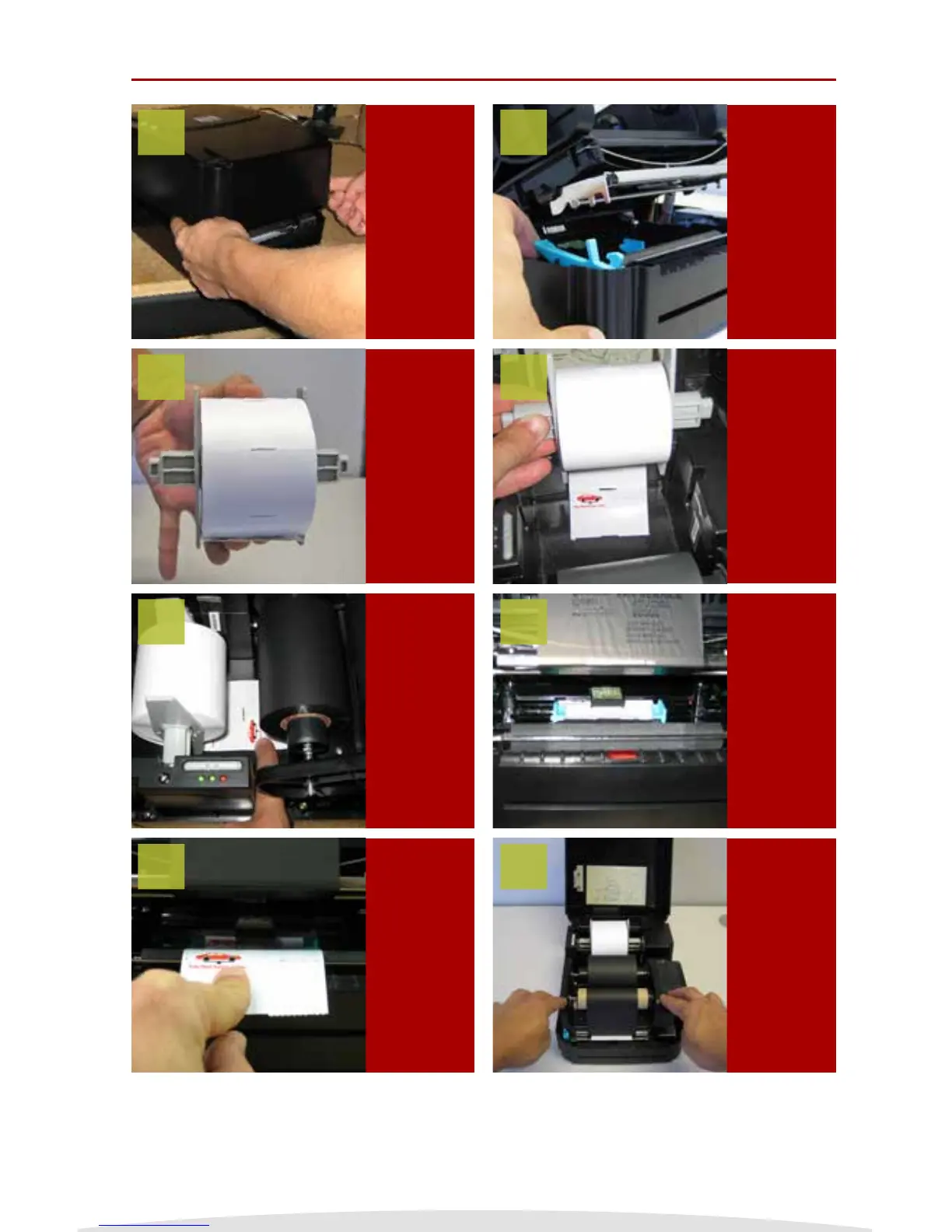
Loading Striker Labels
TURN OFF
Striker
system and
open the
printer cover
Release the
ink carriage
lever by
gently
pressing up
on the lever
Place the
label spindle
with Striker
Stickers
inside the
label spindle
slots in
the printer
system
Make sure
the green
chip is above
the label
and the
adjustable
green guides
are centered
Close ink
clamp and
the printer
clam shell
and start
printing
Load the
Striker
Reminder
Stickers as
shown left,
make sure
the guides
are centered
Push the
sticker below
the ink and
beneath a
green chip
Pull the
sticker so a
some of the
label hangs
out of the
printer
1
3
5
7
2
4
6
8
NOTE: Always have the Striker System cover closed when powering it on.
4