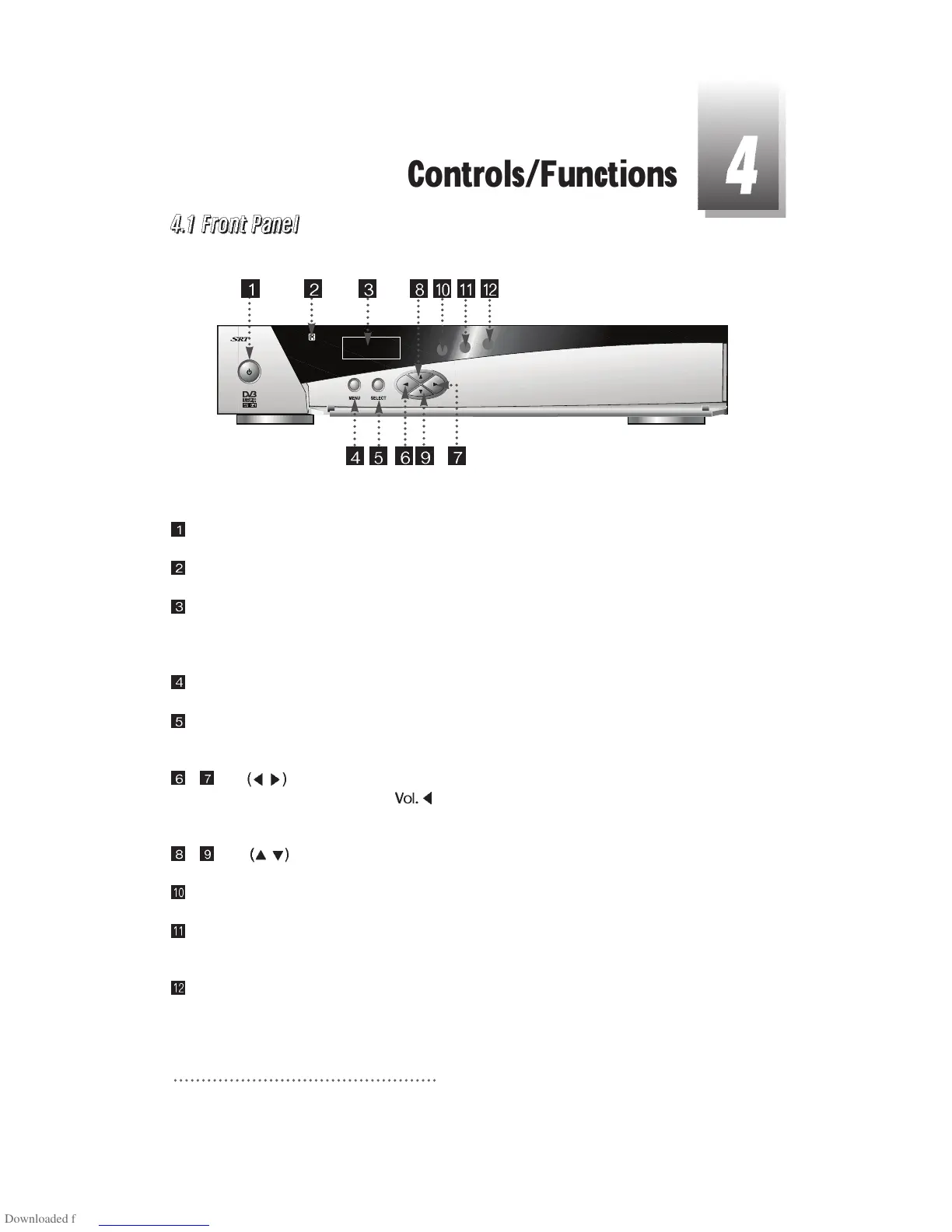
Power : To switch the receiver in “standby” mode or in power on mode.
Remote Sensor : Receives the infrared signal from remote control.
Channel Display(4 Digit)
- When you connect the power line of the receiver, the current time is displayed.
- After programming, the program number is displayed.
Menu : To launch or terminate the menu application.
Select : To activate a highlighted item or go to next level on hypertext menu or confirm the user’s
action.
- Vol.
/ : To adjust the volume level or change the value of an item with preprogrammed
values. The Key
can be used as a backspace to cancel the numerical
input.
- CH.
/ : To change channel or cursor position on the application screen.
Remote Control indication light : Flashes orange when receiving data from remote control.
TV/Sat. mode Indication lamp light : Turn on green while receiving the signals from terrestrial
UHF/VHF antenna.
Standby/Power on Indication light : Turn on red while in the “standby” mode and turn off the red
light while in the power on mode.
6



 To Next Page