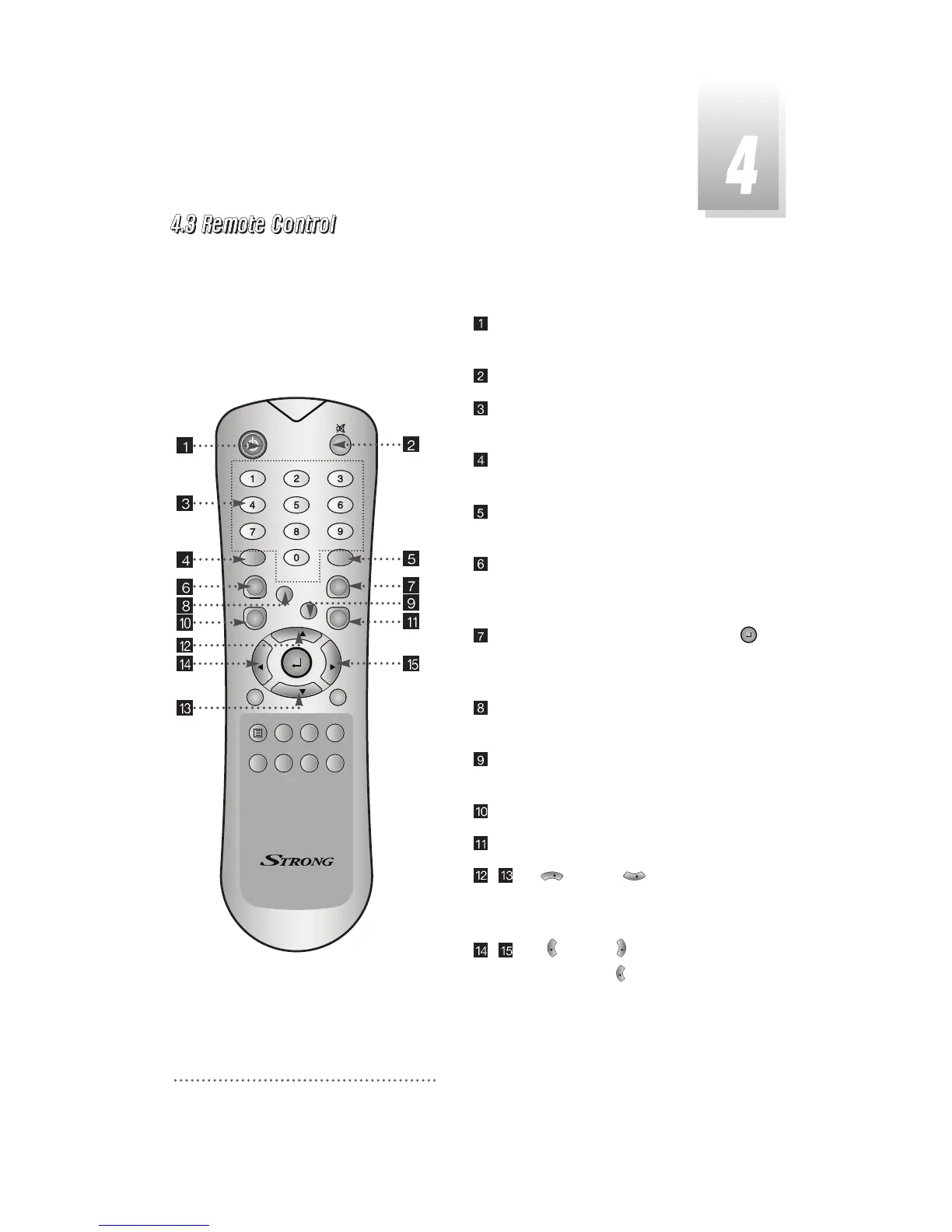
8
POWER
:
To switch into ‘standby’ or ‘power on’
mode.
MUTE
:
To turn the sound on/off.
Numeric Keys(0-9)
:
To select channels and
input of channel numbers or characters.
INFO.
:
To display the information of the current
channel.
AUDIO
:
To change the audio track, stereo-
mono mode.
GUIDE
:
(EPG : Electronic Program Guide)
To watch program information. Press once
more to return to normal mode.
CH LIST
:
To watch the channel list. Press
to confirm or press EXIT to return to previous
chosen channel.
AUX IN
:
To select the output mode of scart
connector.
RECALL
:
To return to the previous chosen
channel.
MENU
:
To enter/exit the main menu.
EXIT
:
To return to previous status or menu.
- Up & Down : To change the
value of a selected item with preprogrammed
values in menu.
- Left & Right : To move the cursor up
and down in menu. can be used as a
backspace to cancel the numerical input.



 To Next Page