Need help?
Do you have a question about the Strymon BigSky and is the answer not in the manual?
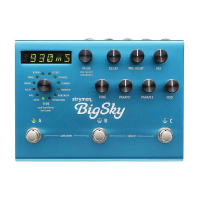
Controls fine adjustment of Decay time, scrolls presets, accesses menus.
Controls the decay time of the reverberated signal.
Adjusts time between dry signal and reverb onset.
Controls balance of dry and wet signals.
Selects desired reverb machine and toggles display.
Adjusts high-end content of reverb.
Adds modulation to the reverberated signal.
Assignable parameters for the current reverb machine.
Engage/bypass presets, infinite sustain/freeze, bank selection.
High impedance inputs, use LEFT for mono.
Use LEFT output for mono.
Connect an expression pedal or footswitch.
MIDI input/output supporting CCs and program changes.
Specifies power requirements and polarity.
Step-by-step guide to assigning parameters to knobs.
Connect external TAP switch for remote control.
Connect expression pedal for continuous control over knobs.
Connect MultiSwitch for tap, bank, or preset selection.
Instructions on how to save presets to current or new locations.
Procedure to reset the device to factory defaults.
Adjusts +/- 3dB for level matching or effect.
Enables reverb trails when bypassed.
Sets press-and-hold function for infinite sustain or freeze.
Enables or disables expression pedal input.
Configures which knobs are controlled by the expression pedal.
Changes bypass mode between True Bypass and Buffered Bypass.
Sets the MIDI Channel for communication.
 General
| Current Draw | 300mA |
|---|---|
| Type | Reverb |
| Inputs | 2 x 1/4" (L/Mono, R) |
| Outputs | 2 x 1/4" (L/Mono, R) |
| Power Supply | 9V DC |
| Presets | 300 |
| Algorithms | 12 |
| MIDI | Yes (via 1/4" TRS or 5-pin DIN) |

 To Next Page