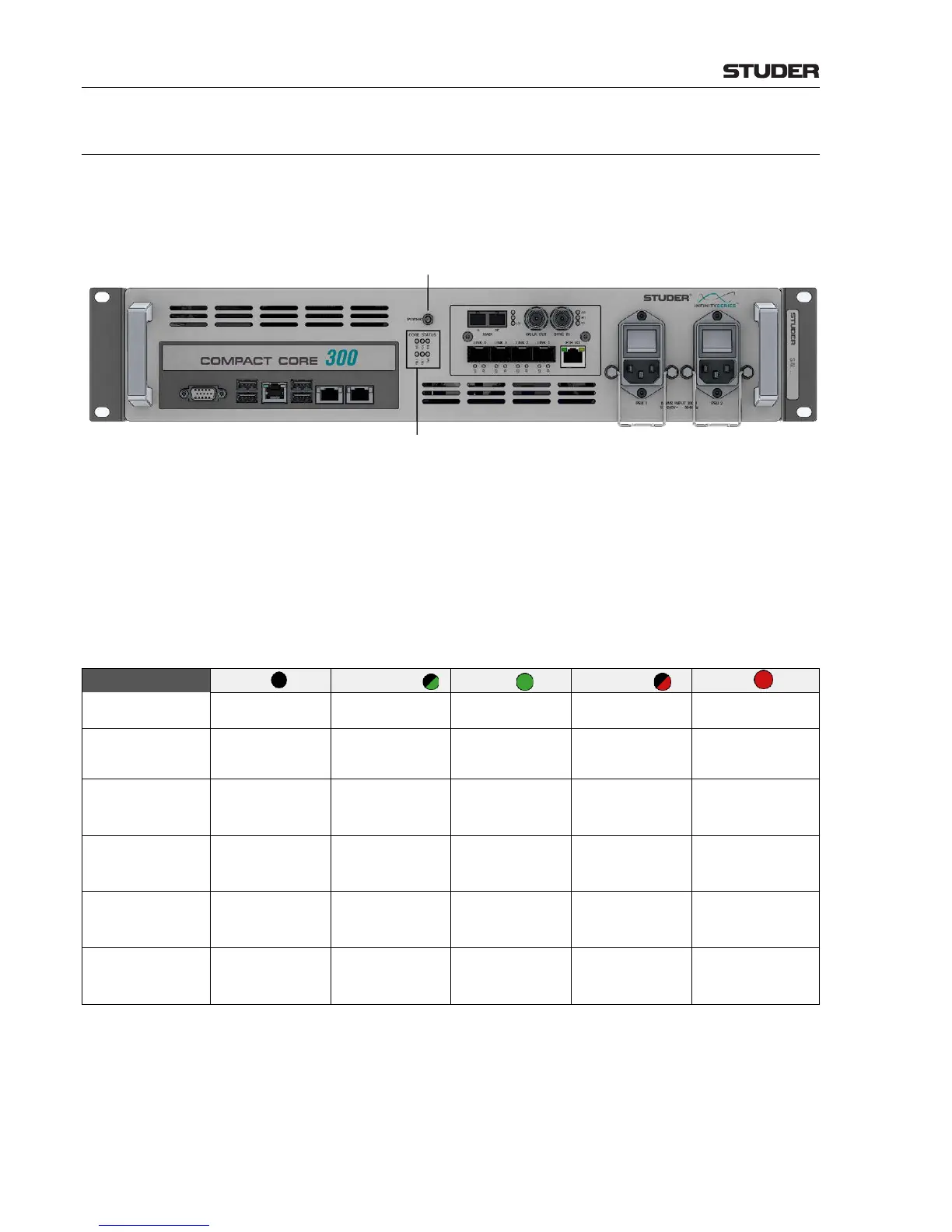
2.2 Hardware
The mainboard within the Compact Infinity Core is a high-end, standard form
factor industrial server mainboard with an Intel chip-set. It is fitted with up to
two Intel® Xeon® CPUs and one STUDER PCIe I/O card (Core Link Card).
Dual power supplies are fitted, with two separate AC inlets.
Power On/Off Switch The Power On/Off Switch is also located on the front panel of the unit.
To turn the system on, simply switch on the AC power by the switches above
the AC inlets and the core will start up. If the AC is already connected then
press the Power On/Off button to start up the core. To power down the core
simply press the Power On/Off button, the system will shut down (this may
take a few seconds).
Status LEDs The Status LEDs display the following information about the status of the
Compact Infinity Core :
I/O Link
Power off Power up Core Link Card OK Core Link Fan fail Core Link Card error
System
Power off
Waiting for
configuration
DSP Processing OK Sync Loss
DSP or Hardware
error
Active
Power off or Slave
DSP Processing
Offline Master DSP
Processing
Master DSP
Processing
- -
PSU 1
Power off - PSU 1 OK - PSU 1 power missing
PSU 2
Power off - PSU 2 OK - PSU 2 power missing
FAN
Power off - ALL FAN OK -
One or more FAN unit
failed



 To Next Page