Vista 5 M2 Digital Mixing System
TFT Meters 3
Date printed: 09.06.11
SW V4.5
Meterbridge Installation (Option)
Please Note This option can only be used for Vista 5 M2 consoles, i.e. with SW versions
4.5.03 and up. If your console should not be a Vista 5 M2, it has to be electri-
cally upgraded to M2 before, please contact your distributor.
Contents of the Kit • Meterbridge(32or42faderversion,dependingonyourconsole)
• 6screwsM4
• 2Cat5linkcables(30cm/1m)
• DVIcable(1.8m)
• Power-onlinkcableDB9(0.5m)
• Thisinstallationinstructionsheet
Required Tools • 2.5mmAllenkey
• 3mmAllenkey
Mechanical
Important
For attaching the meterbridge to the console, you will need the assistance of
one or, even better, two additional person(s). Ask them to proceed with care
in order not to damage any surface or screen.
Switchtheconsoleoffandplaceitinsuchawaythatitsrearsidecaneasily
beaccessed.
Removeanycablingfromtheconsole’srearsidethatmightgetinyourway
during installation.
DisconnectandremovetheGCscreenfromtheconsole.Usea3mmAllen
key.Thisscreenwillnomorebeusedsinceoneofthemeterbridgescreens
isprovidedforthispurpose.
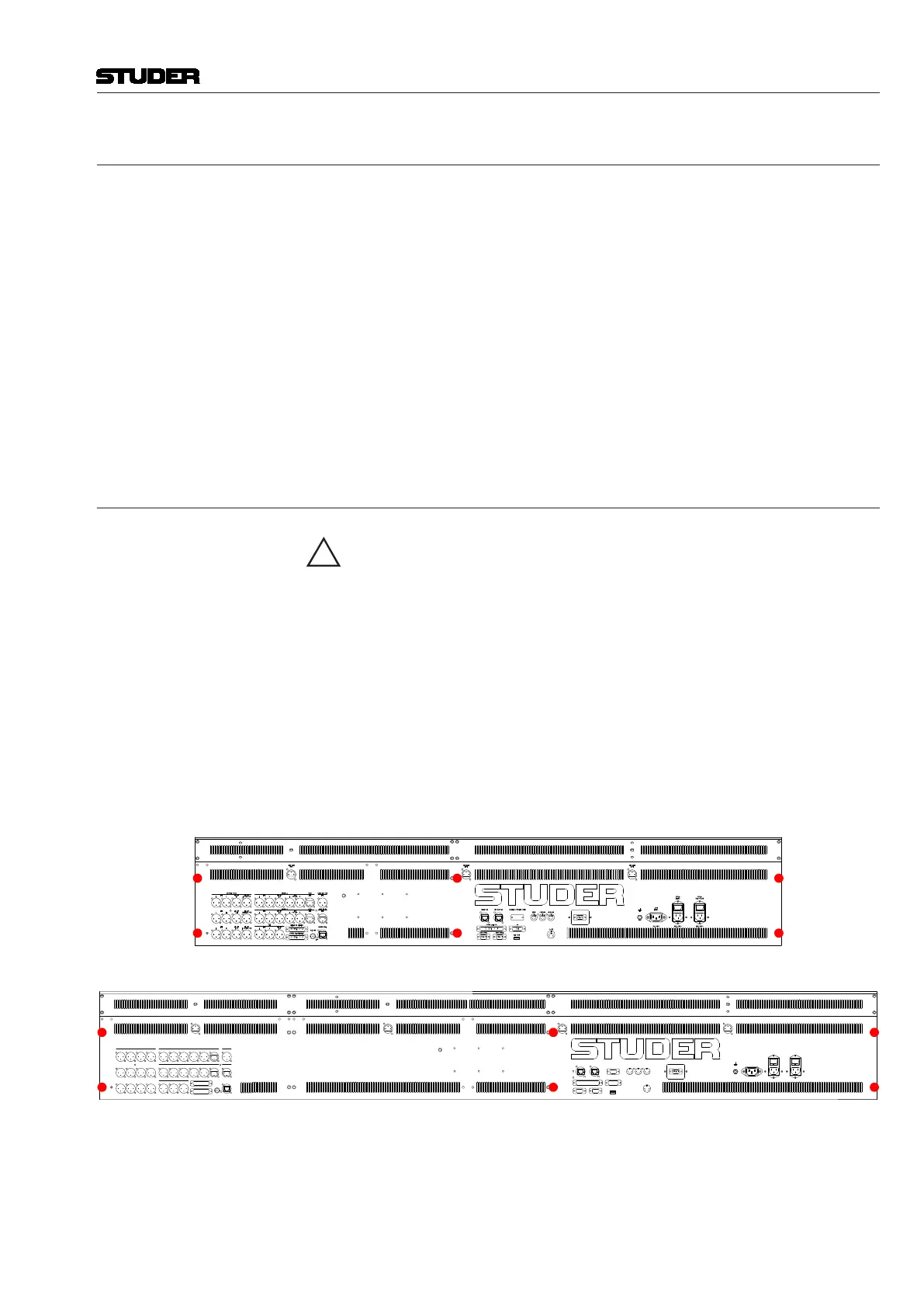
Removethe6countersunk-headscrewsattherearoftheconsole,markedin
redinthepicturebelow.Usea2.5mmAllenkey.Thesescrewswillnomore
beused.
32-fader console:
42-fader console:
VGA
SECONDARY LANPRIMARY LAN GRAPHICAL CONTROLLER SCREEN
VGA
DVI
CUSTOM PANEL GPIO
COM1 (RS422) COM2 (RS422)
DATA (USB)
12/24V
DIN
MIDI IN MIDI OUT 1 MIDI OUT 2
OUT
(MAIN)
POWER
(MAIN)
POWER
(REDUNDANT)
100-240V~ 100-240V~ 100-240V~
(12V)
DESK LIGHT
(12V)
DESK LIGHT
(12V)
DESK LIGHT
LINE
CONTROL ROOM STUDIO A DESK MIC OUT
PROD TB INSTUDIO B
PFL
L R
LINE
L R
LINE
L R
LINE
L R
AES/EBU
L/R
AES/EBU
L/R
AES/EBU
L/R
AES/EBU AES/EBU
L/R (DIR OUT)
AES/EBU
C/LFE (DIR OUT)
AES/EBU
C/LFELFEC
LS RS
AES/EBU
LS/RS
AES/EBU
LS/RS (DIR OUT)
L R
LINE LINE
L R
LINE LINE
LINE
LINE
LINE
(DIR OUT)
LINE
(DIR OUT)
MONITOR INSERT (AES/EBU)
GENERIC I/O (AES/EBU)
MADI (TO CORE)
WCLK OUT
LOCK
TB IN
TB IN
L/R
(12V)
DESK LIGHT
f
DVI
D9p/f D9p/f
MIDIMIDIMIDI
D 37p / f
D 25p / f
D 25p / f
Withyourassistant(s),setupthemeterbridgeattheconsole’srearside.Pro-
visionallyfixitattheextremeleftandrightwithoneofthenewscrewseach
intheupperofthetwoholes.Usea3mmAllenkey.Donottightenthese
screwscompletely.Theninserttheremainingnewscrewsandtightenthem
all.



 To Next Page