EasyManua.ls Logo

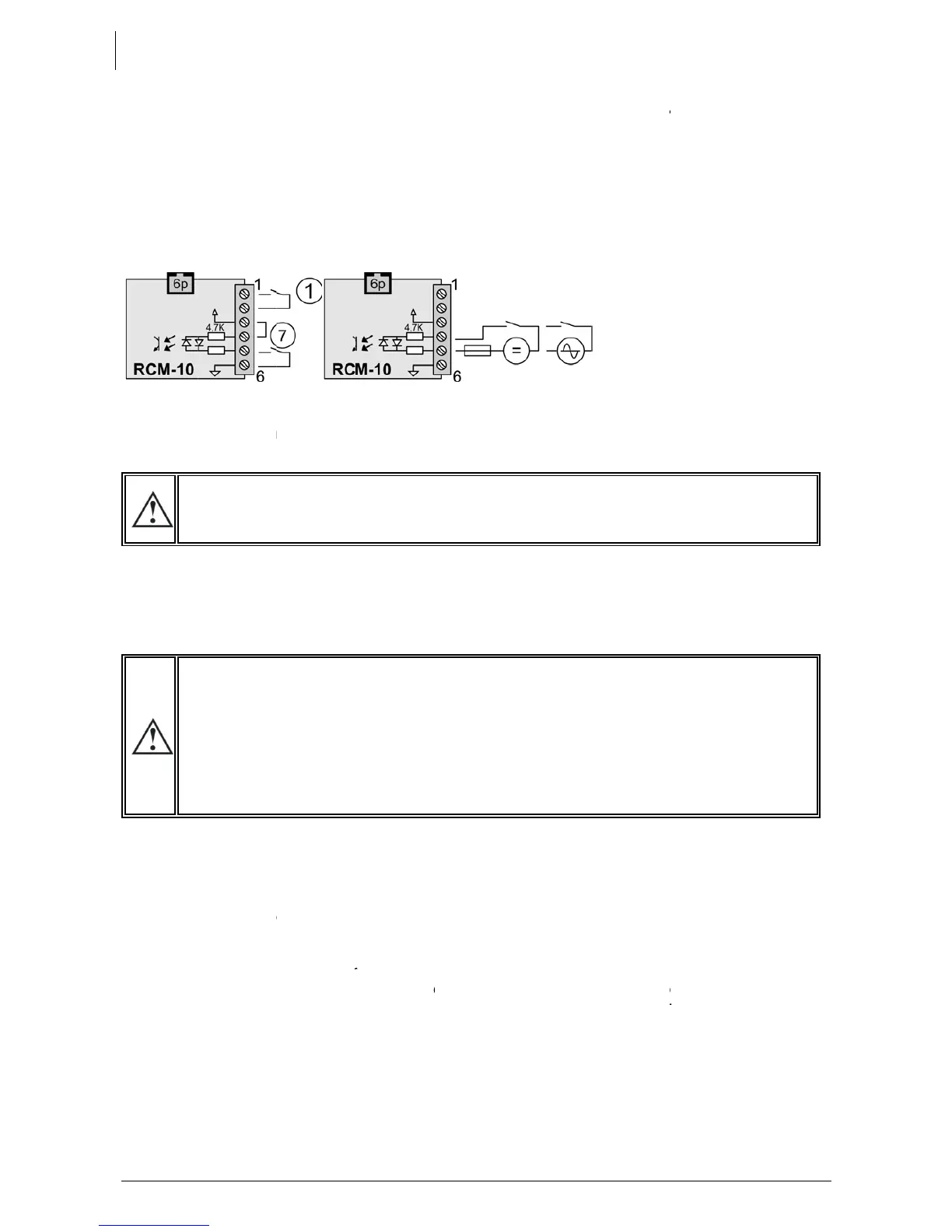
Studer XTH 3000-12 - Connecting the Remote Command Module RCM10 (XTM Only); 5 Powering up the Installation

Studer XTH 3000-12
49 pages
Print Icon
To Next Page IconTo Next Page
To Previous Page IconTo Previous Page
Loading...
S
TUDER
Xtender
18
4.5.11
C
o
The remot
e
stopping t
h
terminals 1
7.1 p. 30. T
e
6.1.12 p.2
6
and 4, or
b
5 PO
W
It
i
sc
th
e
The Power
carried ou
t
Conne
A
e
x
If
p
o
m
e
all
Xt
e
p
o
Puttin
g
The Xtend
e
when the
configurat
Conne
Activate t
h
indicator “
Activa
t
If an AC s
o
input, the
consumer
s
Your instal
system, it i
s
02/03 rem
o
Innotec
o
nnectin
e
comman
d
h
e operati
o
and 2. W
h
e
rminals 4 t
6
. It can be
b
y a voltag
e
W
ERIN
G
i
s imperati
v
rewed tigh
t
e
interior of
up of the
X
t
in the rev
e
cting the b
too high
o
x
ample, inst
a
the Xtend
e
o
larity of th
e
e
lt and will
the conn
e
e
nder pro
v
o
larity, it will
g
the Xtend
e
e
r is suppli
e
battery is
ion {1111}
a
cting the c
o
h
e output
p
AC out” (4
6
t
ing the inp
o
urce (gen
device a
u
s
at the out
p
lation is n
o
s
recomme
n
o
te control.
g the re
m
d
module
R
o
n of the sy
h
en this co
n
o 6 of mod
u
controlled
e
AC or DC
.
G
UP TH
E
v
e that the
t
before th
the conne
c
X
tender m
u
e
rse order.
attery
o
r inappro
p
a
lling a 24
V
e
r has bee
e
battery) it
have to b
e
e
ctions to t
h
v
es not to
w
have to b
e
e
r(s) in ope
r
e
d and is re
a
powered
u
a
ctivated.
o
nsumers a
p
rotection
d
6
) lights up
o
ut circuit b
r
erator or e
l
u
tomaticall
y
p
ut are the
r
o
w in oper
a
n
ded to c
a
Please ref
e
m
ote co
m
R
CM10 can
stem. A co
n
n
tact and
c
u
le RCM-10
by a dry
c
.
of max 60
E
INSTA
L
closing ca
p
e installati
o
c
tion com
p
u
st be carri
e
p
riate batt
e
V
battery in
n connect
is highly lik
e
e
replaced.
h
e Xtender
w
ork corre
c
e
returned t
o
r
ation using
a
dy for op
e
u
p, the m
a
t the outpu
d
evice (F) if
o
r flashes (i
n
r
eaker(s) (H
)
l
ectrical gri
d
y
goes int
o
r
efore supp
a
tion. If pa
r
a
rry this out
i
e
r to the op
e
V.3.1.0
m
mand
m
be “hot pl
u
n
tact free
o
c
losed, the
are used
a
c
ontact (7)
V eff. acro
s
L
LATIO
N
p
for the c
o
o
n is energi
s
p
artment.
e
d out in th
e
e
ry voltage
the Xtend
e
ed the wr
o
e
ly that the
If such is t
h
including t
h
c
tly after r
e
o
your distri
the main
O
e
ration. If y
o
a
in switch
t
existing, a
n
n
the event
)
d
) valid in
f
o
transfer
a
lied directl
y
r
ticular co
n
i
mmediatel
e
rating inst
r
m
odule R
u
gged” on
o
f potential
apparatus
a
s comman
d
between
5
s
s pin 4 an
d
N
o
nnection
c
s
ed. There
e
order giv
e
may serio
u
e
r 3000-12.
o
ng way
a
protection
h
e case, it
w
h
e battery.
e
connectin
g
butor for re
p
O
N/OFF swit
o
u require i
(1) must b
e
n
d/or press
of an abs
e
f
requency
a
a
nd will st
a
y
by the po
w
n
figuration
o
y. Adjustm
e
r
uctions for
CM10 (X
T
connector
(1) can b
e
is stopped
d
entry as
d
5
and 6 wit
h
d
5
c
ompartm
e
are dange
e
n below.
A
u
sly dama
g
a
round by
fuse on th
e
w
ill be nec
e
If, after re
p
g
the batt
e
p
air.
ch (1)
mmediate
e
in the “
O
the ON/OF
e
nce of con
a
nd voltag
e
a
rt to cha
r
w
er source
o
r adjustm
e
e
nts must b
e
this access
o
U
T
M only)
“RCM-10”
(
e
connecte
as describ
e
d
escribed i
n
h
a bridge
e
nt be inst
a
rous volta
g
A
ny Power
o
g
e the Xte
n
accident (
e
battery c
a
e
ssary to di
s
p
lacing the
e
ry with th
e
start-up of
t
O
N” positi
o
F button (4
sumers).
e is presen
t
r
ge the b
a
present at
t
e
nt is requ
i
e
made wi
t
o
ry.
U
ser manua
l
(
15) withou
t
d betwee
n
e
d in Chap
.
n
the chap
.
between
3
a
lled and
g
es within
o
ff must b
e
n
der. For
incorrect
a
ble may
s
connect
fuse, the
e
correct
t
he inverte
r
o
n and th
e
1). The ligh
t
t
at the A
C
tteries. Th
e
t
he input.
i
red by th
e
t
h the RCC
-
l
t
n
.
.
3
e
r
e
t
C
e
e
-

Table of Contents