5
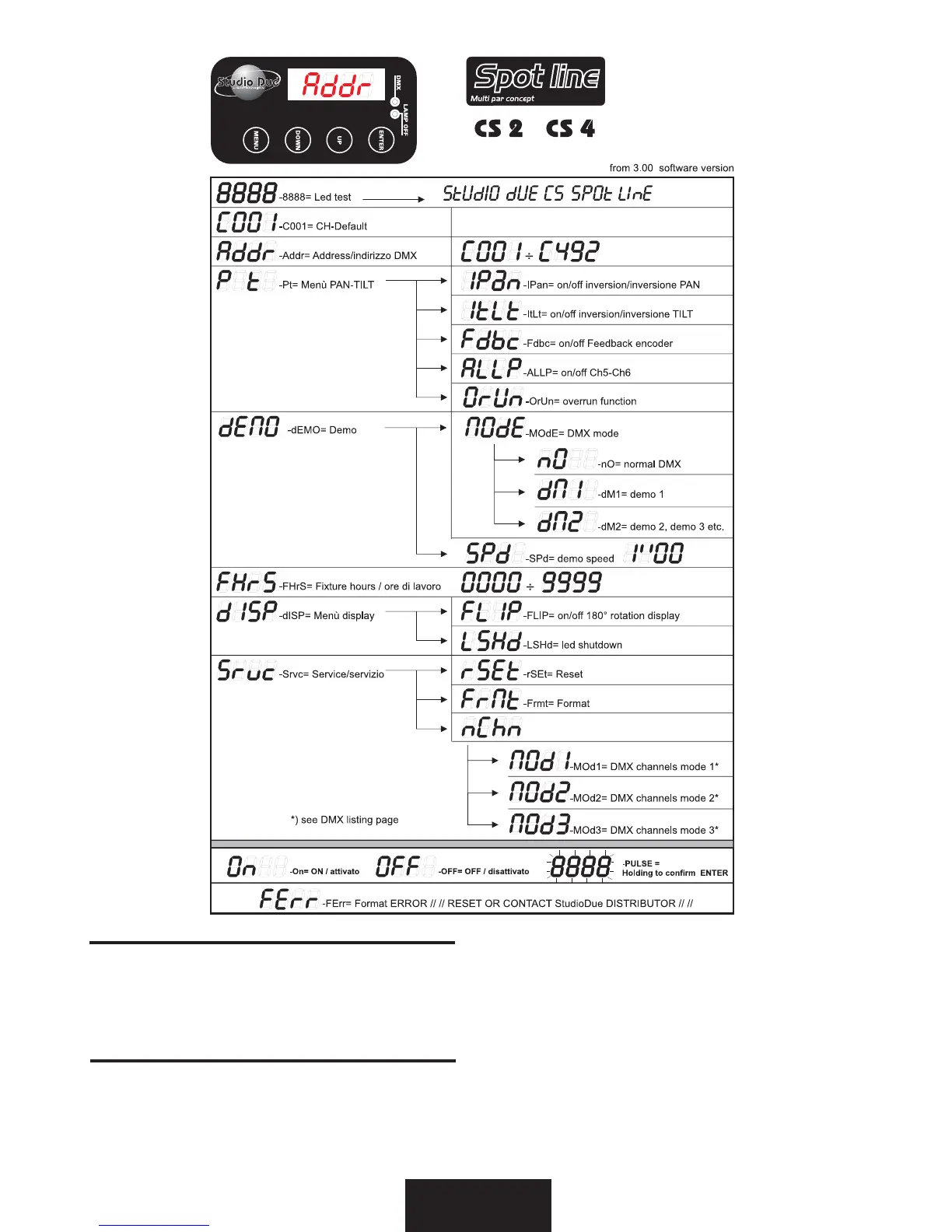
When the fixture is switched on will be present, for few seconds, the writing "STUDIO DUE CS SPOT LINE" (from 3.00 software-
version only), than all the motors and the displays start a reset and then position themselves in the deafult settings: now you can
start the set-up of the fixture through the electronic panel with 4 keys “MENU-DOWN-UP-ENTER”, then choose the best setting
following the schematics given above.
IMPORTANT. The display will flash after each modification: press and holding ENTER to confirm the change you have chosen
All'accensione dell'apparecchio sarà presente per pochi secondi la scritta "STUDIO DUE CS SPOT LINE" (solo dalla versione del
software 3.00), poi tutti i motori ed i display faranno un ciclo di reset per poi posizionarsi nella configurazione di default, a questo
punto si potrà effettuare il set-up dell'apparecchio a mezzo del pannello elettronico provvisto di 4 tasti "MENU'-DOWN-UP-ENTER,
quindi scegliere la migliore configurazione seguendo lo schema sopra riportato.
IMPORTANTE. Dopo ogni modifica il display lampeggerà, per confermare il cambiamento richiesto sarà necessario premere e tenere
premuto ENTER.
eng
ita



 To Next Page