Thank you for choosing Studio Evolution solutions.
Follow the steps below to wire up your EVOBOX.
You have become the proud owner of the EVOBOX karaoke system.
Let's start!
Quick connection
Congratulations!
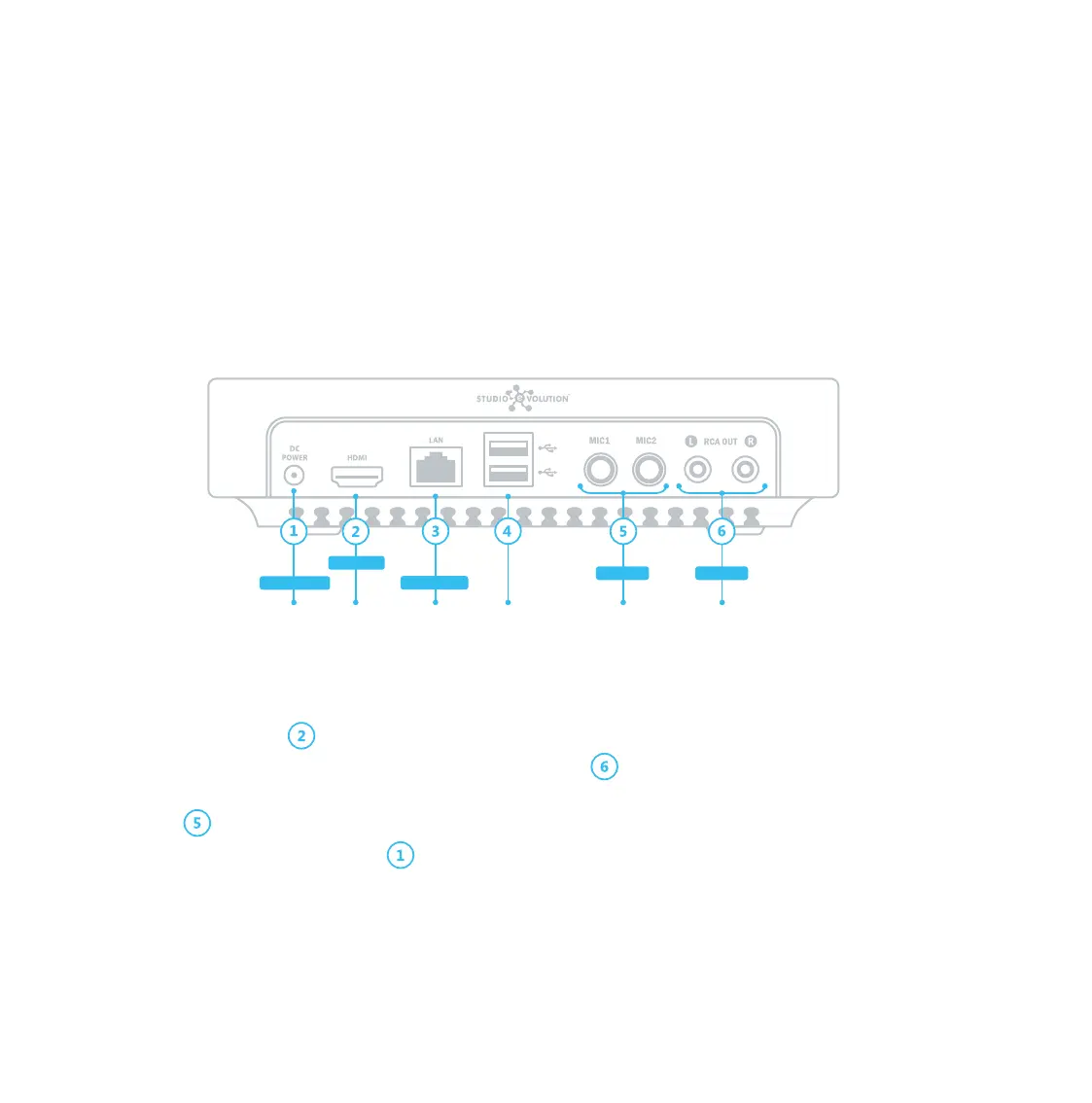
1. Connect one end of the HDMI cable to the HDMI port on your TV. Connect the other end of the HDMI cable to
the EVOBOX HDMI port .
2. Use the RCA cable to connect EVOBOX to the audio system .
3. Use TRS cables to connect wired microphones or a wireless microphone receiver to the appropriate Mic1 and
Mic2 inputs .
4. Connect EVOBOX to a power outlet .
5. Turn on the TV and select the HDMI input to which your karaoke system is connected.
6. Follow the on-screen instructions to connect the remote control, select a language, time zone, and configure
Internet connection.
WARNING! Failure to follow these instructions can result in a fire, electric shock, personal injury, or equipment damage.
Power outlet TV Internet USB drive Microphones Audio system
AC/DC Adapter
Network cable
TRS cables RCA cable
HDMI cable


 To Next Page