The Studiomaster AC3611/AC4811 is a Digital Audio Processor designed for professional audio applications, offering extensive control and processing capabilities for both input and output signals.
Function Description
The core of the AC3611/AC4811 is a 32-bit DSP SHARC processor with a 96kHz sampling rate and 24-bit AD/DA conversion. This robust processing engine allows for precise manipulation of audio signals.
Input Processing:
Each input channel features a comprehensive suite of processing tools:
- High-cut and Low-cut filters: For precise frequency range definition.
- 5-band Parametric EQ (PEQ): With adjustable frequency, gain, and bandwidth. Users can select various filter styles including PEAK, H-SHELF, L-SHELF, Low cut, and High cut.
- Noise gate: To eliminate unwanted background noise.
- Gain control: For level adjustment.
- Mute: For silencing channels.
- Phase adjustment: For correcting phase issues.
- Delay: With a maximum delay time of over 680ms.
- Link function: To link parameters across multiple channels.
Output Processing:
Output channels are equally well-equipped with:
- Crossover: For managing frequency distribution to different loudspeakers.
- 7-band Parametric EQ (PEQ): Offering the same adjustable parameters and filter styles as the input PEQ.
- Gain control: For output level adjustment.
- Mute: For silencing output channels.
- Compressor/Limiter: With adjustable threshold, ratio, attack time, and release time for dynamic range control.
- Phase adjustment: For output phase correction.
- Delay: With a maximum delay time of over 680ms.
- Link function: To link parameters across multiple channels.
Matrix Assignment:
A key feature is the flexible matrix assignment, allowing any input to be routed to any output. This provides immense versatility in system configuration. All input and output channel names can be customized for easier identification.
Filter Styles and Slopes:
All High-cut, Low-cut filters, and Distributor units offer multiple filter styles: Butterworth, Linkwitz-Riley, and Bessel. The slope is adjustable from -6dB/Oct to -48dB/Oct, providing fine control over filter characteristics.
Preset Management:
The device supports 30 user presets, allowing users to save and recall device parameters and single preset files separately. A password protection function is available for high-level applications, ensuring settings are secure.
Signal Generator:
An internal signal generator provides Pink Noise, White Noise, and 20-20KHz Sine Wave signals with adjustable amplitude, useful for system testing and calibration.
Connectivity:
The front panel includes level indicators for input/output, a USB port for PC connection, and RS232/485 control ports on the rear panel. One-key online operation simplifies connectivity and control. Up to 250 units can be linked together via ID settings for large-scale systems.
Important Technical Specifications
- Frequency Response: 20Hz~20kHz, +/-0.3dBu
- Dynamic Range: >110 dBu
- Distortion (THD): ≤0.01% at 1kHz (0dBu)
- Cross-talk: >70dBu 20Hz~20kHz
- C.M.R.R: >75dBu 1kHz
- Input Type: Balanced XLR
- Max. Input Level: +15dBu
- Input Impedance: ≥8KΩ
- Output Type: Balanced XLR
- Max. Output Level: +15dBu
- Output Impedance: ≤50Ω
- Digital Processing: 24-bit sigma-delta A/D, D/A convert; 32-bit DSP, 96kHz Sampling Rates
- Display: Dot matrix screen display for current parameters and all settings
- Power Supply: AC~95V-250V 50/60Hz
- Dimension (LxWxH): 48.2 x 20.5 x 4.4 CM
- Weight: 2.3 kg
Usage Features
Front Panel Controls:
- Input Level Indicators: 5-segment high-precision LEDs show the current input channel's level.
- Input Edit Keys: Press to access and edit parameters for relevant input channels, displayed on the LCD.
- Input Mute Keys: Toggle mute status for input channels.
- Parameter Edit Keys: Navigate through system menus, input, and output parameters.
- LCD: Displays all operational parameters and status.
- Parameter Edit Knob: Used for editing menu selections and confirming parameter settings.
- Output Level Indicators: 4-segment high-precision LEDs and 1 compressor signal LED show output level and compressor status.
- Output Mute Keys: Toggle mute status for output channels.
- Output Edit Keys: Press to access and edit parameters for relevant output channels.
- USB Port: For connecting to a PC for remote control.
Rear Panel Controls:
- Power Socket: 95V-240V AC input.
- Power on/off Switch: For device power control.
- RS232/485 Interface: For central control via RS232 and cascade control via RS485.
- Output Interface: Male XLR balanced outputs (1-8).
- Signal Input Interface: Female XLR balanced inputs (A-D).
PC Software Online Specification:
The device can be controlled via PC software provided on an attached CD. The software allows for comprehensive control and visualization of all parameters.
- USB Connection: Connect the processor to a computer via USB. The software automatically detects the device.
- Online Operation: Once connected, the PC software displays "Online" status, enabling full control of the processor.
- Volume Control Interface: Provides visual representation and control over input/output gain, compression, delay, and matrix routing.
- Compressor Interface: Displays compression status, level indicators, and allows setting all compression parameters (threshold, ratio, attack, release, knee).
- Delay Interface: Shows and allows adjustment of delay parameters for all channels in milliseconds, meters, or feet.
- Matrix Interface: Visualizes connections and allows users to assign any input to any output channel. Channel names are revisable.
- Input/Output Interface (PEQ, Filters, Gain, Phase, Mute): Displays PEQ curve graphs, allows adjustment of PEQ points (frequency, gain, Q, type), high/low-cut frequencies and slopes (Butterworth, Bessel, Linkwitz-Riley), and individual control of gain, mute, and phase for each channel.
Remote Control Protocol (RS232/RS485):
The manual details the command structure for external control, including commands for:
- Gain Control (0x41)
- Mute Control (0x42)
- Load Preset Control (0x43)
- Input Volume Control (0x44)
- Output Volume Control (0x45)
- Get Now Gain (0x48)
- Get Now Mute (0x49)
- Get Now Preset (0x4A)
This allows for integration into larger control systems.
Maintenance Features
Safety Instructions:
The manual emphasizes critical safety guidelines:
- Grounding: Proper connection to ground is essential to prevent electric shock. Users are advised not to modify grounding connections themselves and to consult qualified personnel if needed.
- Environment: Avoid using the device in wet locations (bathtubs, sinks, swimming pools) or near liquids. It should be installed in a draughty or dry environment, away from heat sources.
- Power Supply: Ensure the power source matches the device's specifications. The power cord should be compliant with safety certifications and not be damaged or altered.
- Handling: Close supervision is required when children are near the product. Avoid heavy extrusion or stamping on the power cord.
- Troubleshooting: If the product is damaged (power cord, liquid ingress, rain exposure, abnormal operation, dropped), do not attempt repairs yourself. Contact qualified personnel.
- Altitude and Climate: The device is designed for security use below 2000m altitude and in non-tropical climates.
- Internal Access: Do not open the device to avoid electric shock. All repairs should be entrusted to professional staff.
Accessories:
The product comes with:
- CD (including PC software and user's manual)
- One USB cord
- One electrical cord
The Studiomaster AC3611/AC4811 is a powerful and versatile digital audio processor, offering extensive control, high-quality processing, and robust connectivity for various professional audio environments.

 Need help?
 General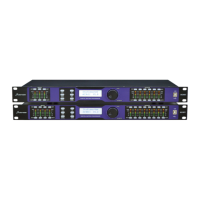

 To Next Page