10
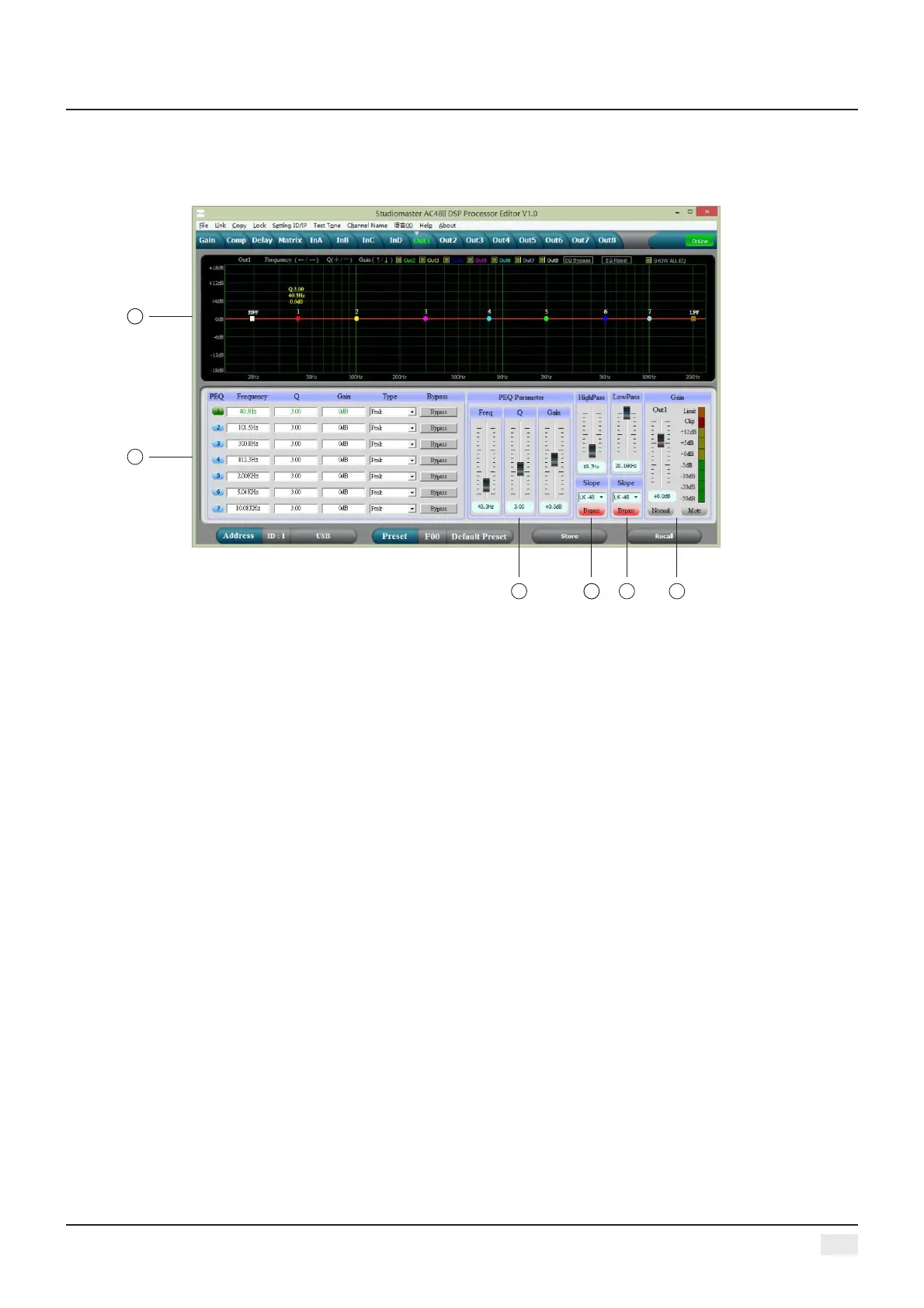
THE SIXTH: OUTPUT INTERFACE
1, Display the current channel PEQ curve graph, can change each PEQ point frequency and gain
through the mouse, and also can change the high/low cut frequency point.
2, Adjustable Gain, Mute, Q , Frequency, Type of all PEQ, Bypass key is optional, we can choose PEQ
style: Balance, High-shelf, Low-shelf, High-cut, Low-cut.
3, The Gain, Q, Frequency of PEQ can be adjusted by putter, and can be controlled by pressing the
UP, DOWN, LEFT, RIGHT key on the keyboard.
4, Low-cut frequency 20HZ-20KHZ is adjustable, you can choose slope rate: Butterworth, Bessel,
Linkwitz-Riley, the scale is:-6dB-- -48dB
5, High-cut frequency 20HZ-20KHZ is adjustable, you can choose slope rate : Butterworth, Bessel,
Linkwitz-Riley, the scale is:-6dB-- -48dB.
6, The Gain, Mute, Phase of the output channel can control separately, as same as the level display
light.
1
2
4
3
5
6
Digital Audio Processor


 To Next Page