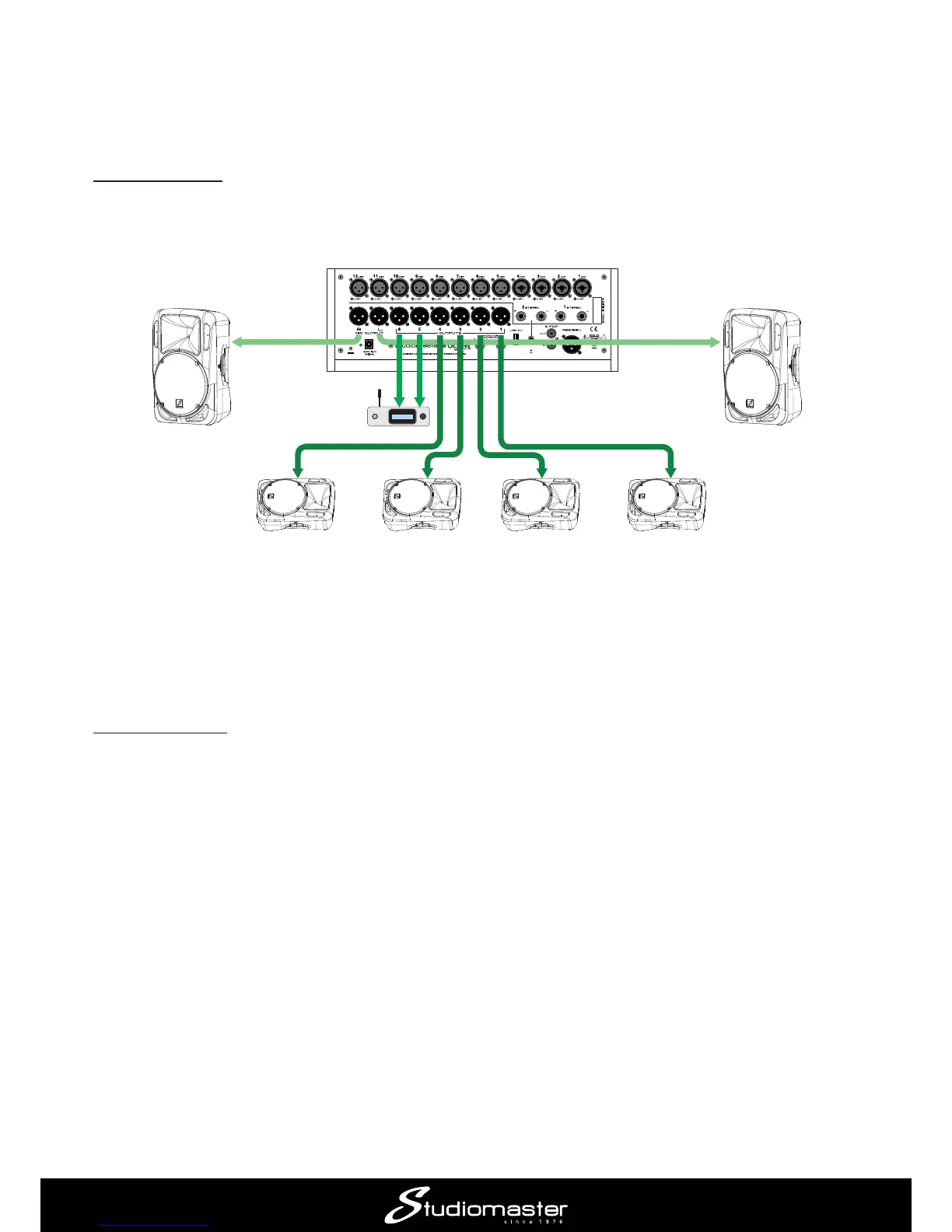
Application Example 4 – using digiLiVE as a dedicated monitor console
digiLiVE may also be used as a dedicated monitor console if the band has a separate FOH mixer
or is using the house PA system.
Connecting up
OUTPUTS 1 to 6 and MIX OUTPUTS L & R
use as monitor feeds. Therefore you can create up eight mono or four stereo monitor mixes, or a
combination of the two.
IEM
TRANSMITTER
(STEREO)
POWERED
MONITOR
3
POWERED
MONITOR
4
POWERED
MONITOR
2
POWERED
MONITOR
1
SIDE FILL SIDE FILL
FREQ
POWERED
MONITOR
4
In the example shown, we are using four powered wedge monitors are at the front of the stage,
monitors to OUTPUTS 1 to 4, the IEM transmitter to OUTPUTS 5 and 6MIX
OUTPUTS L and R.
Making the mix
digiLiVE’s faders have a fourth “layer” or mode – SENDS
input channel by pressing its SELECT button. Selecting SENDSMUTE
buttons; the screen display remains unchanged.














 To Next Page