31 © STULZ USA – all rights reserved 11.8.22
CYBERWALL™ INSTALLATION, OPERATION AND MAINTENANCE MANUAL
1 All electrical connections should be checked to ensure they are tight and properly made.
2. Check all circuit breakers, contacts and wiring. The contactor should be examined and replaced if
contacts are worn or pitted.
Fan/Motor Replacement
To replace a fan or fan motor:
NOTE
Fan/motor replacement requires an overhead lifting apparatus and two technicians. The fan/motor
assembly weighs 240 lbs. (59 kg) each.
1. De-energize unit.
2. Lock Out Tag Out disconnect to prevent re-energizing of unit during maintenance.
NOTE
Remove as many fan screens as necessary to acces the faulty fan.
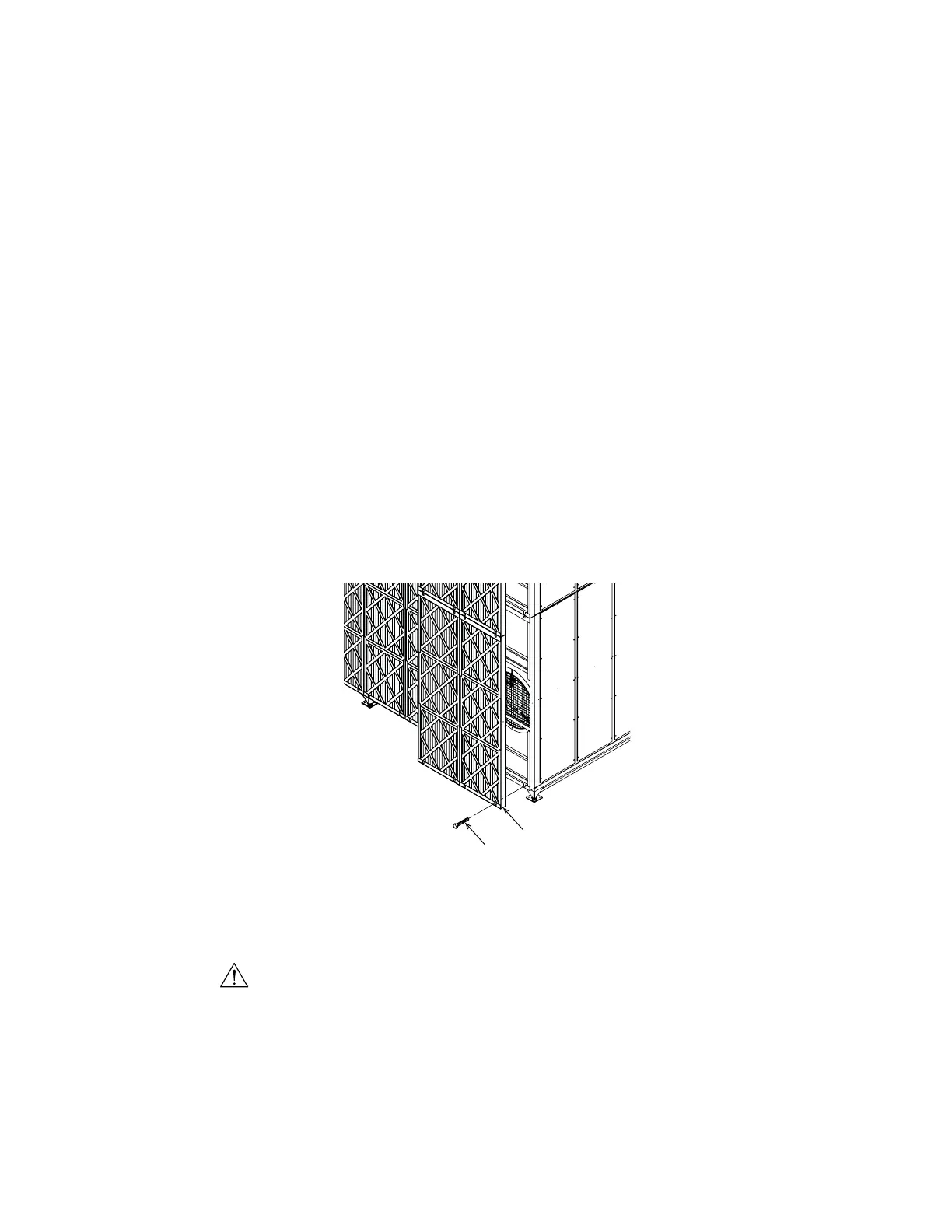
3. Refer to Figure 11. Remove four fan screen M8 hex bolts (1) from each fan screen and remove fan screen
(2) and set aside.
1
2
Figure 11. Fan Screen Removal
4. Confirm wires are de-energize and disconnect wiring from motor at motor electrical box.
CAUTION
Fan assembly is a tip hazard when no longer secured to unit.
5. Refer to Figure 12. Attach chain-fall or hoist from top fan removal eye (3) to motor lifting eyes (4) leaving
some slack in the system.
6. Unbolt four M8 hex bolts (5) at fan pedestal bottom.



 To Next Page