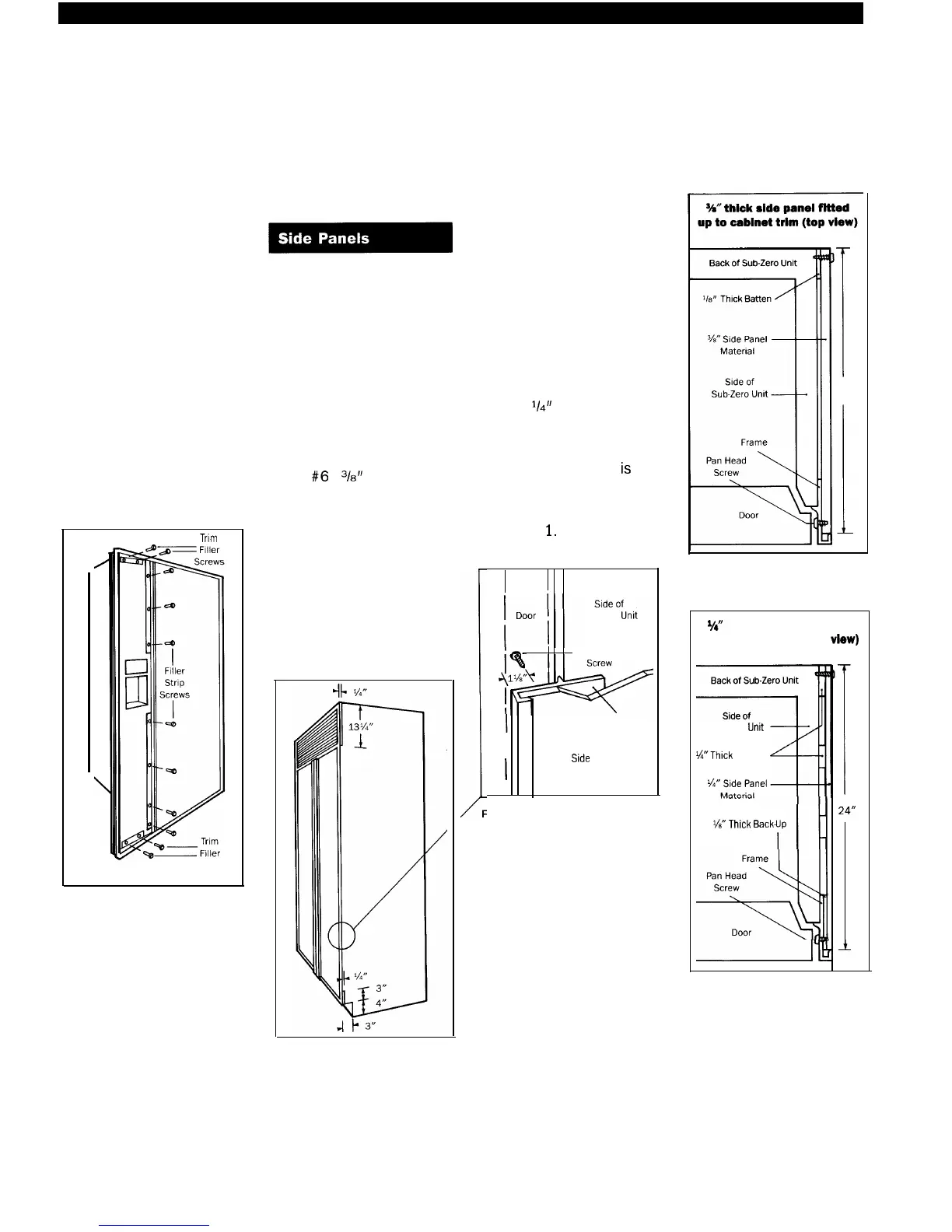
Remove the top and
bottom trim fillers held on by
the mounting screws. See
Figure 20.
In similar fashion remove
the screws holding the verti-
cal trim strip. See Figure 20.
Install the door panels by
sliding them into the frame
on the door and reverse the
earlier steps to reassemble.
0
Trim
Screws
Figure 20
If side panels are being
utilized, check with your
installer for installation
suggestions or consider
these options.
In any of these installation
alternatives, you must drill
three holes equal distance
apart in the vertical section
of the aluminum frame and
install
#6
x
‘/8”
pan head
screws to hold the panels in
place. See Figure 22.
Anchor the back portion
of the side panel with
decorative screws or nails.
Refer to Figures 23-27.
We do not recommend the
use of adhesives.
The dimensions supplied
are for a typical wood side
panel. If
V4”
panel or less is
used and inserted into the
return channel on the extru-
sion then a 24%” size
iS
necessary. The sheet must
also be notched as shown
in Figure 2
1.
U
Figure 22
Sub-Zero
Umt
Pan Head
Frame
Side
Panel
i
24”
I
Figure 23
W’
thick side panel fitted
up to cabinet trim (top
vlew)
Sub-Zero
Untt
?&‘Thick
Battens
%”
Thick
Back-
24“
Figure 24
Figure 2 1



 To Next Page