W’
thick
side panel fitted
in to cabinet trim (top view)
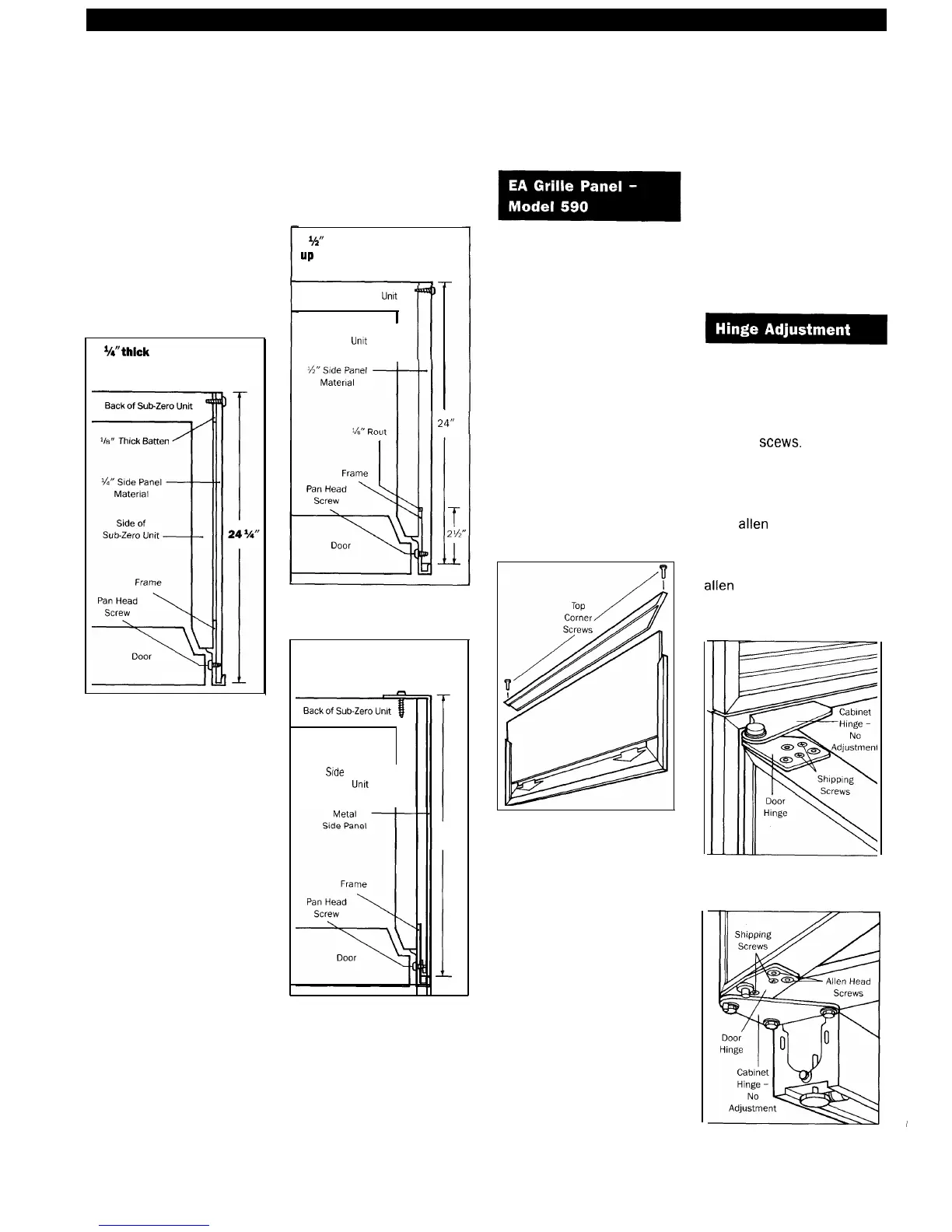
Figure 25
35“
thick side panel fitted
up
to cabinet trim (top view)
Back of Sub-Zero
lht
I
Side of
Sub-Zero Unit
-t
Figure 26
24”
Metal side panel fitted
up to cabinet trim (top view)
Sfde
of
Sub-Zero Unit
-t
24”
Figure 27
Remove the inner grille panel
assembly (refer to Figure 9
on page 14) and remove the
top two corner screws and
pull away the top frame. See
Figure 28.
Lay the remaining panel
assembly on a flat surface
and insert the panel insert
into position in the grille
frame as shown in Figure 28.
Reattach the top frame and
install the inner grille panel
assembly back onto the unit.
See Figure 9 on page 14.
If the doors are out of adjust-
ment, the top or bottom hinge
may be adjusted by removing
and discarding the two small
shipping
stews.
See Figure
29. The top door hinges can
be adjusted left to right and
in or out by loosening the
three
allen
head screws.
The bottom door hinge is
equipped with two adjustment
allen
head screws. See
Figure 30.
Figure 29
Figure 30



 To Next Page